

How do you remove personal information from Google search?

“The internet never forgets.” But in some cases, search engines such as Google offer ways to remove personal information from search results. In the United States, there is no general “right to be forgotten” like the one that applies in the European Union. However, Google still allows users to request the removal of certain personal, sensitive or harmful information from Google Search. This includes contact details, government-issued ID numbers, financial information, doxxing content, explicit material and outdated search results.
- Intuitive website builder with AI assistance
- Create captivating images and texts in seconds
- Domain, SSL and email included
How to remove personal information from Google
In the United States, removal requests usually depend on Google’s own content policies, specific legal grounds or, in some cases, state privacy laws. Google does not remove every result that contains personal information. However, the company provides several tools for users who want to remove personal information from Google Search.
This does not delete the content from the website where it appears. It only removes the result from Google Search if the request meets Google’s removal policies. To remove the information completely, you should also contact the website owner and ask them to delete or update the original page.
You have several options, depending on the type of content:
- Use Results about you to find and request removal of search results that show your personal contact information.
- Use the Remove result option in Google Search if a specific search result displays personal information.
- Use Google’s personal content removal form for sensitive information such as government ID numbers, financial data, doxxing, explicit content or images of minors.
- Use the outdated content refresh tool if the information has already been removed from the original website but still appears in Google Search.
Option 1: Use “Results about you”
Google’s “Results about you” feature helps you find search results that contain personal contact information such as your home address, phone number or email address. You can review matching results and request their removal directly.
To use the tool:
- Step 1: Sign in to your Google Account.
- Step 2: Open “Results about you” in Google Search or the Google app.
- Step 3: Add the personal information you want Google to look for, such as your name, address, phone number or email address.
- Step 4: Review the results Google finds.
- Step 5: Select the result you want removed and submit a removal request.
Google reviews the request and sends status updates to the email address connected to your Google Account. You can also check the status of your requests in “Results about you.”
This option is mainly useful for personal contact information. If the result contains other sensitive information, such as an ID number, financial data or doxxing content, use Google’s personal content removal form instead.
Option 2: Use the “Remove result” menu in Google Search
You can also request removal directly from Google Search. This is useful if you find a search result that shows personal information and you want to report that specific result.
- Step 1: Search for your name or the information you want removed.
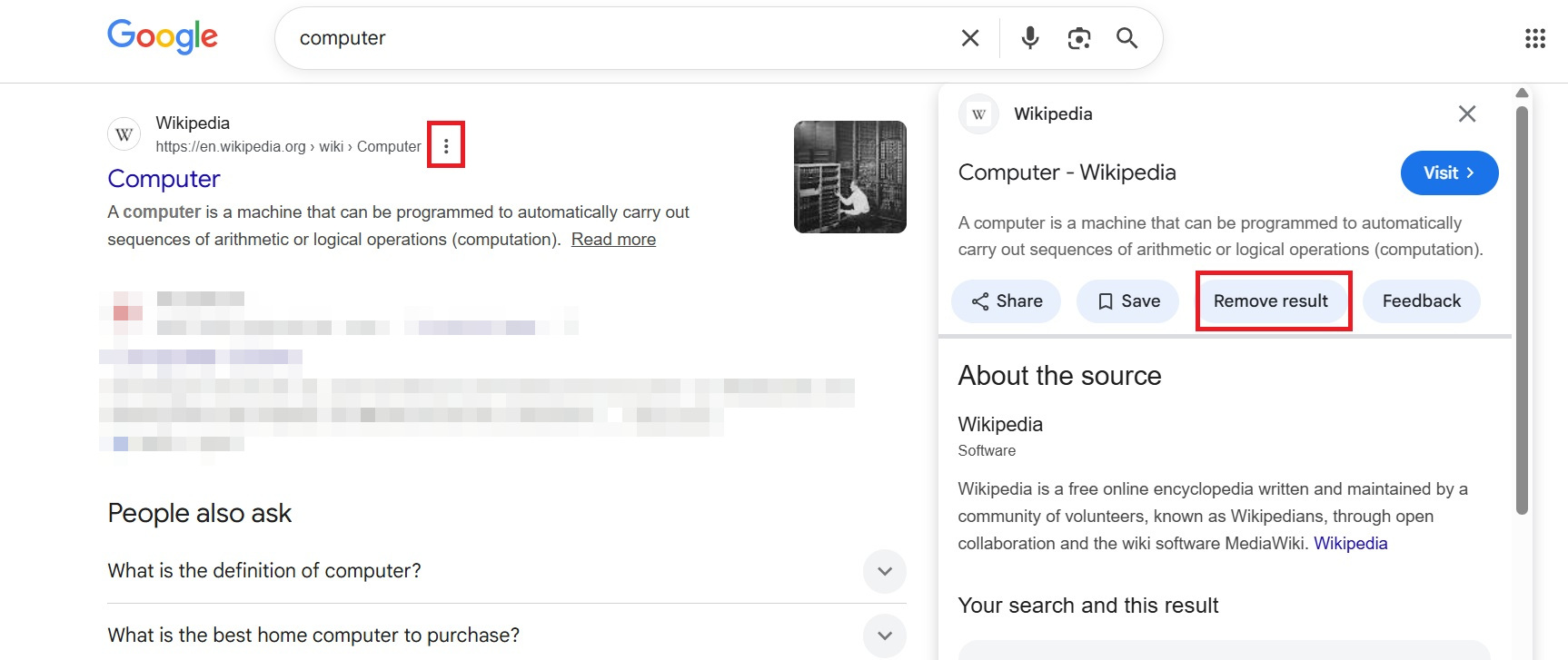
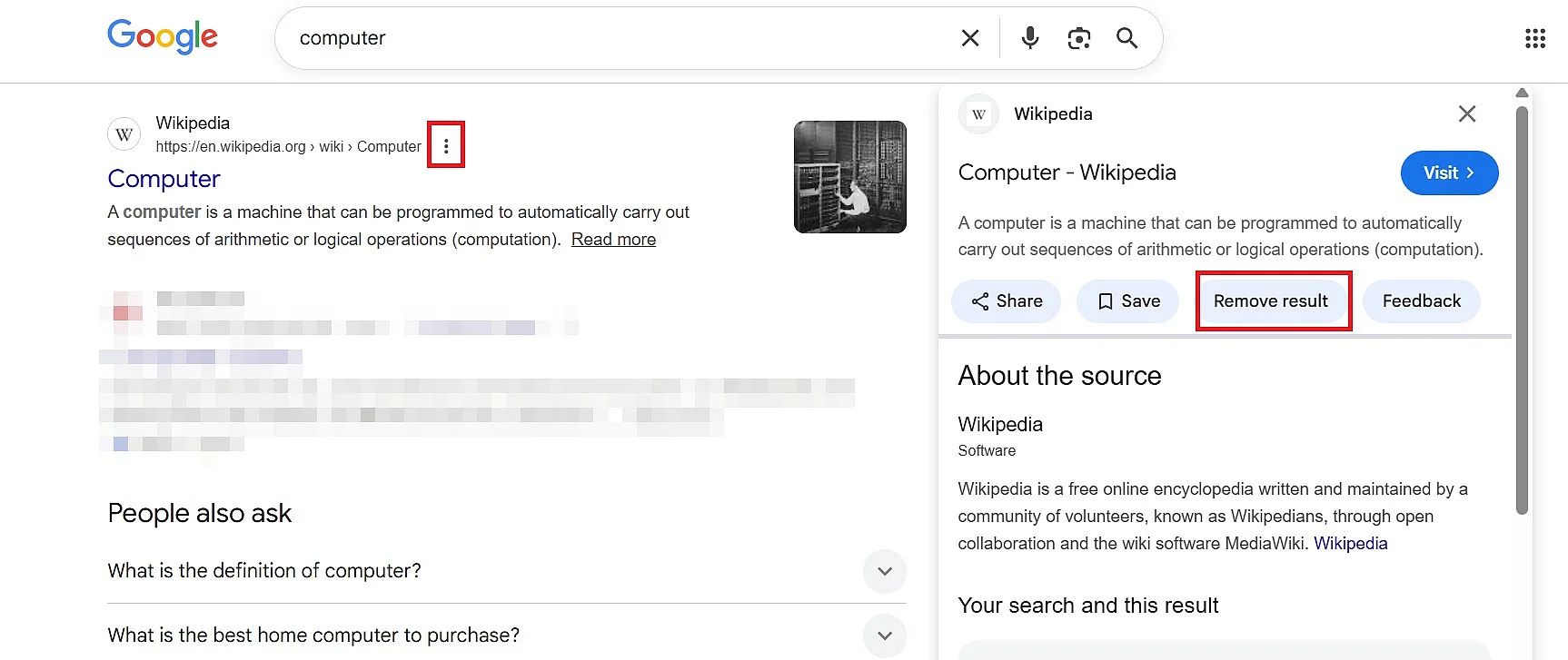
- Step 2: Click the three-dot menu next to the search result.
- Step 3: Select “Remove result.”
- Step 4: Choose the option that best describes the problem, for example that the result shows your personal information.
- Step 5: Enter the requested details and submit the request.
This option is especially useful for search results that show contact details, personal identifiers or other sensitive information. Make sure the information you enter matches the information shown in the search result as closely as possible. For example, if the result shows an old address or a nickname, enter the details exactly as they appear.
Option 3: Use Google’s personal content removal form
If the result contains sensitive or harmful personal information, you can use Google’s personal content removal form. This is the better option for cases involving:
- Social Security numbers, driver’s license numbers, passport details or other government-issued ID numbers
- Bank account details, credit card numbers or other financial information
- Confidential login credentials
- Personal contact information such as your address, phone number or email address
- Doxxing content or information shared with the intent to harass
- Non-consensual explicit images
- Images of minors
- Content on websites with exploitative removal practices
When you submit the form, you need to provide the exact URLs where the information appears. Google reviews only the URLs included in your request. If the same information appears on several pages, add each URL separately.
Google may also ask for screenshots. These help the review team identify the relevant content, especially if the personal information is not easy to locate on the page. Do not submit screenshots that contain illegal explicit material involving minors. In those cases, follow Google’s reporting instructions for child sexual abuse material.
The data itself is not removed from the internet. Only the search result, meaning the link shown on Google Search, can be removed. The information may still be available on the original website, through other search engines or through direct links. It is therefore advisable to contact the website operator as well.
Option 4: Use the outdated content refresh tool
Sometimes the original website has already removed or changed the information, but Google Search still shows the old version. This can happen when the search result or snippet has not been updated yet.
In this case, you can use Google’s outdated content refresh tool. This tool asks Google to refresh the search result so it no longer shows information that has already been removed from the source page.
This option is useful when:
- The page has been deleted but still appears in Google Search.
- The page still exists, but the personal information has been removed.
- The search result snippet still shows outdated information.
- An image has been removed from the original page but still appears in Google Images.
The outdated content refresh tool is not the right option if the information is still visible on the original website. In that case, contact the website owner first or use one of Google’s personal information removal options.
What type of content can U.S. users ask Google to remove?
U.S. users can request that Google remove search results containing certain types of personal, sensitive or harmful information. This does not mean that every request will be approved. Google reviews each request and weighs factors such as public interest, newsworthiness and whether the information is already publicly available through official sources.
Common reasons for removal include:
- Personal contact information: This includes your home address, phone number or email address.
- Government-issued ID numbers: This includes Social Security numbers, driver’s license numbers, passport details and similar identifiers.
- Financial information: This includes bank account numbers, credit card numbers and other sensitive financial data.
- Login credentials: This includes confidential usernames, passwords or access details.
- Private records: This can include medical records or other confidential personal records.
- Doxxing content: This includes personal information shared with threats, harassment or the intent to cause harm.
- Non-consensual explicit content: This includes intimate images shared without consent.
- Images of minors: Google provides dedicated removal options for certain images involving people under 18.
- Exploitative removal practices: This applies to some websites that publish personal content and then charge people to remove it.
Google may reject a request if the content has a strong public interest. This can apply to news reporting, government records, business information or content about public figures.
Is it possible to delete Google results yourself?
You cannot directly delete Google results yourself unless you control the website where the content appears. You can only submit a removal request and wait for Google to review it.
If you own or manage the website, remove the content from the page first. You can then ask Google to recrawl the page or use the outdated content refresh tool if the old information still appears in Search.
If you do not own the website, contact the website operator. Many websites provide contact details in their privacy policy, contact page or legal notice. Ask them to remove or update the information at the source. If they agree, the Google result will usually update over time.
How is this different from the EU “right to be forgotten”?
The European Union has a broader legal framework for requesting the removal of search results that contain personal data. This is commonly known as the “right to be forgotten” and is linked to the GDPR.
The right to be forgotten began with the 2014 Google Spain ruling by the European Court of Justice. The court ruled that, under certain conditions, search engines such as Google must remove some search results in the European Union when they contain personal data that is incorrect, outdated, irrelevant or disproportionately harmful.
The idea was later incorporated into the European General Data Protection Regulation (GDPR). Strictly speaking, the GDPR does not use “right to be forgotten” as a standalone term. Instead, it includes a right to erasure in Article 17.
The United States does not have an equivalent nationwide right to be forgotten. For U.S. users, removal requests usually depend on Google’s own personal content policies, specific state privacy laws or other applicable legal grounds. In practice, this means that U.S. users should focus on Google’s tools for removing personal, sensitive or harmful information from Search.
Since 2024, Google no longer provides website operators with detailed information about removals carried out under the European right to be forgotten. This change was introduced to better protect the privacy of individuals submitting these requests.
What does Google have to remove and what is exempt?
Google does not have to approve every removal request. For U.S. users, there is no general right to remove all search results that are inconvenient, embarrassing or outdated.
Google is more likely to remove results when they contain sensitive personal information, expose someone to identity theft or fraud, involve doxxing, show explicit content without consent or violate one of Google’s personal content policies.
Google may be less likely to remove results when the information is newsworthy, relevant to public life, available through official records or connected to a public figure. The same applies if the result comes from a government website, an educational institution, a news outlet or another source that Google considers relevant to the public.
Within the EU, Google can be required under the GDPR to remove search results containing personal data. However, according to case law from the European Court of Justice, this obligation generally applies only within the EU and does not extend worldwide. In practice, this means that removed results are typically no longer visible to users in the EU, but may still appear for users in other regions.
You also have the option to delete Google reviews. This allows you to take action against false claims about your business. You also always have the option to delete your own Google account if you do not want the search engine to know too much about you.
- Professional templates
- Intuitive customizable design
- Free domain, SSL, and email address
Please note the legal notice for this article.
Reviewer

Melissa Senn
Melissa Senn has been with IONOS since 2016 and focuses on the areas of websites, e-commerce, social media, and AI in the Digital Guide. As a digital strategist, she draws on her extensive SEO and GEO experience to translate complex technological trends into practical content.