

How does Google Keyword Planner help with keyword research?

Keywords play a key role in search engine advertising (SEA) and search engine optimization (SEO). To be found online and reach your target audience at the right moment, you need to know which search terms matter. Google’s Keyword Planner helps with this by providing search volume, competition levels, and forecasts, so you can make informed decisions for your keyword strategy.
Key Takeaways
Google Keyword Planner is a free tool for SEO keyword research and for planning Google Ads campaigns.
- Find new keywords and retrieve search volumes and trends
- Narrow results by region, language, network or time period
- Create forecasts for clicks, costs and conversions
- Use data that comes directly from Google
What is Google Keyword Planner?
Google Keyword Planner is a free tool from Google that was originally developed to help advertisers plan Google Ads campaigns. Since AdWords became Google Ads in 2018, the tool has also offered useful insights for SEO keyword research. It helps you build keyword lists, analyze search volume, assess competition, and identify trends, making it a valuable tool for planning SEO and SEA strategies.
Its key features include
- Searching for new keywords
- Retrieving search volumes and trends
- Creating keyword combinations
- Generating forecasts for clicks and costs
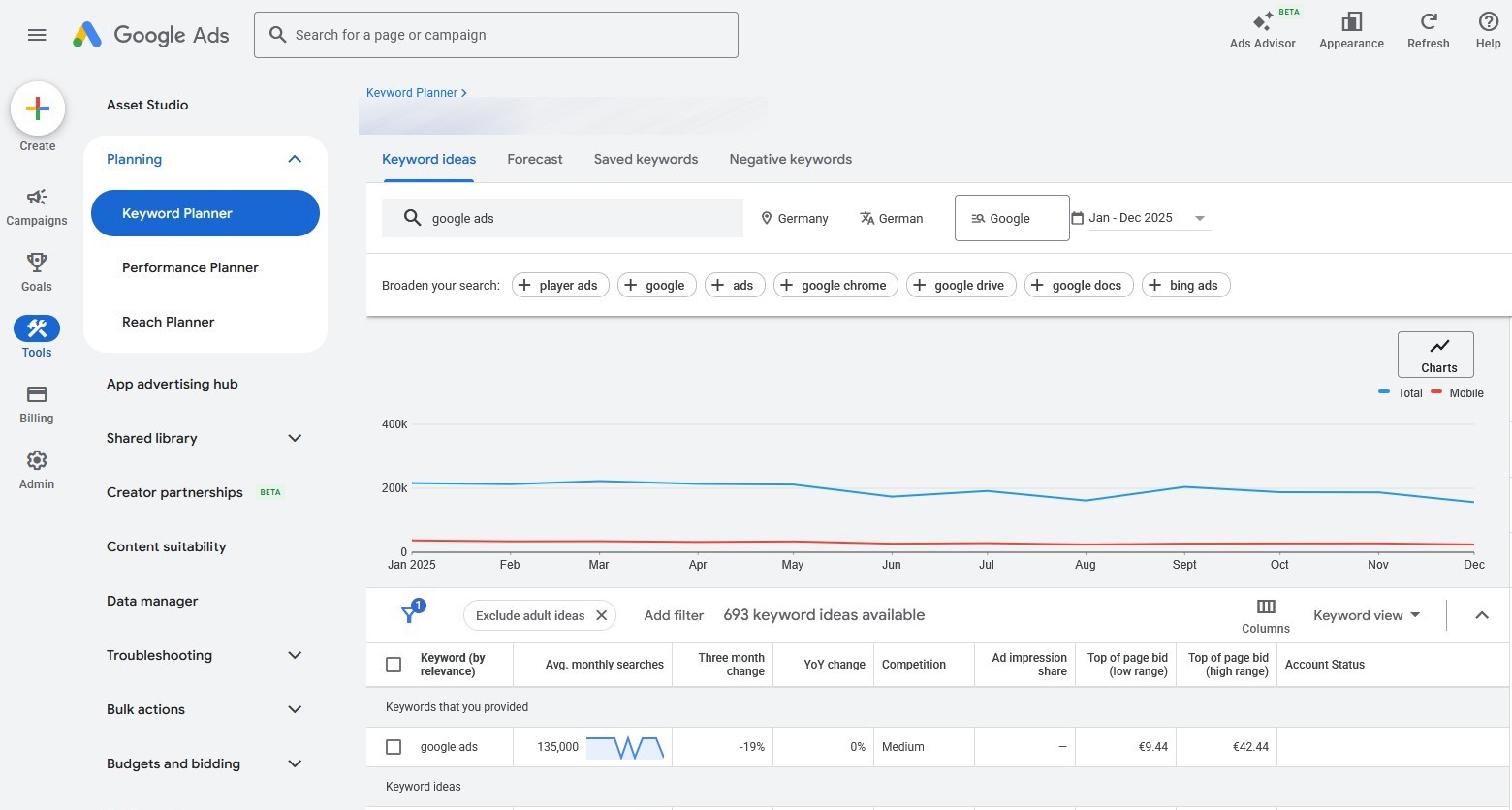
How to use Google Keyword Planner
Generating new keywords with Keyword Planner is straightforward. To access Keyword Planner, you must complete your Google Ads account setup, including your billing information. In your Google Ads account, open the Keyword Planner from the tools menu. To start your research, click “Discover new keywords”. To analyze an existing keyword list, choose “Get search volume and forecasts”.
You can use the tool to
- enter up to ten terms or a website
- define your region or city
- specify the language
- choose between “Google Search” and “Google & Search Network partners”
- set a time period
- narrow down the results with filters, such as search volume, competition or bid range
After clicking “Get results”, you’ll receive a list of keyword ideas with search volume, competition and trend data. Google often displays approximate ranges rather than exact figures. You can then export the results as a CSV file, add them to a keyword plan or use them directly for a campaign forecast.
- Improve your Google ranking without paying an agency
- Reply to reviews and generate social media posts faster
- No SEO or online marketing skills needed
Benefits of Google Keyword Planner for SEO
The Keyword Planner helps you assess search volume, competition and trends for relevant keywords. For SEO, its main benefits include
- Analysis of search trends: Google displays trends and seasonal fluctuations in search queries, helping you respond more effectively to changes in demand.
- Expanded keyword lists: The tool suggests keyword ideas that you can integrate directly into your website strategy. You can save or download these lists and use them for further planning.
- Targeted keyword analysis: Location settings and device breakdowns let you see which keywords are most relevant to your target audience. This helps you align your keyword strategy more closely with user needs.
Even in times of AI-powered search systems, AI Overviews and generative answers, keywords remain central. Modern search engines increasingly understand content semantically and in context, but search queries still form the foundation of visibility. The focus has shifted from individual keywords to search intent, topic clusters and semantic relationships.
What data does the keyword tool provide?
Google Keyword Planner does more than generate new keywords and combine keyword ideas. It also provides detailed statistics and forecasts for search engine marketing. Its main advantage over comparable tools is that the data comes directly from Google. As a result, it often reflects real user search behaviour more closely than the databases compiled by other providers. The following table explains the key metrics and forecasts shown in Keyword Planner during keyword research and analysis:
| Value | Description |
|---|---|
| Average monthly searches | Shows how often users searched for a keyword per month on average during the selected period. Values are usually rounded. |
| Competition | Indicates how many advertisers are bidding on the keyword. Values range from “Low” to “High”. |
| Top of page bid (low/high range) | Shows historical bid ranges for ads appearing at the top of the search results page. |
| Impression share (ad impressions) | Ad impressions divided by exact-match searches during the previous calendar month, for the selected location and network. |
| Search trend | Shows how search demand develops over time, including seasonal changes. |
Using Google Keyword Planner as the basis for an SEA campaign
Keyword Planner is useful not only for keyword research, but also for creating performance forecasts for Google Ads campaigns. When planning a campaign, you can view estimated data on clicks, costs and impressions. The tool typically displays the following metrics:
| Metric | Description |
|---|---|
| Clicks | Shows the estimated number of clicks for the plan over the selected period. |
| Impressions | Shows the estimated number of times your ad could be displayed. |
| Costs | Shows the estimated cost of the plan over the selected period. |
| CTR (click-through rate) | Shows the share of impressions that could result in clicks and helps assess the expected effectiveness of the ad. |
| Avg. CPC (cost per click) | Indicates how much one click could cost on average. |
| Conversions | Shows the estimated number of conversions generated by clicks on your ads. This can include defined conversion actions such as purchases, sign-ups or leads. |
These metrics are especially useful for analyzing the expected performance of your Google Ads campaigns and planning your budget more effectively.
How to view data in Google Keyword Planner
In addition to the default view of monthly search volume trends as a bar chart, Google Keyword Planner offers further analysis views that help you assess the potential of selected keywords more accurately.
- Breakdown by device shows how average monthly searches are distributed across device types such as tablets, smartphones and computers.
- Breakdown by location shows how search volume is distributed geographically, for example by country, region or city. This view is particularly useful for local and international campaigns.
- Plan forecast and performance overview simulate clicks, impressions, costs and conversions based on your selected keywords and bidding settings. This helps you estimate expected campaign performance more realistically.
- Share of possible ad impressions shows historical ad impressions divided by exact-match searches during the previous calendar month, for the selected location and network.
- Competitor-based benchmarks are available outside Keyword Planner through the Google Ads Auction insights report. This report lets eligible campaigns compare their performance with other advertisers.
Reviewer

Melissa Senn
Melissa Senn has been with IONOS since 2016 and focuses on the areas of websites, e-commerce, social media, and AI in the Digital Guide. As a digital strategist, she draws on her extensive SEO and GEO experience to translate complex technological trends into practical content.