

Create your own app – part one: the planning phase

The mobile app industry is booming more than ever before with users enjoying a multitude of apps on their smartphones and tablets. This continuing trend means that it can make sense for even small to mid-sized companies and freelance individuals to develop their own mobile app: particularly when you take into account that the cost, effort, and expertise required for app development are dropping all the time. As long as you have a good idea for an application and someone in your team with a decent technical understanding, then you have many options for developing iOS or Android apps. Beginners can make use of ready-made app starter kits, while more experienced developers can proceed without assistance and have a go at coding their own apps from scratch.
In this latest series of articles, we’ll take you through all the things you need to know when developing your own native mobile app. By native mobile app, we’re referring to an application that is created for use on one particular operating system (like Android or iOS mobile devices). First, we’ll focus on the primary step you need to complete when developing an application: proper planning.
Why develop a mobile app?
If you want to create your own app, the first thing to do is to consider the different formats that would be suitable for your application: there are many different app formats, so you should make sure you know which one is best for your application. Alongside classic native apps, there’s also the option of creating a web app or a hybrid app. Choosing the right app format is the first important decision to make with regards to the technical characteristics of your app and will set the tone for the remaining stages of the development process. This series on app development will focus on the production of a native app for mobile devices. There are several reasons why: the biggest advantage of native mobile apps is that they can be optimized for that particular operating system, and compared to web and hybrid apps, native applications offer higher performance levels as well as quicker reaction times. They’re also less limiting than other app formats in the way that they can interact with existing files on the device, access the complete available memory space of a mobile device, and make use of other native functions on the device (like camera, GPS, push notifications, etc.). To put it simply, a native mobile app gives you the most flexibility for customization and features. Sales and marketing are also much easier with a native app: if you program your app for one of the mobile operating systems by Google (Android) or Apple (iOS), you can sell it on either the Google Play Store or Apple’s App Store. If you use one of these app stores then you have the option if you want to offer your app free of charge or at a price. These online stores are the main port of call for most users, as they offer a built-in, practical way to download apps. Another reason for creating an app is the potential revenue it can generate. After all, consumer spending on smartphone apps has been growing steadily for years. By the year 2021, a worldwide turnover of 78 billion dollars is expected.
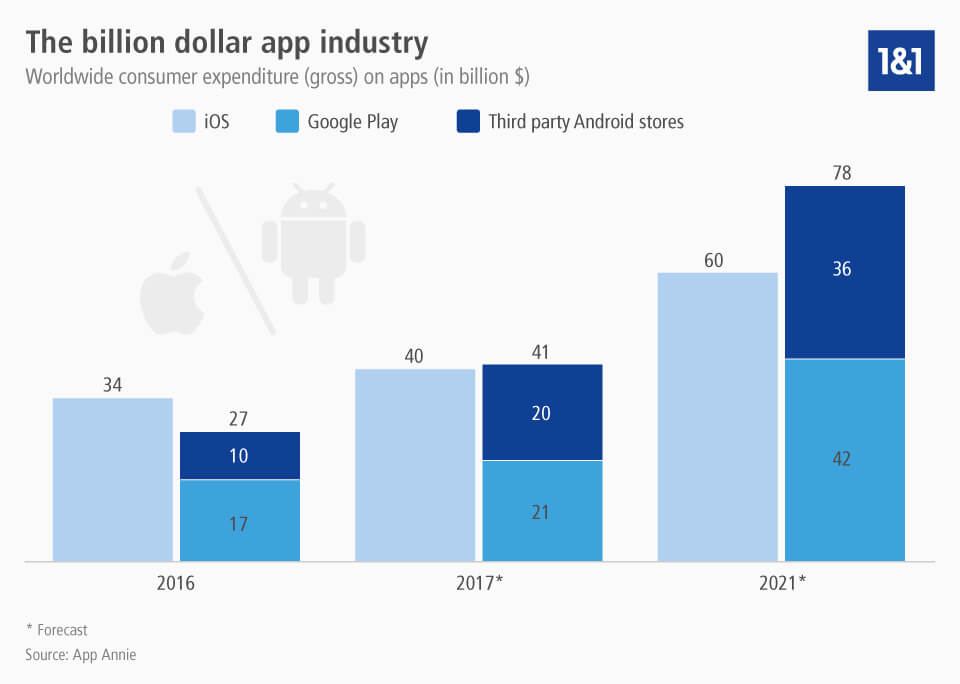
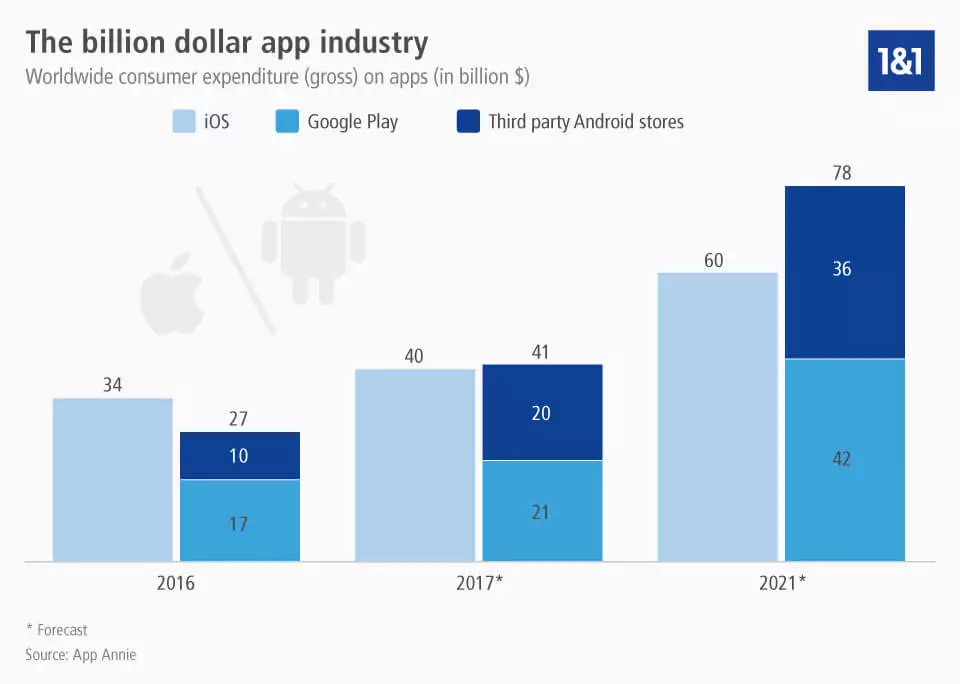
You can download the infographic on consumer expenditure on apps here.
Which applications are suitable for native apps?
Thanks to their high performance, native apps are usually used for the more computer-intensive, complex, and graphically challenging applications. But even simple apps can be made as native apps and profit from the high performance of this app format. If an app needs to use particular native functions of a smartphone or tablet, then the native app format offers the best variety. Components like the camera, microphone, address book, calendar, push notifications, GPS localization, Bluetooth, sensors for position and movement of the device, and many more can be easily integrated into the app. Another great advantage of native apps compared to most web apps and many hybrid apps is that they have the option to function without access to the internet. As a result, any applications that are still useful in offline mode are usually created in this format. Native apps also offer the shortest loading time – this is particularly handy for games and other applications that require a high degree of responsiveness and where there is a lot of activity within a short space of time.
If your primary focus is on perfecting usability and making sure that the operating system offers the user an optimal experience, then it also makes sense to go for a native app format. Since they make use of the platform’s standard frameworks, it’s easy to optimize a native app for the platform-specific user interface, like the smartphone display screen. This means that they usually offer a better ‘look and feel’ than hybrid apps or web apps, simply because they fit correctly and perform the way that users expect. The uniform design and behavior of menus and buttons within different native apps also plays a role here. Users are familiar with the look and feel of their mobile operating systems and so view apps that fit their system properly as a mark of quality – something that you can really profit from as a native app developer.
What added value does my app have?
Before you can create an app, it goes without saying that you have to have a good idea of your app concept and be convinced of its potential. You should test this idea out, even before actually planning the app. A good way to do this is to have a look at the added value of the application – that means the benefits that it offers the user as well as your company.
- Added value for the app user: people will only download and use your app if it offers them something useful. There’s many ways that your app could be of use though – for example by offering information, entertainment, support and assistance, shopping, or communication to users.
- Added value for the app creator: since an app also represents an investment, it has to be worthwhile for you in some way, shape, or form. Once again, the possibilities are broad here – financial gain isn’t the only added value offered by native app development. Apps can help you grow your customer base, create a stronger brand identity, establish or improve your image, and much more.
The planning phase for your native mobile app can only begin when you have found satisfactory benefits for both you and the user. You should remain realistic here: make sure to check that your app idea is both technically possible to create and capable of achieving your aims. You’ll have to make estimates for the amount of time you’ll spend making the app and the financial costs you’ll incur.
Planning the app
The better you plan your app, the more realistic your chances of success will be. Make sure to conduct proper research, speaking to as many knowledgeable and honest people as possible about your app idea. All feedback is useful, and critical feedback from experts can be really useful in the planning and development phases of creating your app.
The planning areas we’ll discuss below are crucial to consider. In an ideal scenario, you should keep them together in a properly documented concept. Similarly, you should create what’s known as a wireframe. This consists of an early schematic illustration of your app, which should represent the user experience on the app in a simple and comprehensible way. Drafts like these aren’t just useful later on in the creation phase – they’re also essential if you decide you don’t want to program the app yourself. A written concept of the app is also a must when looking for any potential investors.


Competitors
Find out whether other companies are offering similar apps to see how your app could set itself apart. If there aren’t any comparable mobile apps to yours, then this could mean that you have real potential for innovation. But be aware that it could also mean there’s actually no demand for such an app, or that your app idea has already been done in another format (e.g. as a web app, hybrid app, or a website), or that it’s simply impractical to create. It’s important to look at what other companies in your industry are doing: analyzing the behavior of your competitors and businesses with similar models to yours can give you a clear view of the current market situation and may also provide you with ideas for your own app.
If your app idea already exists in a similar form, competition analysis is essential. This will give you a valuable insight into which approaches have been successful and which haven’t. Download your competitors’ apps and get to grips with the way they function in order to better understand which features and functions make them popular with users, and which areas they fall short in for you to exploit. Not every app has to reinvent the wheel, but by noting what your competitors are doing and making little tweaks, improvements, and additional features that offer added value to your customers and your business, you can give yourself a good chance of success.
Target group
By defining a target group for your app, you can help make certain requirements concrete (like functions, design, price, etc.). It’s best to do this with the help of statistics, rather than relying on your gut feeling. If, for example, you already operate a website that has a lot of thematic crossover with the app your planning, then you can carry out web analytics (with tools like Google Analytics or Piwik) to learn more about the way your website is used. Analysis tools for websites can tell you how many users load your website on a mobile device, and which operating system they use. This gives you a clue as to which platforms to launch your native app on. Web analytics also offer insights into user behavior, helping you to determine which website functions are most frequently used and so are essential for the app. Surveys and interviews offer another way to discover more about your target market. Bear demographics in mind too: studies have shown that young people are by far the biggest consumers when it comes to apps. An app targeted at seniors would be considered a niche and so is less likely to be successful.
Platform
Which operating system do you want to offer your native mobile app on? This question can sometimes be answered by looking at your target group – for example if you only want to appeal to Android or Apple customers. It could also be the case that your app is linked to a specific software that only exists on a particular platform, meaning that you don’t need to worry about any others.
If you’re not looking to target one particular brand of app user, then you need to carefully consider whether you’re going to develop an iOS app, an Android app, or both. They each have their own programming language, meaning that if you choose to program your app for both platforms, you’ll need to develop and maintain it as if it were two separate apps, one for each operating system. This is considerably more work, but it can be worthwhile: Android and iOS account for close to 98% of the market share for mobile operating systems worldwide, with Android leading the way ahead of Apple’s iOS.
Since the market share for smartphones using other operating systems like Microsoft Windows Phone (Windows 10 Mobile) or Blackberry 10 OS is extremely low, we’d recommend that you only develop an app for these platforms in exceptional circumstances. Instead, you should focus your development or planning on one or both of the big two – iOS and Android.
Features
When it comes to app programming, many developers follow the principle of reducing the functionality of an application to the bare essentials. An app usually serves a specific purpose – or concentrates on a central feature. You can still use the planning phase to make a comprehensive list of all the features that you can possible think of including, but then you should separate this list into features that are absolutely indispensable and features that would be nice but aren’t essential. It’s important to recognize that not all the features you want will fit into your app – you have to make sacrifices to optimize performance.
The vast majority of users expect an application to be easy to understand and intuitive to use. This is why it’s crucial that you use the planning phase to make sure that your app isn’t too complex and packed full of features. It can be useful to create sketches of the individual menu screens to help you to visualize your idea. This also gives you a chance to assess menu navigation and the respective display on different screen sizes (smartphone vs. tablet). This gives employees and any external investors or developers a good idea of how the final application should look and function.
Financing and generating revenue
The success of your mobile app project will stand and fall with its financing. If you aren’t in a position to cover the development and maintenance costs of your app, you’ll need to seek out donations, sponsors, and other sources of income. You should make appropriate and accurate cost estimates for this. But even if you can afford to develop the app yourself, you must still prepare an accurate and detailed budget plan: a clear financing model for your app is mandatory. Don’t forget that most native mobile apps have maintenance costs on top of their initial development expenses. In addition to the expenses model for your app, it’s a good idea to create a revenue model too. You can use this to determine how and when your app is going to generate revenue. If you’re creating a shopping app for your online shop, then your revenue model will be quite straightforward. But if you’re planning an app that isn’t focused on e-commerce or self-marketing the core principles of a business, then there are three classic models for developing revenue:
- Fee-based app: in this model, users pay a fixed fee to download the app. This sounds like an easy and sensible solution, but be aware: not all users are prepared to pay money for apps. In fact, the vast majority of Android apps are available for download free of charge. Apple users are generally seen as the clientele most likely to pay for an app. But even if you have a target group who are probably willing to pay for your app, you should be aware that competition in the app market is fierce. If your app is going to come at a price, it’s going to have to offer excellent content, a good reputation, and a high profile to achieve success. One good way to demonstrate your content to users is to offer a free trial or test version of the app. This lets your users familiarize themselves with the app before they choose whether or not to pay for the full version of it.
- In-app purchasing: in-app purchases involve making sales within the app itself – either for the chance to use additional functions or to block ads. ‘Freemium’ apps also rely on this model: applications are offered free of charge in reduced form, with users having to pay for extensions or the full version of the app. This model is only effective if the price structure is balanced; price rises that start too high, rise steadily, or seem disproportionate are likely to scare users off rather than tie them into the app.
- In-app advertising: display banners and other mobile advertising formats are a good way to generate income from your app – this revenue model is the most popular on Android. The drawback here is the impact on user experience. Whenever the ad is on display, the user will have part or all of their display screen blocked and so won’t be able to use your features. If this happens too regularly or is too much of a distraction or annoyance to the user, it will result in negative feedback and ratings for your app. Another option for in-app advertising is to offer affiliate marketing to generate revenue. This method is a partner program and basically involves providing links to external websites in your app. If users click on the link and head to your partner’s website to buy products or use services there, you can receive a commission as the affiliate partner.
But not all apps target monetization directly. If the main revenue of the app creator is made elsewhere through other services, then the native mobile app can sometimes just function as a marketing tool, helping to advertise products/services and build up the company’s reputation through helpful features and additional information. Many companies and organizations use apps to market their core business model: online shops offer a shopping app, while online newspapers offer their articles. Companies like Google, Facebook, Dropbox, or Spotify all offer services on their apps that are similar to what they offer on their main sites and so tie into their overall revenue models.


Legal framework
Remember to pay attention to certain legal aspects of your app as well. The same rules apply to apps as do to your website: if you collect, process, or save personal data of users, you have a duty to inform them in an appropriate manner. Your app also has to request permission to send push notifications or access any native features of your chosen operating system like the camera, microphone, or camera roll. Before you start collecting data or accessing native features, you’ll also need to prepare a comprehensive, clearly worded declaration of the information you’re collecting, where you’re storing it, and how users can access it.
Remember that trademark and patent laws apply in apps too. To find out more about the importance of branding and how trademark and patent protection works, you can refer to our guide to US patent law.
Detailed app planning pays dividends
It may seem like a time-intensive process, but accurate planning and sketching of an app can really pay off. This isn’t just for content optimization either: legal aspects and financing need to be discussed carefully and meticulously as well. This comprehensive planning will be useful further down the line, as you can refer to it to make sure you’re on track and that you haven’t overlooked anything important about your concept or implementation. After the planning phase is over and you’ve secured the financial backing to create your native mobile app, it’s time to move onto the basic technical implementation of your design. Even if you’re a newcomer to app development, you shouldn’t be fearful of this step: a promising app idea that’s been properly planned out is more important than the programming know-how required to develop the app, which you can bring into the project in the form of freelancers or an agency. In part two of our series on creating your own app, we’ll look at the different options you have for programming your app. We’ll also discuss the pros and cons of using an app-building kit and in which situations it’s best to leave the app programming to external experts.