

Headless CMS

Without content management systems, content creation work would be a lot more complicated. Instead being entered directly into the code of a website, the CMS contents are entered via a backend and output by the system in the frontend. The works quite well as long as you’re only managing a single website. Meanwhile, editors and content managers often have multiples sites and applications in play at the same time. To be able to handle this, one either needs multiple CMS, which means that content must be manually transferred from one to the other, or can instead use a headless CMS, which enables output in any number of media.
What is a headless CMS?
A headless CMS is both an extension and a tightening of a classic CMS. The system takes in integral components to make it compatible with a wide variety of outputs. This is possible because the frontend and backend of a headless CMS aren’t monolithically linked with each other anymore.
What is this development good for?
In a classic CMS, the created content is injected into the backend via an interface and organized in databases (usually MySQL). From there, the system links the content with themes/templates and presents the website via the frontend view. Content management systems like WordPress, Drupal, or TYPO3 are designed to simplify daily work with content. Content can be adjusted and managed via the administrator interface without any web design or programming knowledge necessary. The prime example of CMS use is a blog. Bloggers often publish content (text, photos, videos) in high frequencies. It’s entered into the backend’s management area using HTML or WYSIWYG editors, and all the blogger specifies is a time of publication. This allows bloggers to focus on writing or creating content instead of programming. Other benefits: Multiple users with different roles and rights can work via the backend. Thus, CMS also becomes an editorial system. The readers of the blog aren’t affected by these processes: They only have access to the frontend, where they are shown the content released for publication, as usual.
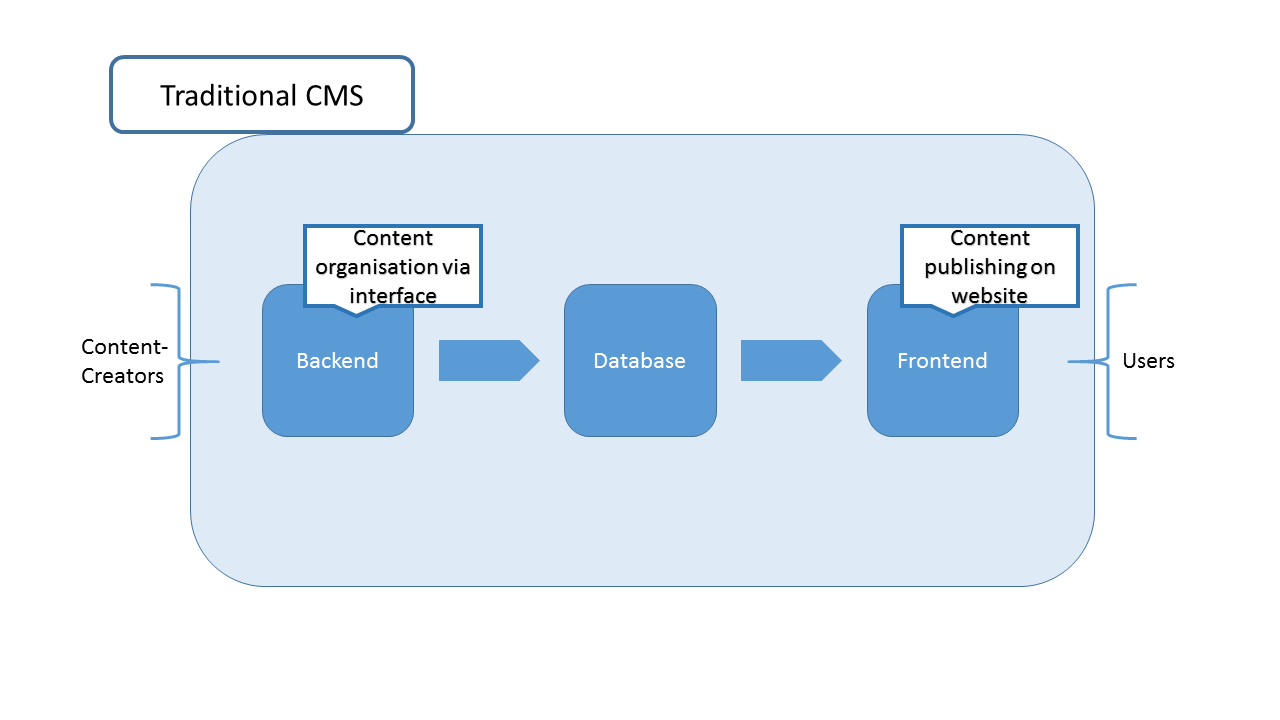
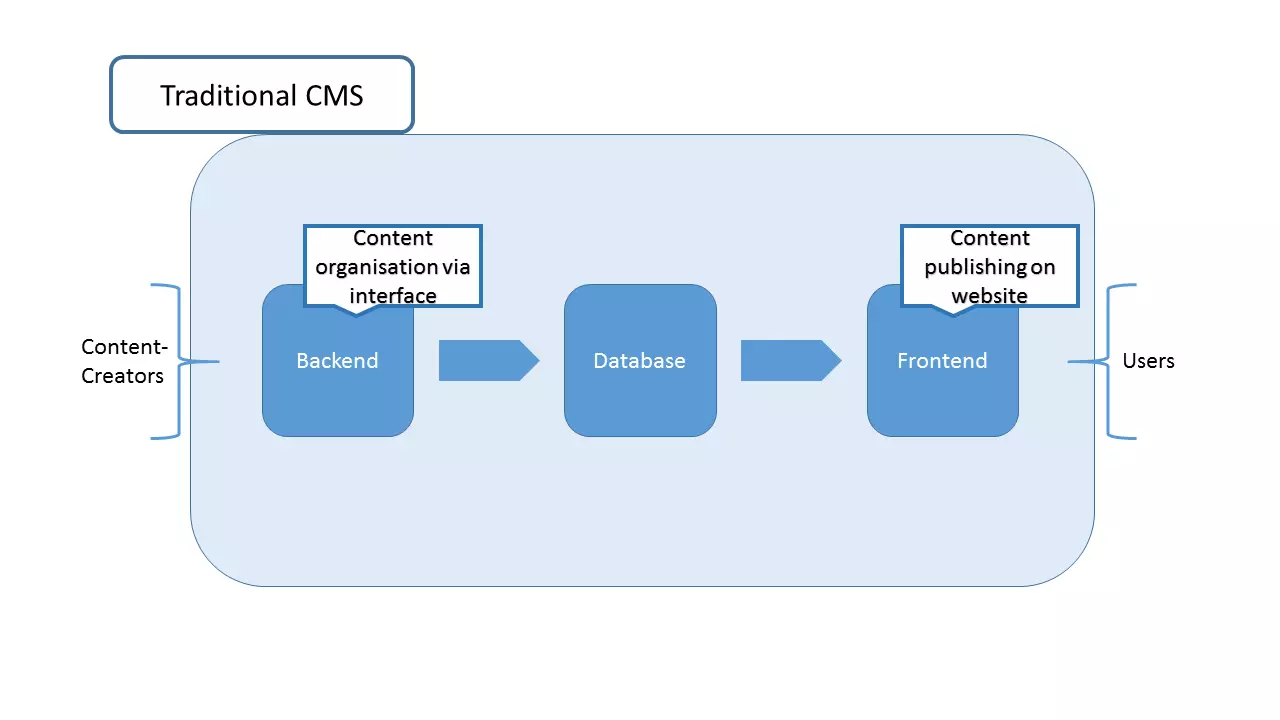
To make the use of these systems as simple as possible, a monolithic link between the frontend and backend is used. For example, on the administrative interface of WordPress, you can alter the look of a website without any web design knowledge using the template engine. This also means that you’re bound to the requirements of the system when creating content. This applies both to the number of outputs as well as the use of the programming language (for example, WordPress uses PHP). To avoid these constrictions, you can switch to a headless CMS.
Headless CMS
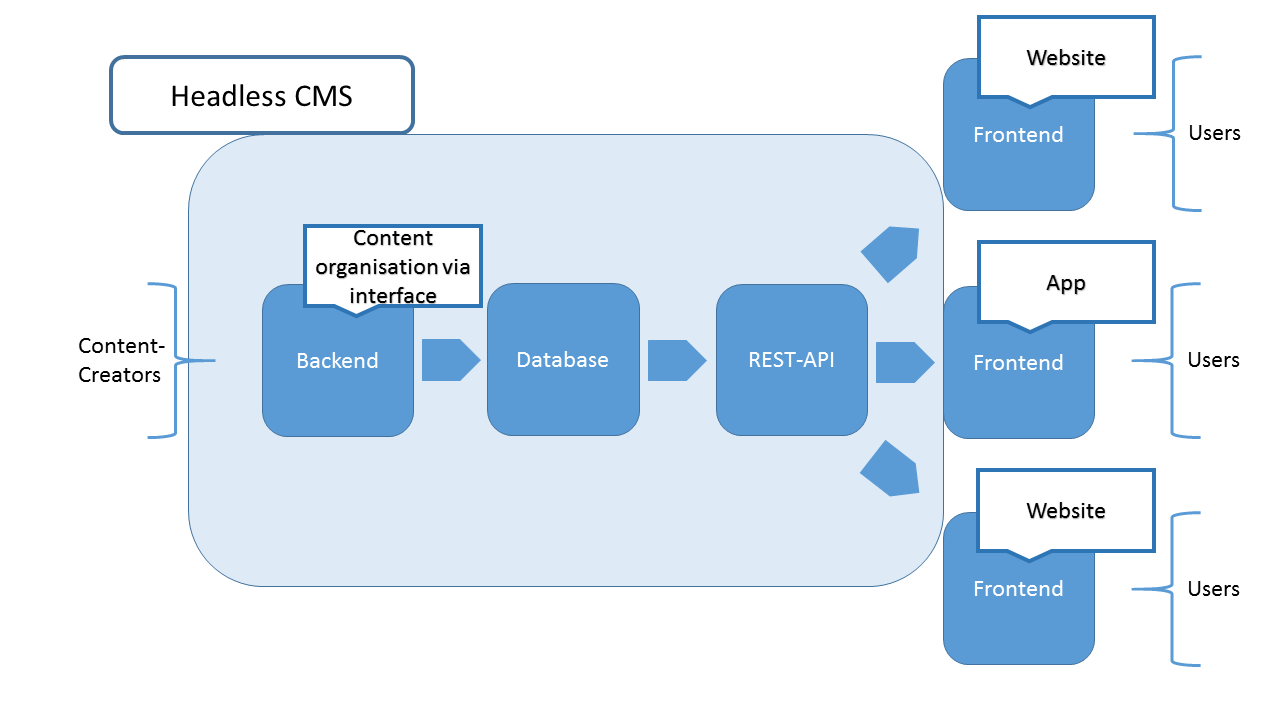
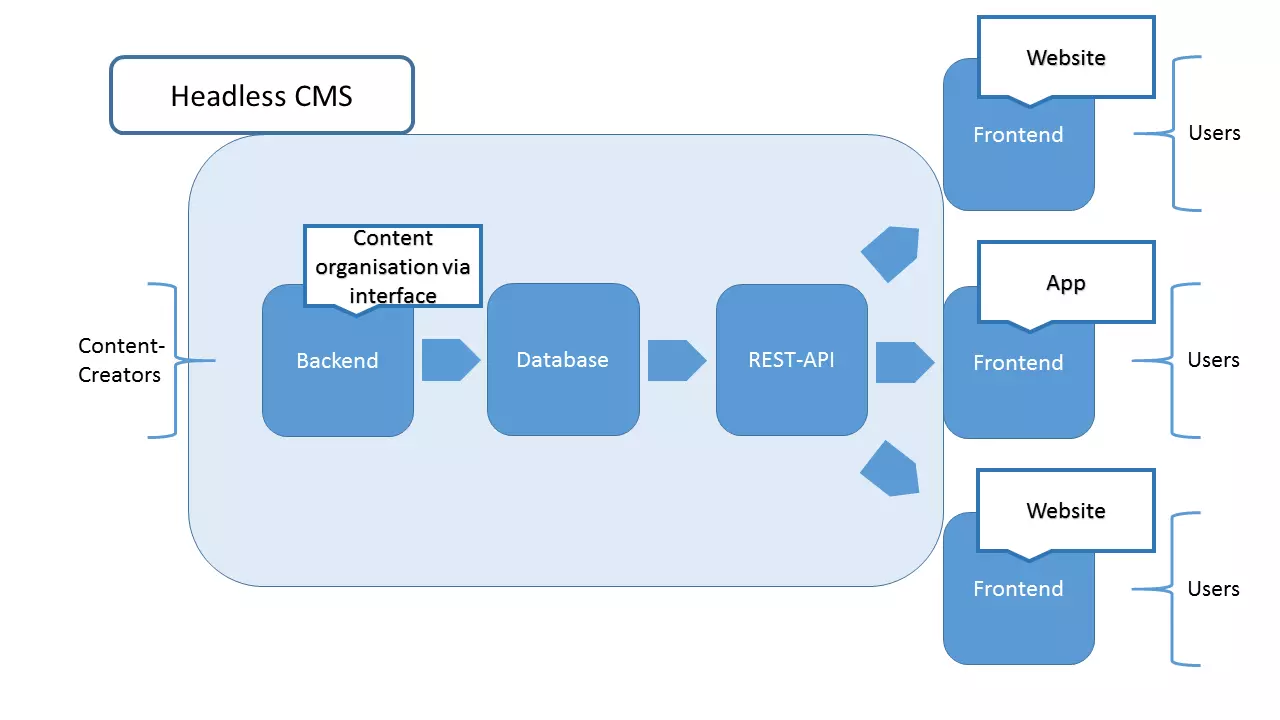
For content managed in a CMS to appear on different media, the output on the website (the view) is disconnected: The head of the CMS is taken, so to speak, hence the name. Instead, an API is integrated that sites and applications can access. The various media have access to the content, but the presentation mode is individually regulated. Backend and frontend are thus decoupled from each other.
REST-API: The headless CMS interface
A REST-API (Representational State Transfer-Application Programming Interface) is an interface that is less complex but more flexible to use. A REST-API uses the defined HTTP request methods such as PUT, GET, POST, and DELETE for communication. With such commands, a client can access information on the server to retrieve or change it. In principle, REST follows the architectural style of the web. REST-APIs (often called “RESTful APIs”) are built according to these criteria:
- Servers provide resources: A REST-API is also available to external applications via a server. Access therefore doesn’t only work locally.
- Addresses identify things: Different types of applications need different file formats. With REST, the URI/URL doesn’t refer to a resource in a particular format, but instead to the element itself. Clients request the element in the desired format for content negotiation.
- Messages are self-explanatory: Each message on the server is self-contained and doesn’t refer to any previous ones.
- Resources given with links: Within REST, objects are linked with one another using hyperlinks for simple navigation.
By adhering to these architectural principles, the communication between server/API and various clients can work flawlessly. This makes REST architecture perfect for a headless CMS API.
REST is actually more of an idea than a technique. The computer scientist Roy Fielding introduced it as a construct of the World Wide Web in his dissertation in 2000 and received a lot of recognition.
Benefits of the separation of backend and frontend
The described separation is useful from two perspectives: From the point of view of backend development, it helps the desire to spread content through more than one output. In a headless CMS, it doesn’t matter what kind of platform is given for the output of content. The REST-API only provides the data (in the form of JSON). This can be read by any frontend you want, regardless of what technology it’s programmed with.
The frontend development view also offers benefits: As a web designer, you’re no longer bound to the requirements of a content management system with a headless CMS. The programming language is no longer defined. Because of this, the construction of mobile apps on various platforms is now possible. Only the raw data needs to be received and processed. This offers the presentation lots more wiggle room than is possible with most classic CMS.
Another benefit is the dynamic request capability. Renewed content requests on a website on a classic CMS are followed by a reload of the entire page. The REST-API, however, delivers dynamic data that can be integrated into the site structure at any time without it needing to be reloaded.
By separating the headless CMS backend from the individual frontends, a practical situation arises: since trends in web design are subject to regular changes, it’s useful to adjust the frontend of your own website from time to time. If this isn’t bound to a database and content management system, then it can be independently edited. Editors can also create, manage, and publish other content while working on a new frontend.
The benefits of headless CMS:
- Unlimited number of frontends
- Can combine different programming languages
- Flexible frontend design
- Continuity via decoupling
- Dynamic data
Which headless CMS are on the market?
There are already some providers of headless content management systems on the market, but there are more every day. The providers listed below differ primarily in offering a paid total package or a free open source variant. There are also various hosting offers available.
- Contentful: The Berlin-based team has been working on the principle of headless CMS since 2011. By doing so, they’ve developed their system – including a functional backend – from the ground up instead of rebuilding a preexisting, classic CMS. But the offer is only available for free to a limited extent.
- Directus: The provider Directus goes in a different direction. The system is primarily offered for free as an open source package. For those who want to rely on a premade hosting alternative, there are different subscription variants to choose from.
- Contentstack: Built.io, the manufacturer of multiple digital solutions, offers a paid headless CMS with Contentstack. Thanks to a REST-API, content creators have access to an easy-to-use backend that can provide content to the web, mobile apps, and the Internet of Things. This offer is primarily suitable for large companies.
- Cloud CMS: This service provider offers its headless CMS as a cloud service. It functions more or less like other offers, but instead of running the content management, database, and interface on its own host, they’re offered on the cloud. Only in the high-price segment of the offer is a self-hosted CMS provided.
- eZ Platform: The company eZ Systems has been offered since 1999 with the open source product eZ Publish as a classic CMS. The old concept was finally scrapped 16 years later in favor of a headless CMS with the eZ Platform. It is also open source: The product is freely available under the GNU GPL license. There are also paid variants with professional support and alternative licensing offers.
To decide which headless CMS offer is right for you, you need to research the individual requirements and knowledge. For those who have their own server and can create an open source CMS, the free versions of eZ Systems or Directus are highly recommended. If you don’t have the necessary know-how for the installation and setup of the system, then you should take advantage of a paid variant to benefit from the advantages of this content management style.
Decoupled CMS
Headless CMS isn’t the best choice for every situation, though: Anyone who only uses one output for their content makes the process unnecessarily complicated by switching to the newer architecture. As a rule, this is because the corresponding servers must do more: costs and efforts both increase. Above all, you have to set up the frontend yourself. With a classic content management system, this work can be spared – the frontend is simply designed by the template engine.
Content creators will also be missing out on a feature that any traditional CMS provides: In a headless CMS, no preview of the posted content is provided. Since the components are separate from one another, the backend doesn’t know anything about how the content should be presented. Decoupled CMS may provide the right balance instead.
The ‘decoupled’ property applies mostly to headless CMS: Backend and frontend are no longer a unit. Progressive decoupling defines a method, though, where the frontend isn’t omitted, but instead APIs are connected. Nothing is cut out, it’s simply extended – so the output still runs via the CMS. Further frontends can dock using a plugin, which creates the interfaces.
In these circumstances, the benefits of a classic CMS are still best: Content is presented via the system’s own engine, including the existing format templates. For example, if you also want to offer your content through an app, then the data can be obtained from an added API. The benefits of headless CMS and classic CMS complement each other in this extended version.
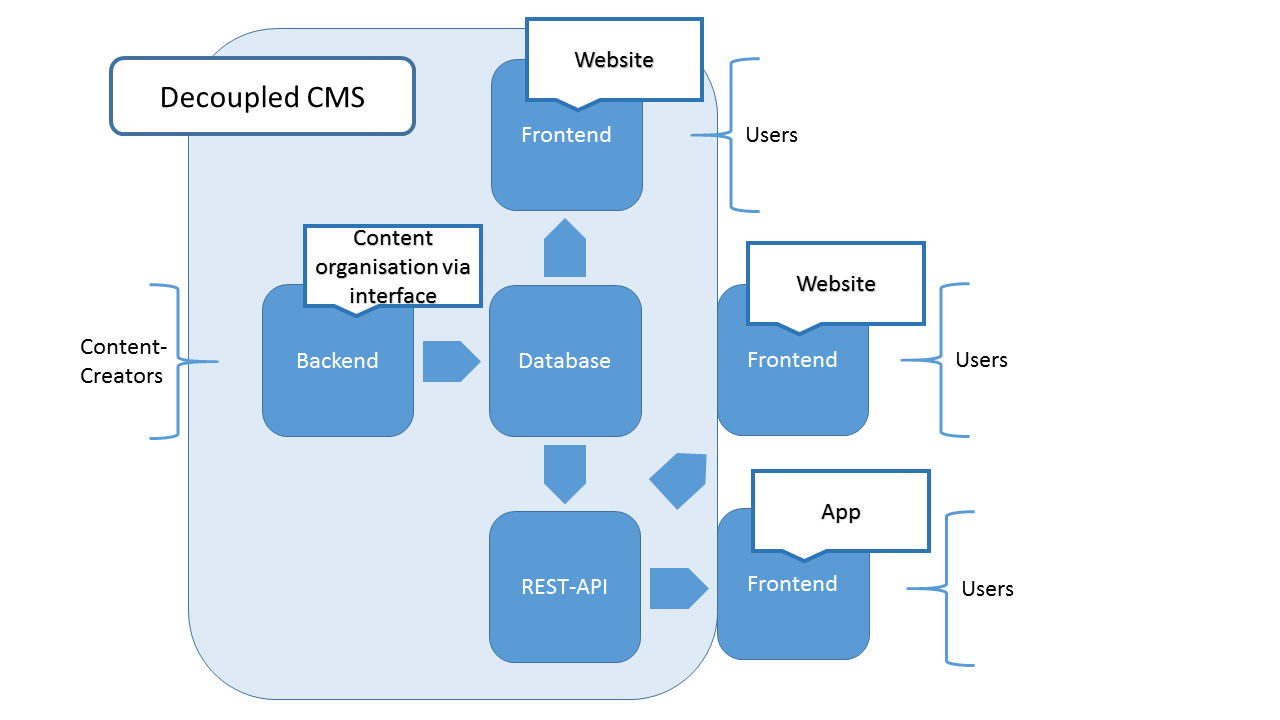
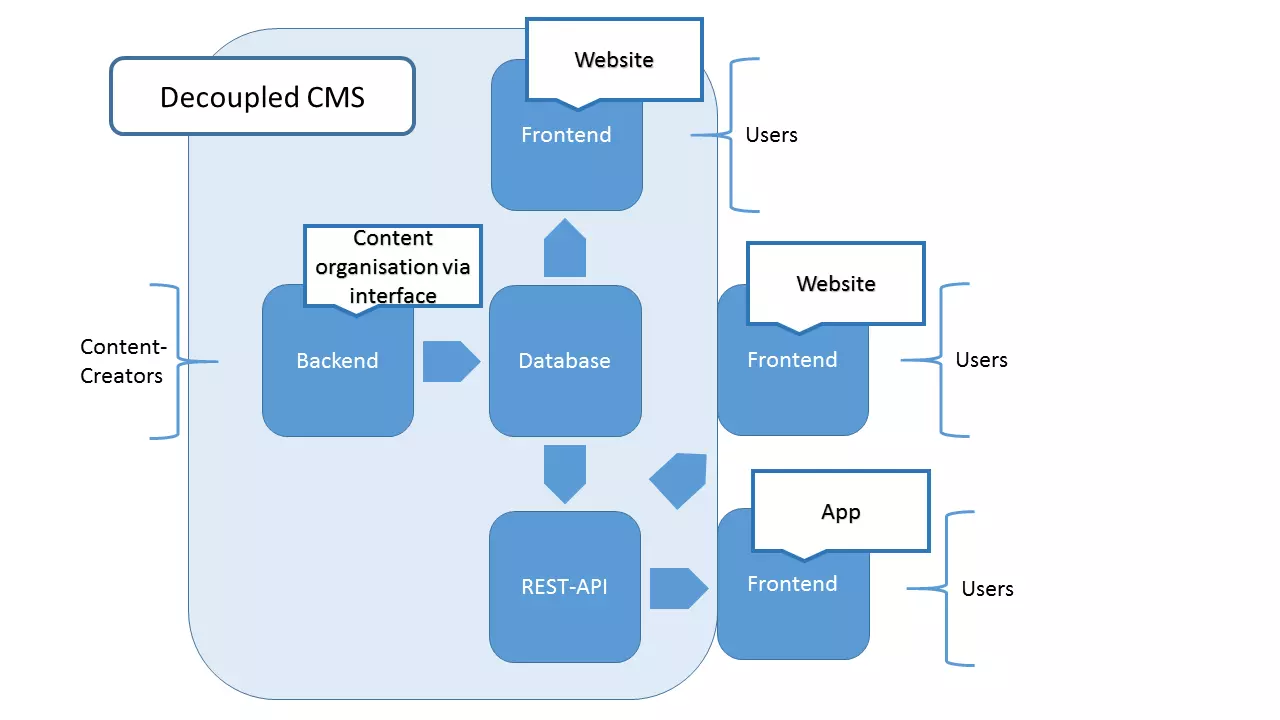
Classic CMS becomes decoupled CMS
Since headless CMS is discussed increasingly more often, the providers of traditional content management systems are realigning themselves. For example, since version 4.7, WordPress has added a REST-API as an integrated component. In earlier versions, this could only be connected via a plugin. The extension didn’t make it a headless CMS, though: WordPress becomes a decoupled CMS instead. Users who appreciate the scope of the content solution, including the template engine, can continue to work without losing any functionality. But those who want to use the CMS for the management of app content, for example, profit from the included interface. Drupal can also be transformed in a hybrid, as from version 8 onward the open source CMS offers the possibility to publish content in further frontends using RESTful web services.
Should you switch to headless CMS?
Whether you should trade in your traditional system for a headless CMS or not depends primarily on what you plan to do with it. If you only want to present your content on a website, such as a blog, then getting rid of the frontend isn’t a good idea. Headless CMS does offer advantages beyond the possible quantity of output media, but this rarely justifies the extra effort. The use of a decoupled CMS also offers no additional value in this case: Why implement an interface when you only need to use the built-in frontend of the system?
Of course, if you want to present your content on various platforms, it’s a different story. Headless CMS is particularly effective if you want to realize large projects. Multichannel capabilities, websites in PHP, Python, or Ruby, apps for iOS or Android – these present no problem at all. Editors and other content creators can manage their content as usual via the backend interface. Headless CMS (and decoupled CMS, when used correctly) are now professional frontend developers – they can be used with total freedom, as made possible by REST-API.
The redevelopment of the content management system (not really a further development, since only half of the system is still used) is a reaction to the changing requirements of the internet. The special features of smartphones, the Internet of Things, or virtual reality, make a reevaluation of the way that content is created and published necessary. Headless and decoupled CMS are only the beginning. Therefore, even if working with a traditional CMS is still sufficient, you should continue keeping track of new developments. In view of the swift developments of the past few years, it could be that classic CMS will soon be just as poorly adapted to the habits and needs of many users as static websites currently are.