

PHP Framework CodeIgniter

CodeIgniter serves as a web application framework for developers who prefer speed over an abundant range of functions. The main design goal of this open source PHP framework, according to the official project site, is to combine maximum performance and flexibility with the smallest possible program framework.
What is CodeIgniter?
CodeIgniter is a web framework written in PHP that prides itself on making the development of web applications faster and more efficient by using a compact software design. The U.S. software company EllisLab created CodeIgniter. The first version was released in February 2006. On July 13, 2013 they announced that they would no longer be able to provide the necessary resources for further development of the software. One year later the project was taken over by the British Columbia Institute of Technology (BCIT). The source code of the framework is under the MIT license and can be obtained via the online service GitHub. The most current stable version CodeIgniter 3.1.3 is available for free download on the project’s official website.
Makeup and structure of the framework
The performance-oriented design of CodeIgniter is reflected in the lean structure of the PHP framework. This is based on the software architecture pattern Model View Controllter (MVC). The basic principle behind MVC is the strict separation of program code and presentation. This is accomplished through a modular software structure and the outsourcing of PHP code. There are three central components: the data model (Model), the presentation (View), and the controller (Controller).
- The data model (Model) represents the data structure of a web application developed on the basis of CodeIgniter. For this purpose, model classes are defined in the source code. These include special functions with which information from a database can be accessed, stored, or updated.
- The presentation (View) is the part of the application that is presented to users. As a rule, this is an HTML document in which content is dynamically integrated via PHP. A view is basically a kind of template. CodeIgniter provides the opportunity to define webpage elements like the header and footer or RSS-sites in the view. Generally, web applications use multiple views to refer to content using the same data model. This allows different program features to be presented in different views.
- The controller (Controller) serves as a mediating entity between the model, view, and any other resource that is required to process an HTTP request or dynamically generate a website. This component takes inbound requests, validates the input, selects the desired view, and passes on content that the data model has loaded from a database.
The following graphic shows the interplay between the MVC components in a schematic representation:
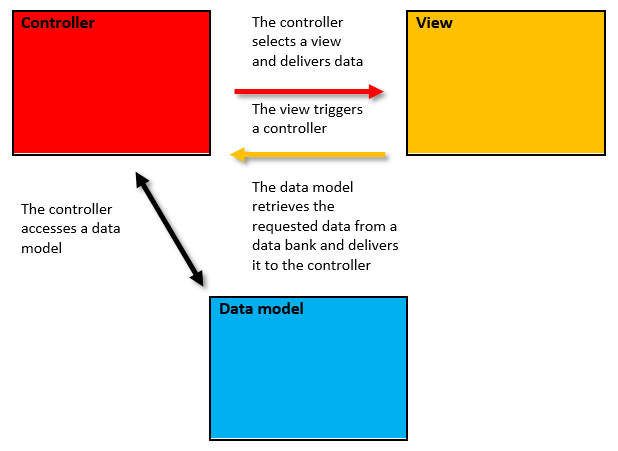
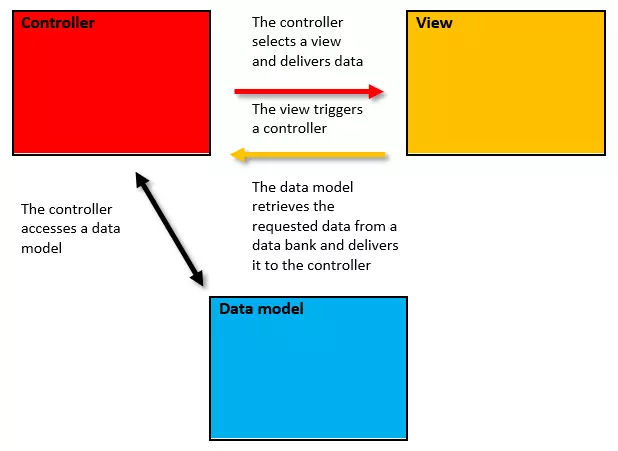
The MVC structure enables a flexible software design in which individual program modules can be exchanged, revised, and reused with minimal effort. Changes to a component have no impact on the source codes of the other components (provided no changes are made to the interfaces).
The strict separation between program logic and presentation provides for a clear, well-structured program code. Web applications based on MVC are considered to be maintenance friendly. In the case of an error, the search for its source is usually limited to just one of the components.
The MVC architectural model also allows for the separate development of a web application’s logic and layout. Back-end and front-end developers work in parallel, and applications can be completed much faster.
CodeIgniter makes use of MVC, but doesn’t bind users completely to this architectural model. While it requires the use of the controller and view components, connections to databases via the model component are optional. Additionally, an application based on CodeIgniter can also be carried out using a hierarchical MVC architecture (HMVC), which follows the classic MVC format but adds a hierarchical component.
The application flow of PHP frameworks
CodeIgniter is based on a URL concept. That means that the controller, as the central control unit between the view and the model, is accessed by entering a URL into the search bar of the web browser. Developers create so-called controller classes. These are PHP files that contain various functions used to load libraries, plugins, or helpers, connect to databases, integrate a data model, or search for a specific view. The application flow of CodeIgniter is based on the following URL structure: example.com/class/function/parameter The domain (example.com) is followed by a controller class, that should be addressed, as well as a particular controller function. The end forms the optional parameters. These are used to deliver the controller IDs or variables. In theory, a CodeIgniter URL could look like this: example.com/news/article/511 Such a URL addresses the controller news on the domain example.com and prompts the function article to be executed (for example, loading a view of the same name for presentation of the article). Which contents of the data model should be retrieved from the database and which are passed to the controller via the URL are optional parameters – in this example an article with the ID 511. In the output configuration, CodeIgniter quotes index.php in every application URL: example.com/index.php/news/article/511 This PHP file contains information about where to find the core files of the framework. It also helps you find integrated libraries, plugins, or helpers as well as in which index the application files are contained. The index.php is used to initialize all base resources. If CodeIgniter runs on the Apache HTTP server then the index.php and mod_rewrite can be removed from the application URL to make a “clean” web address available for the end users and search machine crawlers. Developers insert the following code block into the .htaccess file of the web server:
RewriteEngine On
RewriteCond %{REQUEST_FILENAME} !-f
RewriteCond %{REQUEST_FILENAME} !-d
RewriteRule ^(.*)$ index.php/$1 [L]
The basic structure of the PHP framework primarily supports the controller classes, model classes, and view templates.
Controller classes
CodeIgniter gives developers the opportunity to program individual controllers as user defined classes. Web developers create a separate PHP file for each controller in the index application/controllers/. Controllers contain the program logic of a web application developed with CodeIgniter and are created as subclasses of the CI_Controller class. In the source code, programmers do this using the extends keyword.
class News extends CI_Controller {
}
As a subclass, News inherits all of the visibility public and protected functions from the parent class CI_Controller.
The keywords public, protected, or private serve in PHP to define the visibility of a feature or function. If an element is declared as public, all classes in a software have access to that element. If this access is restricted to the parent classes and derived classes, programmers use the keyword protected. An element that is declared as private only is available to the class that the element defines.
Every user defined controller class has to contain a constructor function with which libraries, a data model, databases, or helper classes can be integrated. Since PHP5 __construct() has been used as the standard constructor function.
<?php
class News extends CI_Controller {
    public function __construct() {    //defines the constructor
        parent::__construct();                 //retrieves the constructor of the parent class
        $this->load->helper('url');        //loads a helper class for working with URLs
        $this->load->helper('file');     //loads a helper class for working with the files
        $this->load->database();             //loads a database
        $this->load->model('News_model');    //loads a model with the name “News_model”
}
?>
The example shows the class News as the subclass of CI_Controller. The constructor function __construct() integrates two helper classes, a database, and the data model News_model. The individual code lines are excerpted in the source text.
All controller classes that are defined for CodeIgniter in PHP have to start with a capital letter (News instead of news). In the URL, though, they can be written in lower-case.
Controller functions
If the basic framework for user defined controllers is located, the actual program logic follows in the form of controller functions with which views can be retrieved or interactions with an integrated data model can be carried out.
In order for a controller to load a view, the underlying HTML document must be stored as a PHP file in the application/views/ index. A simple view for article presentation could, for example, look like so:
<!DOCTYPE html>
<html lang="de">
  <head>
    <meta charset="utf-8">
    <title><?php echo $title; ?></title>
 </head>
 <body >
    <h1><?php echo $headline ?></h1>
    <p><?php echo  $content_body ?></p>
 </body>
</html>HTML documents that contain PHP code must be saved as PHP files (.php). This is the only way to make sure that the PHP interpreter of the web server runs scripts instead of outputting the PHP code as text.
To load a view in the controller, a user defined function is needed. The following code example uses the article() function to load the article.php view.
public function article() {
    if (!file_exists(application/views/article.php)) {
        show_404();
    }
$this->load->view('article');
}
The program code reads as follows: first, CodeIgniter tests whether the index application/views/ contains a file with the name article.php. This inquiry is implemented through the language construct if and the negative (!) command file exists().
If the condition is met and the command finds no file by that name in the corresponding index, then if returns the value TRUE and CodeIgniter executes the function show_404(), which is listed under if. In this case, a user receives the notice that the requested file doesn’t exist. But if the if command isn’t fulfilled and the !file_exists is evaluated as FALSE, then CodeIgniter initiates the function $this->load->view(‘article’). This is used to load the corresponding file as a view into the application.
As long as it’s in PHP format, the desired data can be listed in the view() function without a suffix. If other formats are being loaded, then the respective file suffix is obligatory.
CodeIgniter is usually used as part of dynamic web applications. These display dynamically generated webpages to users instead of static HTML sites. This can be done by filling the view with data that matches the parameters passed to CodeIgniter via the URL.
example.com/news/article/511
Until now, the only view for article display was loaded with the function $this->load->view('article'). But now it’s necessary to specifically integrate the contents that are linked to the parameter 511. We assume that this is an ID that’s linked to a particular news item using a database management system. To load it from the database into the program, the above example needs to be supplemented so that the data model embedded in the constructor is addressed.
public function article($id) {
    if (!file_exists(application/views/article.php)) {
        show_404();
    }
    $data = $this->News_model->get_data($id);
    $this->load->view('article', $data);}
The delivered function argument (here under the variable name $id) corresponds to the ID part of the URL – for example, 511. The yet-to-be-written model function get_data() is used to load the article content linked to the ID from the database. The view() method invokes the article view and delivers the data to it in the form of an associative array ($data). The data model News_model also delivers the data to the News controller, which passes it on to the view.
All operations associated with data fetching are transferred to the embedded data model.
Model classes
Data models are used by CodeIgniter to provide functions that can be used to perform certain database operations. Exactly like controller classes, model classes are programmed using the user defined PHP framework.
To create a model class, first you have to create a class name – in this case, News_model. Similar to controller classes, all user defined model classes are subclasses of the parent class CI_Model. The inheritance is implemented through the extends keyword. Model classes also incorporate databases and other resources with the constructor function.
class News_model extends CI_Model {
    public function __construct() {
        parent::__construct();
        $this->load->database();
    }
}
Model functions follow this basic structure, in which developers define all database operations that should be available to the controller via the respective data model.
Model functions
Model classes enable developers to define individual functions for database operations. In the above example, we utilized the user defined function get_data() in the controller class News to load article content from the database into the view. In the model, we only define which database operations are hidden behind the function.
class News_model extends CI_Model {
    public function __construct() {
        parent::__construct();
        $this->load->database();
    }
public function get_data($id) {
     $this->db->select('content');
     $this->db->from('example_table');
     $this->db->where('id', $id);
    $query = $this->db->get();
    return $query->result();
}
In the model class News_model the above function get_data() is defined as a database operation, which is the column of the data set specified by select() with the delivered ID number ($id) from the database table specified by from() and returned via get() with the help of the function result() as an array. A data model typically provides a variety of model functions. Developers can draw on the query builder class, which includes a set of predefined functions for classic database operations. An overview can be found in the official documentation of CodeIgniter frameworks.
Routing with CodeIgniter
Which control class and function should be addressed are given to CodeIgniter with a URL. To do this, the web framework uses the URL structure class/function/parameter. This basic structure can be adapted as required. CodeIgniter provides the file routes.php in the application/config/ index for this purpose. This contains an array called $route that enables developers to define their own routing criteria.
In the output configuration of the $route array there are three default entries: the standard controller, a routing rule for the 404 override, and a rule for the automatic replacement of hyphens (-) with underscores (_).
$route['default_controller'] = 'home/welcome';
$route['404_override'] = 'home/welcome';
$route['translate_uri_dashes'] = FALSE;
The first default entry provides the standard controller of the application. This is loaded by CodeIgniter whenever a URL other than the domain contains no further routing information. In the current example the routing rule defines the controller class home as the standard controller. Visitors who don’t specify the target webpage in the URL are therefore redirected to home and presented with the welcome view. Usually this is a redirection to the start page. If no controller is defined as the standard then CodeIgniter shows a 404-error page when the start page is called.
The second default entry in the $route array defines a controller that can be called when the controller addressed by the URL isn’t found in the application files. The routing rule $route[‘404_override’] = ‘home’ overwrites the 404-error page that would normally be shown in such a case, and instead leads to the controller class home.
The third default entry in the $route array prevents routing errors based on hyphens. The hyphen isn’t a validate character for class or function names and is automatically replaced in URLs in the default settings.
To create a user defined routing rule for a dynamic URL the web developer has two available options with CodeIgniter: Routing entries for dynamic URLs can be defined with Wildcards (placeholders) or with regular expressions.
routes.php supports two types of wildcards:
Websites with a large number of 404-error pages are difficult to crawl and make it hard for search engines to access relevant data. In addition to the impact on user experience this can have a negative influence on the ranking in search engines. As a rule web developers should endeavor to avoid 404-error pages.
| Wildcards of routes.php | Description |
|---|---|
| :num | Functions as a placeholder for integers (whole numbers) |
| :any | Functions as a placeholder for a string (characters) |
The following example shows an entry in routes.php that enables the function (article) to be deleted from the URL:
$route['news/article/(:num)'] = 'news/$1';The wildcard :num reads the parameter of a dynamic URL and stores it in the variable $1. If you define routing rules with :num or :any then you have to put them in simple brackets with routes.php.
routes.php also accepts routing rules in the form of regular expressions. The two placeholder types can also be noted as follows:
:num corresponds to \d+
:any corresponds to [^/]+
An alternative to the above example would be the following notation:
$route['news/article/(\d+ )'] = 'news/$1';Regular expressions are also put in brackets with routes.php.
An overview of application flow
The following graphic outlines the flow of an application on the basis of CodeIgniter in seven steps:
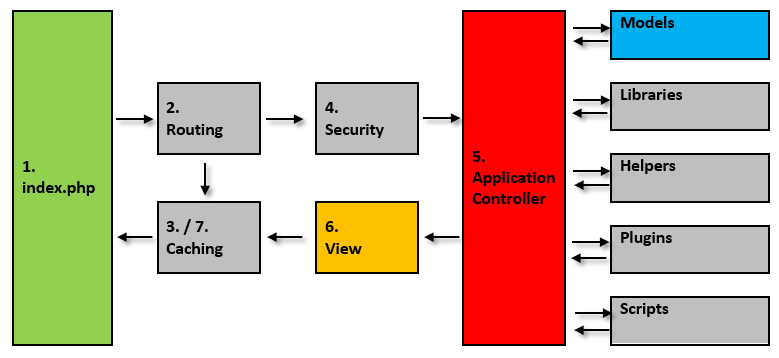
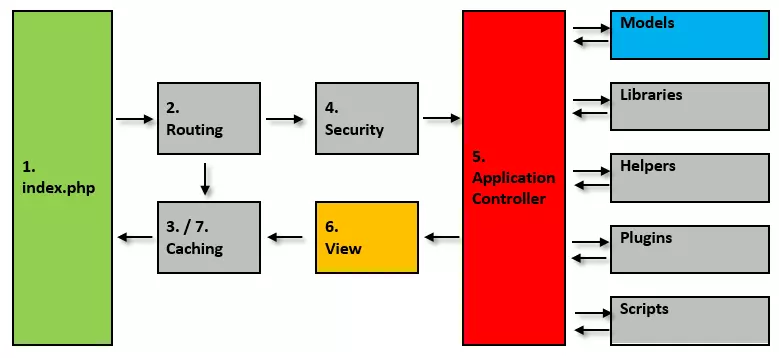
1. CodeIgniter uses index.php as a front controller for incoming HTTP requests. All basic resources needed to run the application are initialized here.
2. As part of the routing, CodeIgniter checks which action is to be carried out. For this purpose, the application compares the URL in the request with the routing rules defines in routes.php.
3. Routing is followed by caching. If a response matching a request is count in the application’s cache it’s delivered directly to the requesting web browser. Otherwise, the controller determined during routing is executed with a preceding filter function.
4. The CodeIgniter framework contains an integrated filter that intercepts harmful inquiries. Before the application loads a controller matching the request, every HTTP request undergoes a security check.
5. If the request passes the filter, then the controller is executed. This selects a matching view and loads the data model as well as all libraries, helper classes, plugins, and scripts needed to answer the query.
6. As soon as all of the relevant data has been passed to the view, it can be delivered to the web browser.
7. If a caching is activated, CodeIgniter temporarily stops outgoing data to be able to directly answer repetitive queries.
Benefits of the CodeIgniter framework
With more than 13,000 stars, CodeIgniter is a highly respected GitHub development project and ranked 3rd among the most popular PHP frameworks. The benefits of the application are as follows:
Minimal configuration effort: CodeIgniter is quick to get started. Users aren’t delayed for long with the configuration of the framework and can instead begin with the development of the planned application almost immediately after the installation. The configuration effort is essentially restricted to the settings in config.php and the application/config/ index. Here, users define a standard path for web browser access, a key for encryption, a name for session cookies, and settings for cross-site scripting (XSS). It is also recommended to create an .htaccess file to remove index.php from the path of application URLs via RewriteRule. A database connection configuration is also necessary, which you enter into the database.php file.
- Small footprint: CodeIgniter leaves a small footprint behind in your system. The download pack of the framework spans around 11MB. More than 9MB of which is due to the detailed documentation of the software. The minimal amount of code is due to the fact that the CodeIgniter basic system only contains a few small libraries. Additional resources can be loaded as required.
- Excellent performance: The lean core system means that CodeIgniter can score a higher speed in comparison to other PHP frameworks. The system was praised by the PHP inventor Rasmus Lerdorf, among others. In 2008, the Free and Open Source Conference (FrOSCon) he announced that he liked CodeIgniter “because it is faster, lighter, and the least like a framework.”
- “Clean” URLs: CodeIgniter automatically generates user friendly, search machine appropriate URLs. Instead of accessing dynamic web content through query strings like other PHP frameworks, CodeIgniter uses a segment-based approach.
URL with query string: example.com?controller=news&function=article&id=511
Segment-based URL: example.com/news/article/511
- Free programming style: CodeIgniter is based on a free interpretation of MVC architectural structure. There is no set programming style for developers.
- Extensive documentation: CodeIgniter has a detailed documentation in English, including a beginner’s tutorial in which the source code is clearly and well commentated. The CodeIgniter documentation is on the project website as an online guide as well as an available version for download.
- Community support: Developers who build their applications on the basis of CodeIgniter can support themselves with help from other users. The project is accompanied by an active community. A public forum can be found on https://forum.codeigniter.com. Currently, more than 7,300 users are involved in exchanges over the deployment and further development of the framework in about 65,000 threads.
Drawbacks of the CodeIgniter framework
Since the development of the CodeIgniter framework stagnated before the takeover by the BCIT took place, developers searched for technological improvements that had been adapted by comparable frameworks in recent years but were unsuccessful with CodeIgniter.
- ORM only through third parties: Object Relational Mapping (or ORM) describes a technique of software development that allows applications to store objects written in an object-oriented programming language such as PHP in a relational database. CodeIgniter doesn’t natively support ORM, so the technique can only be integrated through a third party.
- No template engine: CodeIgniter prides itself on functioning without a template engine. Instead, the framework provides optional simple template parser. This can be seen as a benefit as the use of a template engine usually comes with a performance overhead (additional expense at runtime). In addition to the framework the use of the template language also has to be learned. But a template engine does allow for the separation of the data generation from the code for the presentation, which usually leads to a clearly structured source code. If a template engine with slim syntax is used, this can significantly reduce the overall volume of the application code.
- No namespacing: With namespace, PHP allows you to separate code from different application groups. PHP developers use this feature to avoid conflicts that can come up when naming classes and functions. For example, naming collisions with internal PHP classes, functions, constants, or elements integrated by a third party are common. CodeIgniter doesn’t use namespacing anymore.
- No PHP auto-loading: Since Version 5, PHP offers the functions __autoload() and spl_autoload_register() that allow required class definitions to be loaded automatically. The CodeIgniter framework doesn’t utilize this feature.
- Fewer built-in libraries than other PHP frameworks: Because of the lean software design, CodeIgniter offers significantly fewer libraries in the output configuration than other PHP frameworks. These primarily include the most important tasks of web development like database access, e-mailing, validation of form data, maintenance of sessions, or working with XML-RPC. For tasks that go beyond the scope of the basic features you have to integrate your own libraries or resources from a third party. This is a point that developers who are looking for a minimized framework can also interpret as an advantage.
CodeIgniter for the hurried reader
The table below provides an overview of the basic information of the CodeIgniter framework:
| CodeIgniter | |
|---|---|
| Developer | British Columbia Institute of Technology (BCIT) |
| Current release | Version 3.1.2 |
| Design pattern | MVC/HMVC, Active Record, Chain of Responsibility |
| Necessary knowledge | PHP, Object-Oriented Programming (OOP) |
| Programming language | PHP 5.6 or higher |
| License | MIT License |
| Database support | MySQL (5.1+), Oracle, PostgreSQL, MS SQL, SQLite, CUBRID, Interbase/Firebird, ODBC |
| ORM | Only through third parties |
| Caching | Yes |
| Template engine | No |
| Namespaces | No |
| PHP auto-loading | No |
| Search machine-friendly URLs | No |
| Security features | Cross-Site-Request-Forgery (XSRF), Cross-Site-Scripting (XSS), SQL-Injection |
| Testing library | PHP Unit |
Conclusion: Which projects are suitable for CodeIgniter?
With its compact design and user-friendly syntax CodeIgniter is best suited for the prospective programmer. Anyone who has already had some experience with dynamic web development based on PHP will also become familiar with the PHP-based lightweight framework pretty quickly. Experienced programmers will also appreciate the flexibility that allows them basic functionality with a reduced PHP framework. But if you want to use CodeIgniter, you should be familiar with the MVC architectural structure and be able to do without a template engine as well as native ORM. Despite the minimal code range CodeIgniter is equally suitable for small and large web projects.
Reviewer

Julia Hertler
With over 18 years of experience in content marketing, Julia Hertler has deep expertise in digital communications. For the past 10 years, she has specialized in the areas of domains and hosting at the IONOS Digital Guide, making complex technical topics easy to understand.