

How to create the perfect website style guide

A unique and instantly recognizable style is central to the design of a website. When it comes to large-scale web projects with several teams, a website style guide that covers essential design features ensures the content and design of a website is consistent no matter who’s working on it.
What is a website style guide?
In online marketing, a style guide is a set of rules for the uniform design of an online presence. Your online presence isn’t just your website though, it also accounts for social networks and apps.
Closely related to corporate design and corporate identity. help companies to present a cohesive front across all communication channels—be it on social media, in emails, via the company website or through online publications. Such guidelines are a great resource for employees and help to clearly communicate how to represent the business both visually and textually, so that (potential) customers can instantly recognise the company online.
While there’s no authoritative definition on what a style guide is in the context of web design, one thing is clear: It’s more than just creating a pretty logo and a company color scheme. In addition to deciding upon the fonts and colors that should be used, a website style guide also determines image design and the arrangement of elements as well as the tone of voice of written material.
If followed properly, a solid web style guide will ensure that a website is cohesive and that the design and color scheme are consistent. This should be the case even if different designers are working on different parts of the website or if different types of websites are being used for the same brand.
Why is a website style guide important?
It’s important to have a style guide, because without one, collaborating on the design and content of a website can be rather difficult. A style guide helps to ensure that the design of a website isuniform and speaks to the target market by communicating design concepts and ideas to a whole team (and in some cases several teams) of designers. A well-planned website also makes it easier for visitors to connect with a brand and may even lead to them recommending the brand to others.
A website style guide is also important for communicating concrete rules in design patents, for example, rules about how a company’s logo can be used.
What are the benefits of having a website style guide?
By creating a style guide for the design of your website, you have a document that you can share with new developers and designers, reducing the amount of work that you have to do every time you onboard a new developer or designer. A style guide can also help to cut costs that would otherwise arise from having to redesign parts of your website that do not align with the brand identity.
A uniformly-designed website communicates professionalism and credibility. Customers and users are much more likely to want to visit your site and spend more time on it as well. Having a consistently designed website and social media presence also helps to increase brand awareness.
3 website style guide examples that get it right
So, what does a finished style guide for a website look like? There are some examples that you can easily find online, including the Boy Scouts of America’s brand identity guide, Zoom’s style guide and Mozilla’s style guide. By clicking or scrolling through the different chapters in each of the style guides, you can get a good impression of the level of detail needed to create a comprehensive website style guide.
Boy Scouts of America website style guide
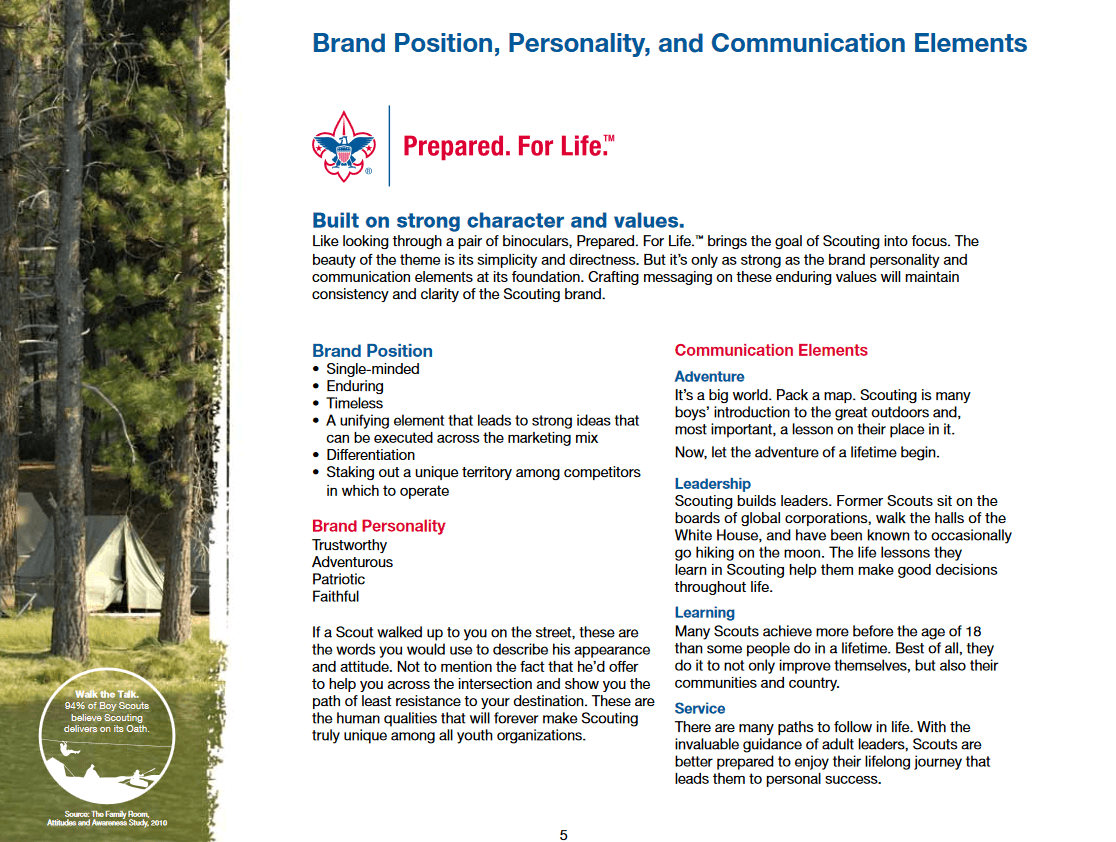
The lengthy guide to branding for the Boy Scouts of America (BSA) focuses on a range of important details, including font choice, badges, branded products and corporate identity. The opening pages are dedicated to covering the whole idea behind the BSA and designed to inspire readers to rally behind the project. One big recurring feature throughout the style guide is the use of full stops, with the BSA’s main slogan being Prepared. For. Life. ™. Their style guide regularly highlights the importance of periods as a way to add weight and power to sentences and statements. The BSA also offers a lot of information on brand positioning and the importance of maintaining a good brand image at all times.
Zoom website style guide
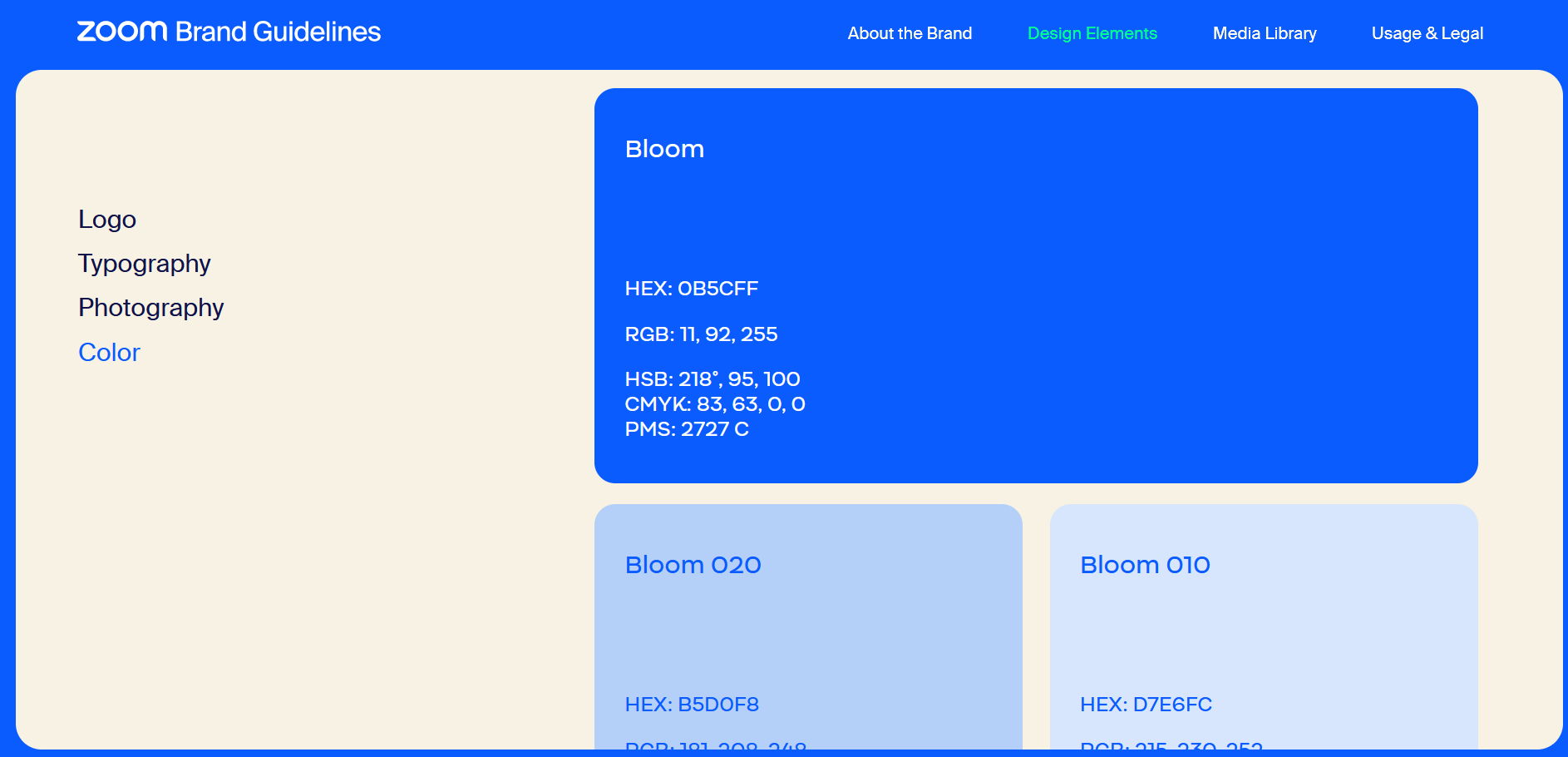
In contrast to the BSA’s style guide, Zoom opts for a more compact approach. Under the Design Elements section of its brand guidelines, Zoom focuses on providing information about its logo, font, photography style and color palette.

Mozilla website style guide
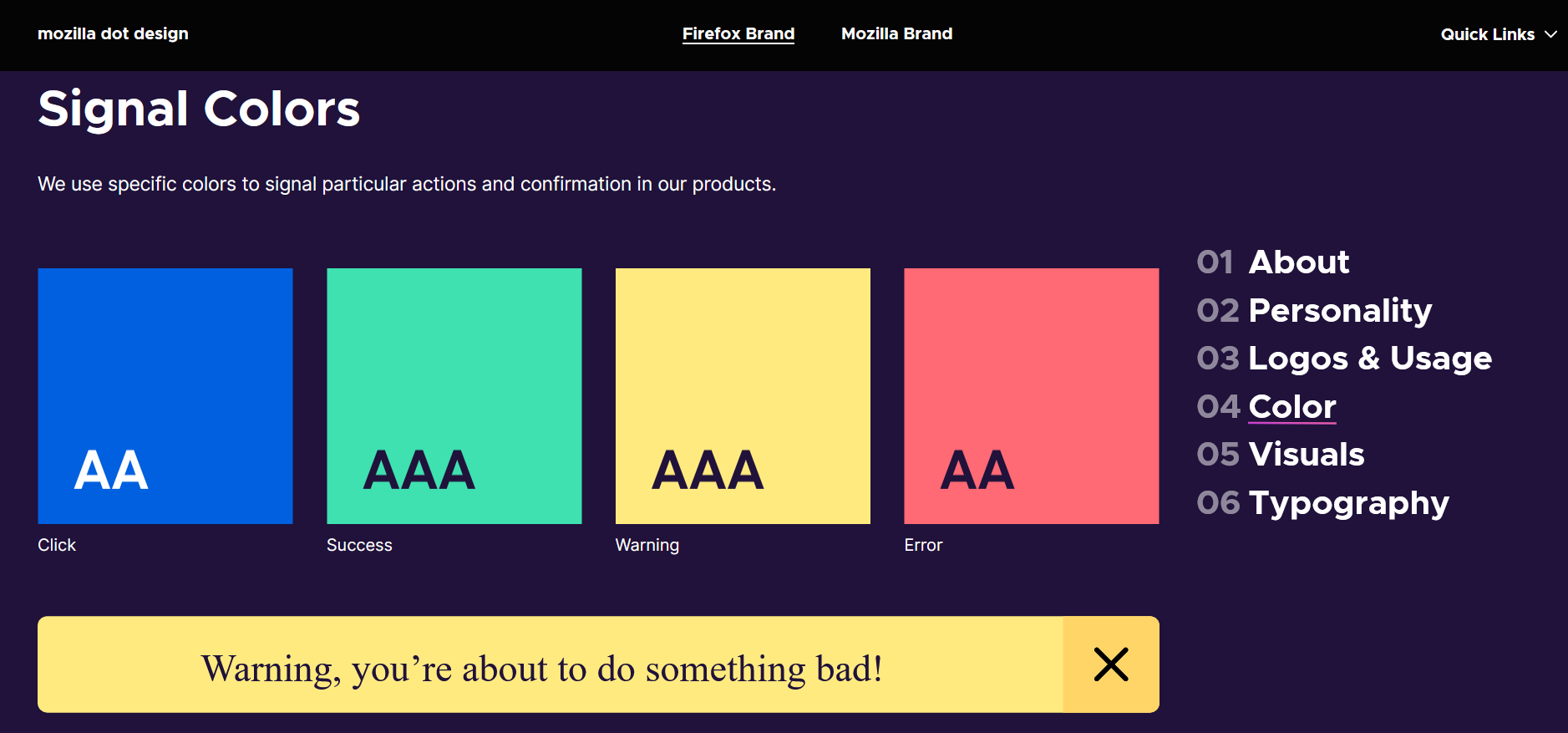
Another great example of a web style guide from a successful organization is the digital style guide from Mozilla. Here, the focus is on the logo and how to properly use it. The style guide contains rules about what sort of background should be used with the Firefox logo. It also contains guidelines for colors that correspond with certain actions or responses from the browser.

All of the examples emphasize the importance of usinggood illustrations and short descriptions to make sure your website style guide is clearly understood. The most important thing is maintaining a logical structure: The Boy Scouts of America website utilizes an effective table of contents page for their PDF format. With Mozilla, users can quickly navigate to pages with a menu located on the right side of the screen. Similarly, Zoom has also provided navigational elements on the side of their screen, however, they have opted for the left side. You can use the style guides above as inspiration for your own web project.
How to create an effective website style guide
If you’re running a company or are responsible for helping to develop a company’s image, sooner or later you’ll be faced with the question of how to develop a website that reflects the company and its mission. You’ll also need to think about how to design the website in a way that makes it instantly recognizable. Your answers to these questions should form the foundation of your web style guide. Once you have the foundation laid, you’ll want to take time to think about your target market, the details of your design, and how to best communicate your vision and keep it up to date.
Analyze your target market(s) and define your corporate philosophy
One of the first things to do before writing your website style guide is to make sure your corporate philosophy, otherwise known as corporate identity, matches your target market. To assess this, you’ll need to gather lots of data and carry out an in-depth analysis of your target group: It’s important to define the age, gender, educational background, living situation and interests of your target audience as precisely as possible. This is because you can only ensure your website provides and displays content in a way that resonates with them by actually getting to know them. The website style guide should also describe your corporate philosophy as well as the company’s objectives and tone of voice. What does the company stand for, and which words can/should be primarily used on the website in order to convey the company’s ideals?
Define your tone of voice, color palette and typography
Your corporate image and the information you gather on your target market should be incorporated into your website’s design guidelines. In order to increase brand recognition, most websites use the same color scheme that they use for the company logo. But your target market can also influence your choice of color. Websites targeting a younger audience, for example, will typically have bolder and more striking colors than sites designed for an older target market. Websites for older target markets usually stick to simpler designs with muted colors. The same can be said of font choice, too. Websites aimed at younger people are more likely to go with unusual and unique fonts to spark interest in their website, while traditional and classic fonts are chosen in order to come across as being more serious. Always remember the importance of readability though. No matter how nice a unique font or color scheme may seem, if your website is difficult to read, it will deter all site visitors, regardless of demographic.
The website style guide should also contain information on which colors, words, icons, etc. should not be used. Certain words can carry negative connotations that the website and the company may want to distance themselves from. That’s why it’s important to make note of these so that all employees are on the same page and don’t use these words when creating content for the website. The same applies to colors and images: Which color combinations should be avoided? Which image content should never be posted to company social media accounts? If you have already created a logo for your company, you should also include the logo design in your style guide.
Some of these may sound really obvious, but including guidelines about content that you don’t want to feature is also crucial for a good website style guide.
Include detailed information and examples
The more exact and precise your web style guide is, the more money and time you’ll save in the long run. You should explain the guidelines in as much detail as possible: Colors should be clearly defined with hex codes, RGB values, and corresponding mapping. A short description can also be useful to explain why the colors were chosen and the effect that they’re supposed to have on the viewer. It’s also crucial to outline which colors have been chosen for which element(s). You’ll also need to specify where to place icons, button elements, banners and logos as well as which colors can be used for them.
Creating a visual summary instead of relying solely on words can often provide more clarity. Such illustrations can contain specific information about column width and line height, allowing the designer to quickly get an idea of how everything should appear on the finished page. Including sizes for images, icons and logos is also a good idea.
You should also define how fonts should be used and which size they should have. Think about how, when and where particular fonts should be used. A good website style guide will also include examples. These are used to show which font should be used for the main headings, for subheadings and for the general text. It’s also important to include information about line spacing, indentations, and spacing between individual page elements.
Of course, not every company is able to include a web design style guide on their own website, which is why we’ve included the BSA’s PDF web style guide to show how you can create a well-structured handbook that can be given to employees and designers before they start working on the project.
The following table offers a useful overview of the most important points to cover in a good website style guide:
| Section of the style guide | Main questions to answer | |
|---|---|---|
| Basic design principles | What does the company stand for? What are the main aims of the company’s web presence? Which design principles can be used to underline the company’s business philosophy and corporate identity? | |
| Target groups/personas | Who is the website/social media account/web presence aimed at? Who’s in the target group? What are their preferences and interests? | |
| Tone of voice and wording | How should customers, readers and visitors be spoken to? Which words/expressions should be used, and which are to be avoided? | |
| Logos and wordmarks | How should logos and wordmarks appear? When, how and where should/must they be used? | |
| Basic website structure | How should your website be put together? How wide are different columns and how large should line breaks be? How should elements be ordered on individual pages? Which menu structure should be implemented? | |
| Colors | Which colors represent the intention of the website and speak to the target market most effectively? What are their RGB values and hex codes? Which colors can be combined, and which are best left out | |
| Font style | Which font style should be used for which texts and elements? How big should the font be, and which color(s) can it have | |
| Icons | Which icons can/should be used? Where should they be placed and what do they mean? | |
| Content | Which content should be used to fill your website/web presence? How should this be implemented using graphics, text and multimedia elements? |
- Intuitive website builder with AI assistance
- Create captivating images and texts in seconds
- Domain, SSL and email included
Maintain and update your style guide
Once you’ve created your website style guide, your focus will shift to updating and modifying your web presence accordingly. This is the only way to ensure a united front across all communication channels in the long run. A uniform approach is essential for branding and corporate identity. But this doesn’t mean that the web design style guide for a company should never be changed. In fact, quite the opposite: You should regularly maintain and update your website style guide. Ask yourself: Are your designs still current? Is your font still modern? Are there new web design trends that you should implement on your website?
Remember that the tastes and preferences of your target group may change. So, while it’s important for your web presence to remain consistent and true to the website style guide you initially developed, you should pay attention to trends and how they change and adapt your guidelines as you see fit.
Don’t have your own logo yet? With the IONOS Logo Generator, you can create one for free.
Reviewers

Melissa Senn
Melissa Senn has been with IONOS since 2016 and focuses on the areas of websites, e-commerce, social media, and AI in the Digital Guide. As a digital strategist, she draws on her extensive SEO and GEO experience to translate complex technological trends into practical content.

Christian Heldmaier
Christian Heldmaier is an experienced online marketing and SEO specialist from Karlsruhe. He has been working as an SEO Manager at IONOS since July 2020.