

What is OneDrive? Key facts about Microsoft cloud storage
OneDrive is Microsoft’s in-house cloud storage service. If you have a Microsoft account, you get 5 GB of free storage that you can use however you like. If you need more space for business use, you can upgrade to a paid OneDrive plan.
What is Microsoft OneDrive?
OneDrive is what’s known as a cloud, meaning an external data storage service. It lets you move important data to a backup, share it with others, and work on it collaboratively. As a cloud storage service, OneDrive works similarly to other online storage services as files are stored on servers on the internet and can be accessed at any time via apps or your browser.
For Windows users, OneDrive is a familiar tool, because since Windows 10 the storage service has been part of the standard repertoire as an integrated cloud service (even if it’s not always activated). As with other providers, you can upload your data to Microsoft cloud storage with a single click, back up your data, or share selected files with other users.
- Store, share, and edit data easily
- Backed up and highly secure
- Sync with all devices
What features does OneDrive offer?
To use OneDrive’s features, sign in with your Microsoft account. Once signed in, you also get access to various Microsoft services such as Word, Excel, PowerPoint, and Teams. If you use Windows 10 or Windows 11, you’ll already find OneDrive as an icon in File Explorer.
Key OneDrive features include:
- uploading and downloading files to and from the cloud
- sharing selected files with others for viewing or editing
- collaborating using Microsoft services such as Word and Excel
- moving files into the OneDrive desktop folder to keep them in sync
- automatically syncing changes across your devices
- accessing your files from anywhere, on any device
- using mobile apps on Android and iOS to access your data on the go
- expanding your storage with paid OneDrive plans
- saving Office documents directly to OneDrive using the “Save As” option
Synchronization automatically applies changes between cloud storage and devices. This way, users always work with the latest version of a file.
What are the requirements for using OneDrive?
To use OneDrive, you need a Microsoft account. The following minimum technical requirements also apply:
- Windows 10 or later
- macOS 13.0 or later
- no official OneDrive desktop client for Linux
- at least 1 GB of RAM
- a stable internet connection
In practice, you can use the cloud storage on most modern computers, smartphones, and tablets without any issues. If you’re already signed in to Windows with a Microsoft account, the service is typically integrated by default.
What OneDrive versions are available?
Different OneDrive versions let you access cloud storage across a range of devices and platforms. In addition to using it in a browser, you can also use the service as an app or desktop client on various systems.
Other variants include, for example:
- OneDrive client for macOS
- OneDrive for Xbox
- OneDrive for HoloLens
- OneDrive for Surface Hub
- OneDrive for Microsoft tablets
The OneDrive mobile app is also available, allowing you to access and edit your cloud data on Android (version 6.0 or later) and iOS (version 16 or later).
Advantages of OneDrive
Value for money
One advantage of OneDrive is the price-performance ratio of the different storage plans. Even the paid basic plan offers additional storage space, while the free plan provides essential cloud features with 5 GB of storage. For many users, this free storage is sufficient to store documents, photos, or smaller backups.
Integration with Microsoft 365
Another advantage of OneDrive is its integration with Microsoft 365. Documents can be saved directly from applications and then edited collaboratively.
Some of the key features include:
- collaborative document editing
- file versioning
- secure document sharing
- additional protection against ransomware
Personal Vault
A special security feature is the so-called Personal Vault. You can store particularly sensitive files there that receive additional protection. In the free plan, you can store only a limited number of files in the vault, while paid plans allow unlimited use.
Fast and easy synchronization
With OneDrive synchronization, you save changes centrally in the cloud, independent of your device, and sync them effortlessly. So when you access your storage from other devices (including mobile devices), changes are applied automatically.
Store files in the cloud
By storing files in the cloud, users can free up local storage space while also creating backups of important data. In addition, files can be accessed regardless of the device or location being used.
Disadvantages of OneDrive
Only 5 GB of free cloud storage
Even a simple cloud storage comparison shows that OneDrive offers relatively little free storage. Users of Google Drive get 15 GB of free cloud storage. This means OneDrive still provides more free storage than Dropbox’s 2 GB, but its free plan falls short compared to some Dropbox alternatives .
Version history only available to a limited extent
Restoring older versions of documents is in some cases tied to paid plans. Advanced features for recovering changes are usually only available in premium plans.
Limited upload size
Even with paid plans, uploads are limited to files up to 250 GB each. If you need to upload larger files, consider using OneDrive alternatives.
| Advantages of OneDrive | Disadvantages of OneDrive |
|---|---|
| ✓ good value for money | ✗ only 5 GB of free cloud storage |
| ✓ integration with Microsoft 365 | ✗ restoring files etc. requires a paid plan |
| ✓ personal vault for sensitive data | ✗ upload limit for individual files |
| ✓ automatic synchronization | |
| ✓ cloud backup and access from anywhere |
How much does OneDrive cost?
The cost of OneDrive depends on the amount of storage you want and the additional features. Depending on your requirements and needs, Microsoft’s cloud storage offers different prices and plans as well as Microsoft 365 licensing models for personal, family, or business use.
| Plan | Cost | Details |
|---|---|---|
| OneDrive | Free | 5 GB of cloud storage without additional Office services |
| OneDrive Basic | + | 100 GB of cloud storage without additional Office services |
| Microsoft 365 Single | + | 1 TB of cloud storage and all key Office applications |
| Microsoft 365 Family | ++ | up to 6 people, includes 6 TB and all Office applications |
| OneDrive Business | +++ | cloud storage for businesses |
| Microsoft 365 Business (Basic & Standard) | ++ | The Business plans are suitable for companies and collaborative work in different teams. The Basic version includes Microsoft Teams as well as SharePoint, Exchange, Excel Mobile, and PowerPoint Mobile. The Standard plan adds comprehensive features such as all Office applications, business email, plus support, deployment, and business licenses. |
Cost legend: + = low, ++ = medium, +++ = high
How secure is OneDrive?
To protect your data, OneDrive offers two-factor authentication that safeguards your OneDrive and Microsoft account from misuse. The transfer and access to your OneDrive data use AES 256-bit encryption. Additional security is provided by the following features:
- a personal password
- security information and recovery options
- advanced security features such as ransomware and virus protection
- version history for documents
Some of these features are only available in advanced plans.
The key OneDrive features
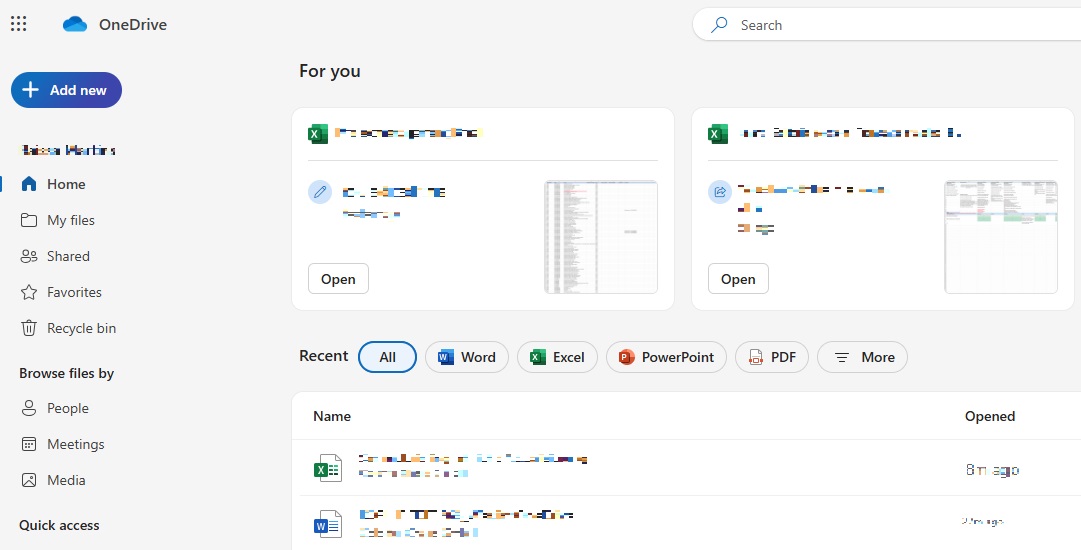
The core OneDrive features focus on the management and organization of files in cloud storage. The interface is clearly structured and provides quick access to your stored content.
Key areas of the interface include:
- My files: displays all stored documents and media
- Recently used: shows recently opened files
- Shared: lists files that have been shared with others
- New: allows you to create new folders or documents
Reviewer

Jeanna Raffa
With over 18 years of experience in online marketing, Jeanna Raffa possesses extensive expertise in digital marketing. Since 2020, her focus has been on providing practical information regarding email, office, and cloud storage solutions.