

What is iCloud and how does it work?
iCloud is Apple’s cloud storage service that lets you back up, sync, and access your data across multiple devices. It comes preinstalled on every Apple device and includes 5 GB of free storage. You can use this space to automatically back up your data and keep it in sync across your devices.
How does iCloud work?
iCloud is a cloud storage service from Apple that lets users store and back up data online and sync it between different devices. If you own a Mac, iPhone, or another Apple device, iCloud is already preinstalled. It is a type of cloud storage that Apple introduced in 2011. You can store various types of data in Apple’s cloud, sync it to other Apple devices using iCloud Drive, and even create a Mac backup, for example.
iCloud accesses various Apple services whose data is automatically backed up and synchronized at regular intervals. These include:
- Photos and videos
- Emails
- Passwords and login data
- Contacts
- Calendar entries
- Notes and reminders
- Text messages
- Bookmarks from the Safari browser
- Files
- Music, videos, and e-books from Apple Music or Apple Books
- App purchases from the App Store
Once synchronization is complete, you can not only access the data from all your other Apple devices, but also share it with others. iCloud also offers the ability to collaborate on documents from services like Pages, Numbers, or Keynote.
- Store, share, and edit data easily
- Backed up and highly secure
- Sync with all devices
What are the requirements for iCloud?
Using iCloud only requires an Apple account (Apple ID). This is usually created when you first set up a device and can then be used on multiple devices.
If you don’t have an account yet, you can create one via the official Apple account management page. There, click “Create Your Apple Account.” In the dialog box, enter your details, email address, and chosen password, then set your security questions. After that, sign in to iCloud with your new Apple account and select in the settings which apps you want to connect to iCloud.
With the “iCloud for Windows” app, you can also use Apple’s iCloud services on Windows 10. All you need is an Apple account to sign in. Once set up, you can sync iCloud Drive, photos, or contacts with your Windows computer.
How do you set up iCloud?
In the settings, you can choose which data should be stored in iCloud and synced, and you can adjust this at any time. If you’re using a Mac, for example, follow these steps:
- Open System Settings from the Apple menu.
- In the sidebar at the top, click your Apple account.
- Select the “iCloud” section and specify which services should be synchronized.
After activation, the selected data is automatically synchronized with iCloud and is available on other devices where you are signed in with the same Apple account.
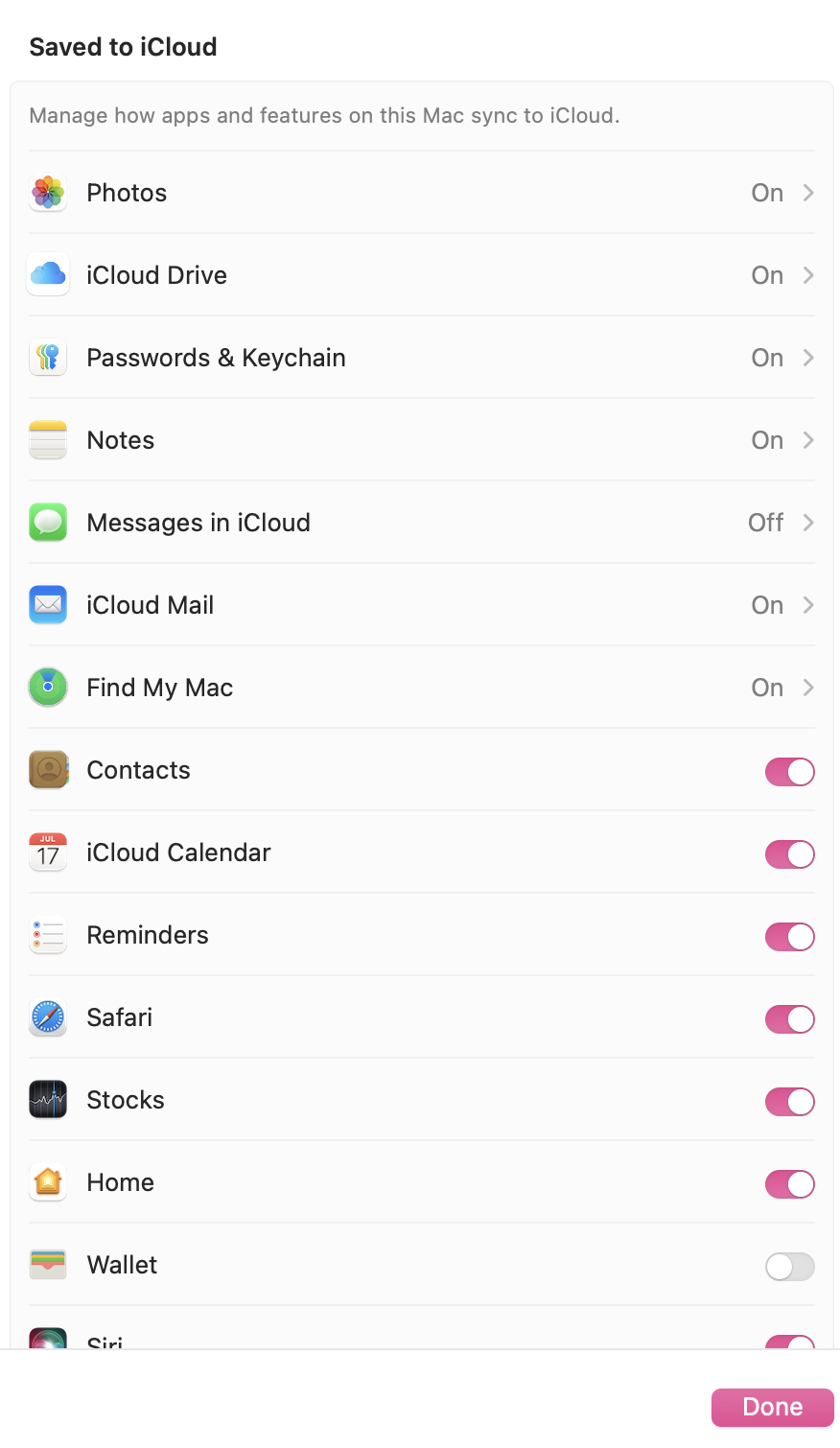
On your iPhone or iPad, you’ll find the iCloud settings under your Apple account in the Settings app. From there, you can choose which services you want to connect to iCloud storage.
How secure is your data in iCloud?
Apple stores your data in secure data centers and protects it with encryption both in transit (TLS) and on its servers using 256-bit AES encryption (including many iCloud and Keychain data). When you create a new Apple account, you also need to enable two-factor authentication (2FA), which helps prevent unauthorized access and adds an extra layer of security to your data.
According to Apple, data from security features such as facial and object recognition is not stored in iCloud. This sensitive information is processed only locally on your device and is not uploaded to the cloud.
Basically, iCloud uses the following two security concepts to protect your data:
- Standard data protection: This option is enabled by default. Your data is encrypted, and the keys are stored in Apple data centers. This is not full end-to-end encryption; however, Apple can assist with data recovery.
- Advanced data protection: Advanced data protection can be enabled optionally. As a result, you have sole control over the encryption keys for most iCloud data. This includes, among other things, iCloud backups, photos, and notes.
On the official Apple website, you can use the full iCloud security overview to get a clear picture of how secure iCloud is.


How much storage does iCloud offer?
When you sign in to iCloud, you get 5 GB of free storage by default. If your iCloud storage is full, new data won’t be uploaded. You can fix this by freeing up space, for example by deleting photos in iCloud.
If you need more storage, you can upgrade to a paid iCloud+ plan, which is available in different storage tiers.
| Storage plan | Cost | Details |
|---|---|---|
| iCloud | Free | 5 GB of cloud storage |
| iCloud+ 50 GB | + | additional storage |
| iCloud+ 200 GB | + | suitable for multiple devices |
| iCloud+ 2 TB | + | large storage for extensive data |
| iCloud+ 6 TB | ++ | very high storage requirements |
| iCloud+ 12 TB | +++ | maximum storage size |
Cost legend: + = low, ++ = medium, +++ = high
All paid storage plans can be shared with up to five other people.
What are the advantages and disadvantages of iCloud?
With iCloud, Apple users can back up and sync their data reliably and fully automatically.
| Advantages | Disadvantages |
|---|---|
| ✓ automatic synchronization between Apple devices | ✗ only 5 GB of free storage |
| ✓ backup of important data | ✗ additional storage costs extra |
| ✓ easy access to files | ✗ internet connection required |
| ✓ integration into many Apple services | ✗ large files can take up a lot of storage space |
| ✓ collaborative editing of documents |
Do you have to use iCloud?
Using iCloud isn’t a must. Apple users can also back up their data with other cloud storage services.
If you choose not to use iCloud, you can turn off specific features or sign out of your Apple account. However, your stored data will still remain in the cloud and can be accessed via the web interface or from other devices.
If you have changed your Apple ID or want to switch to an iCloud alternative, you should delete your iCloud account.
iCloud alternatives for Apple users
Some of the most popular iCloud alternatives include:
These alternatives mainly differ in how much free storage they offer. With Google Drive, you get 15 GB compared to iCloud’s 5 GB, and you can expand this storage further for a fee.
- Automatic backup & easy recovery
- Intuitive scheduling and management
- AI-based threat protection
Reviewer

Jeanna Raffa
With over 18 years of experience in online marketing, Jeanna Raffa possesses extensive expertise in digital marketing. Since 2020, her focus has been on providing practical information regarding email, office, and cloud storage solutions.