

OAuth (Open Authorization)

Nowadays, we use numerous websites, programs, and mobile apps to make our personal and professional lives easier or more comfortable. With such a wide variety of tools, it has become normal for many people to use an app such as Instagram on another website such as Facebook. In other words, it is possible to operate across platforms. However, since a lot of personal data is transferred during these processes, it makes sense to question the security of this transfer. The OAuth authorization protocol is designed to reduce the risk of unauthorized data misuse – our question is, can it do justice to this weighty ask?
OAuth explained
OAuth, short for “open authorization,” is an open standard protocol that enables secure API authorization. The technical term API (short for “Application Programming Interface”) refers in this context to an interface that functions as a data transmitter between different applications, user interfaces, or web pages. Authorization of such data transfers performed by APIs is necessary because without them there is a risk that unauthorized third parties may intercept the data and misuse it for their own purposes.
This means that if, for example, an app is to post on Facebook in the name of the user (i.e. access the Facebook API), it must have permission from this user. Likewise, an application needs the user's authority to extract their profile information from another service. Through OAuth, the user can give this authorization without having to provide the authorized application with their username and password – in other words, they retain full control over their data.
Conversely, providers such as Google, Twitter, and Facebook can use OAuth to make their products and services more flexible and at the same time more secure, for example by means of single sign-on solutions. Amazon and Microsoft have also joined the ranks of large companies that use OAuth as their access delegation standard for their services.
What updates are there in OAuth2?
The OAuth2 (also called “OAuth 2.0”) was published in October 2012 as a complete revision of OAuth and has now largely replaced it. The Graph API of Facebook only supports the new protocol as authorization standard. It serves the authentication layer OpenID Connect (OIDC) as a basis.
In principle, the task of OAuth2 is the same as that of its predecessor – providing the user with more flexibility and high security at the same time by means of API authorization. However, numerous weaknesses of the original protocol were fixed, making coding and implementation more difficult as the systems of Facebook, Twitter, and other API operators became more complex over time.
Apart from a complete change in terminology, the most important new feature of OAuth2 is that, unlike its predecessor, it no longer requires cryptographic signatures for any machine-to-machine communication. This makes its application much easier. But it also means that the new protocol is technically less secure – a fact that brought some criticism to OAuth2.
Open Authorization 2.0 has also been enhanced with more differentiated grant types and improved protocol performance. The developers have achieved this by OAuth2 no longer asking for the access data of the user (resource owner) at each communication step, but only at the initial authorization of the respective application (client). Another notable innovation are access tokens with shorter validity that make it easier for a service (resource server) to revoke authorizations. In addition, the user can decide under OAuth2 which authorizations (scope) they grant to an application.
Differences between OpenID and SAML, and OAuth
Especially when it comes to single sign-on (SSO), OAuth is often mentioned in the same breath as OpenID and SAML. Although all these concepts are about the reliable verification of user identities, there are big differences between the three.
OpenID vs OAuth 2.0
OpenID (short for “open identification”) is, as the name suggests, an open protocol. When a user creates an OpenID account, they can use it to log on to other services and applications that also support OpenID via a token. A good example of this is the “register with Google” function, which can now be found on many websites, and which allows a single sign-on procedure via the user's Google account.
In contrast to OAuth, OpenID is not strictly speaking an authorization, but an authentication procedure. The two procedures have been closely linked since 2014: OAuth 2.0 is the basis on which the new version of OpenID, called OpenID Connect (OIDC), is built. OAuth2 allows different types of applications (clients) to verify the user's identity through authentication by an authorization server – and to obtain additional basic information about the user. In return, all the necessary functions for login and single sign-on are added. OpenID Connect can also be extended with optional functions such as session management and encryption of identity data.
SAML vs OAuth 2.0
The open and XML-based “Security Assertion Markup Language” (short: SAML) combines the properties of the two previous concepts. It is a standard for both authentication and authorization. SAML is similar in its functionality to OpenID and is also used for single sign-on procedures.
Functionality of OAuth2
Taking a look at an overview of the roles and approval processes defined in the OAuth2 protocol will be helpful in understanding how it works.
Roles in OAuth2
OAuth2 defines four roles:
- Resource owner (also: user): An entity that grants a client access to its protected data (also: resources).
- Resource server (also: service): A server on which the protected data of the resource owner is stored.
- Client (also: third party): A desktop, web, or mobile application that wants to access the protected data of the resource owner.
- Authorization server: A server that authenticates the resource owner and issues a temporary access token for a scope defined by the resource owner. In practice, Authorization Server and Resource Server are often operated together and are then also referred to as OAuth Server.
Grant Types in OAuth2
Furthermore, a distinction is made between four predefined approval processes (grant types), which are used in various applications:
- Authorization code: The client asks the resource owner to log in to the authorization server. The resource owner is then redirected to the client along with an authorization code. In exchange for this code, the authorization server issues an access token for the client.
- Implicit authorization: This approval process is very similar to authorization by authorization code, but is less complex because the authorization server issues the access token directly.
- Resource owner password credentials: Here, the resource owner entrusts his access data directly to the client, which is largely contrary to the basic principle of OAuth, but means less effort for the resource owner.
- Client credentials: This very simple approval process is used when the client wants to access data that does not have an owner or does not require authorization.
Generalized OAuth2 protocol process example
If you know the terms mentioned above, you can easily understand the different protocol procedures. Here is an example:
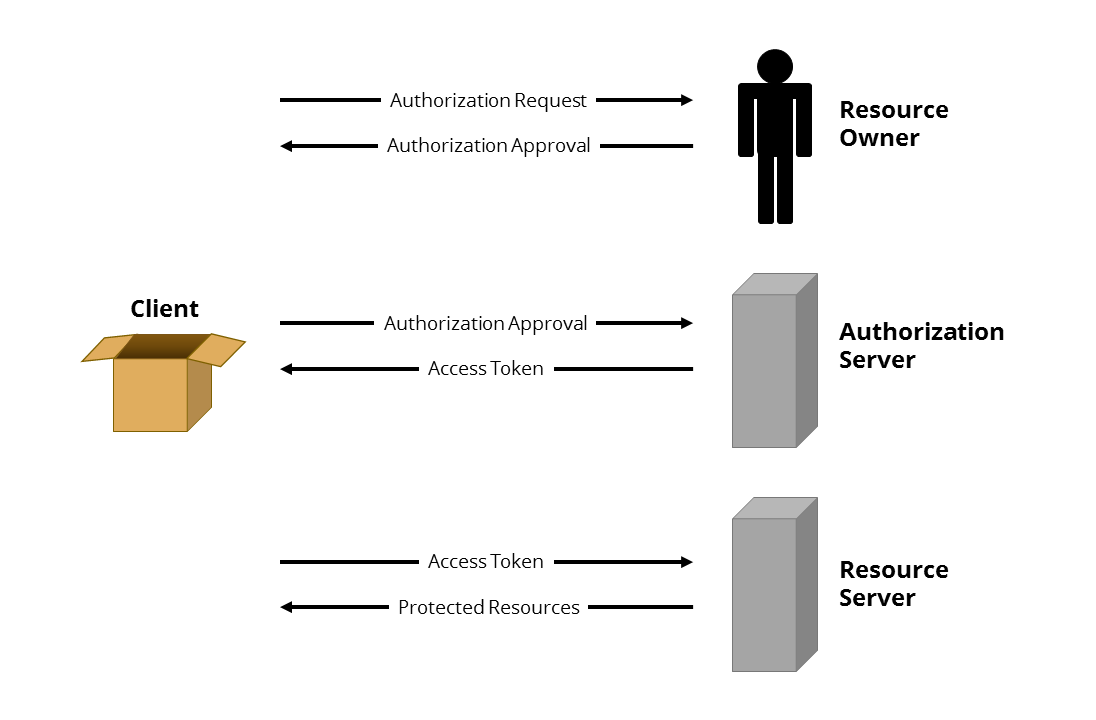
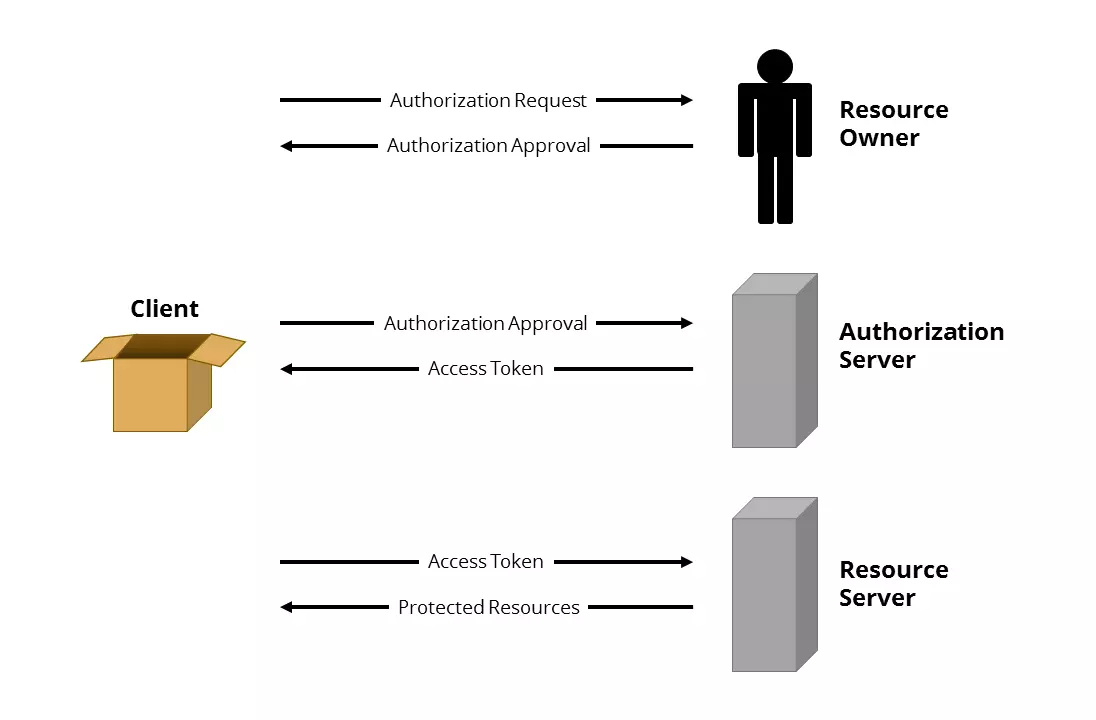
- The client requests authorization from the resource owner either directly or via the authorization server.
- The resource owner grants authorization through an authorization process.
- The client requests an access token from the authorization server with the authorization permission.
- The authorization server authenticates the client based on its authorization permission and issues an access token.
- The client uses the access token to request the resource owner's relevant protected data from the resource server.
- The resource server authenticates the client using its access token and provides the desired data.
If the client needs access to the protected data of the resource owner again in the future, it can use a refresh token that is limited in time but has a much longer service life to request a new access token from the authorization server. No reauthorization by the resource owner is required.
Concrete example of OAuth
Social networks Pinterest and Facebook provide concrete examples of the OAuth2 procedure. Pinterest offers the option to import contacts from Facebook friend lists. To do this, Pinterest needs access to the respective account and the information stored there. For data security reasons, however, it is unwise to pass the username and password from Facebook onto Pinterest – after all, Pinterest would then have unlimited access to all data and functions of the Facebook account at any time. In order for Pinterest to still be able to access the required Facebook data, OAuth2 is used:
- First you log into your Pinterest account and navigate to the settings in the user profile.
- In the menu bar “social networks” move the slider next to “Facebook” to “yes.”
- Pinterest now asks you to log in to Facebook and confirm the Pinterest app. This action is considered authorization.
- Pinterest requests an access token from Facebook’s authorization server and then uses it to access the protected data on the resource server.
- The imported Facebook friends are now also displayed in the Pinterest account.
Security and criticism of OAuth and 2.0
The fact that even a system designed for the protection of personal data such as OAuth cannot be one hundred percent perfect was already demonstrated in April 2009, when a security gap was discovered in the authentication process. As with many other such systems, phishing is also a constant risk, and between April and May 2017, one million Gmail users were victims of an OAuth-based phishing attack. In a fraudulent e-mail, users were asked to authorize a fake interface to allow an alleged application called “Google Apps” access to their account information.
In October 2012, the effort of upping security from OAuth in its new model, OAuth 2 reached a final result – but without the approval of the original developers. Only OAuth2 editor-in-chief Eran Hammer-Lahav had worked on the old OAuth – and even he eventually distanced himself from the new project, three months before its release. In an article on his blog hueniverse.com from July 26, 2012, he explained the background on his decision and called OAuth 2.0 "way to hell" in the headline.
What happened? According to Hammer-Lahav, the development of the new protocol had been determined by constant debates between the developers and the companies involved (including Yahoo!, Google, Twitter, and Deutsche Bank). At some point, issues were ignored in favor of economic interests. The consequence would be a program which, according to Hammer-Lahav, could no longer be described as secure. Instead of representing a precise standardized protocol, OAuth2 is at most a framework that can be adapted and extended at will.
One more thing Hammer-Lahav regrets is the fact that the decision was made to implement OAuth 2.0 more easily (for example by omitting signatures), which leads to a lack of security. In order to program a secure application that supports OAuth2, developers would need to have a considerable amount of expertise. It is therefore more likely that insecure applications will accumulate on the network in the future. Implementation errors are unavoidable, given the incomplete and excessively complex specifications, says Hammer-Lahav.
Hammer-Lahav was somewhat correct in his concerns. In 2016, a research group at University of Trier had to deal with the security of OAuth2 and discovered two security gaps. One of them allowed man-in-the-middle attacks. Basically, however, the researchers considered the protocol to be relatively safe – provided it was implemented correctly.