

What is a cache?
A cache is a digital, intermediate storage that retains already accessed data for subsequent reuse. The following queries can then be answered directly from the cache, without having to contact the actual application. A typical use case is web browsers: Each browser has its own cache that’s able to temporarily store certain website contents. When this website is visited again at a later time, it can be loaded faster, since the retained data is requested directly from the cache, rather than the server.
Cache: A cache (pronounced “cash”) is an intermediate storage that retains data for repeat access. It reduces the time needed to access the data again. Caches represent a transparent layer between the user and the actual source of the data. The process for saving data in a cache is called “caching.”
To illustrate the concept of caches, let’s consider the following analog example from medicine:
Imagine a dental treatment or surgical operation. The doctor asks the assistant for a utensil, like a scalpel, disinfectant, or bandage. If the utensil has already been laid out, the assistant can immediately respond to the request and hand it over to the doctor. Otherwise, the assistant will need to locate the utensil in the medical cabinet and pass it to the doctor. After use, the assistant keeps the utensil close to hand for quick, subsequent reuse.
The individual utensils are not completely unrelated in terms of their use: For instance, if the doctor asks for disinfectant, they will likely also need a swab; a needle is also useless without sutures. The assistant will keep the associated resources available to minimize the time required to retrieve them.
As you can see, keeping resources on hand that are often needed or used together is a very useful, commonplace practice. In the digital world, these processes all come under the term “caching.”
What is the purpose of a cache?
The primary purpose of a cache is to reduce the access time for important data. “Important” data means:
- Data that is often required: In this case, it would be inefficient to keep accessing the data from the slower storage underlying the cache. Instead, the data is supplied from the cache with quicker access times.
- Data that requires a time-consuming process to generate: Some data is the result of computationally intensive processing, or the data has to be compiled from different parts. Here, it makes sense to store the finished data in a cache for subsequent reuse.
- Pieces of data that are needed together: It would be inefficient to load related pieces of data only after you have requested them. Instead, it is much more effective to hold all data available together in the cache.
How a cache works
Now let’s look more closely at how caches work. We’ll also cover how intermediate storage generally operates and where it is used.
Underlying cache process
- A query for a resource is sent to the system or software that has a cache.
- If the resource is already contained in the cache, it is provided from the cache. This is referred to as a “cache hit.”
- If the resource is not found in the cache, it’s first loaded from the underlying system into the intermediate storage and then provided. This is referred to as a “cache miss.”
- If the same resource is requested again in the future, it can likewise be supplied from the cache as a cache hit.
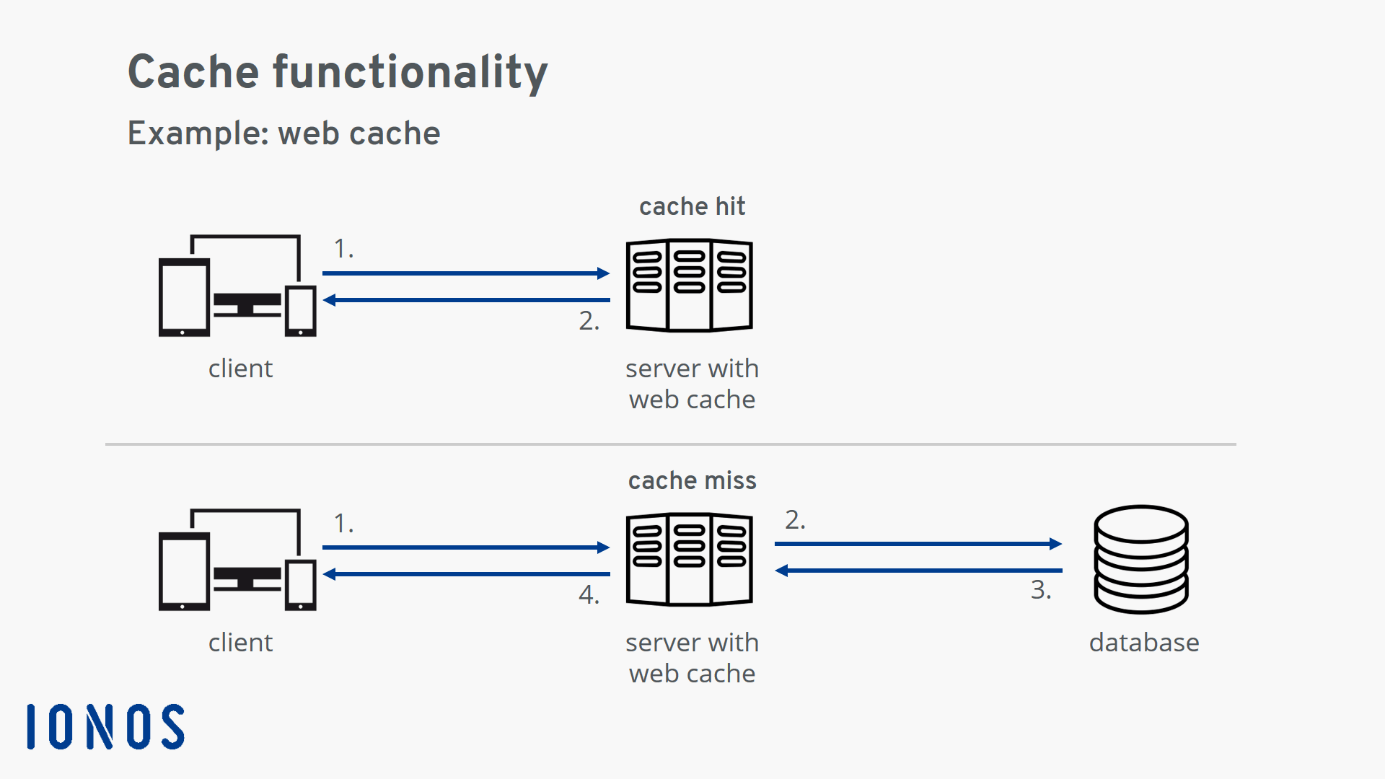
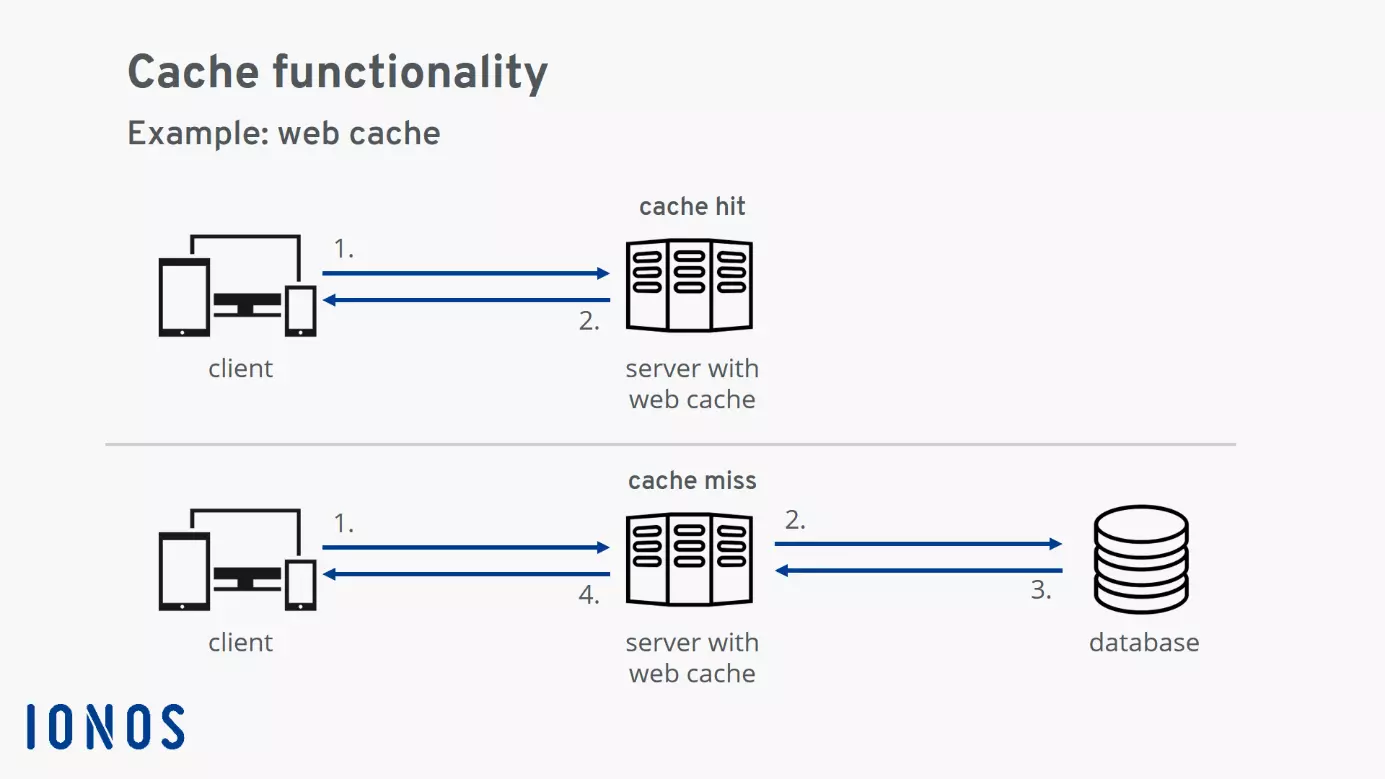
The diagram illustrates the underlying process: A client sends a query for a resource to the server (1). In case of a “cache hit,” the resource is already contained in the cache and is provided to the client straight away. In case of a “cache miss,” the requested resource is not contained in the cache and is, therefore, retrieved from the system underlying the server (a database in this example) (2). As soon as the resource is available (3), it is provided to the client (4) and saved in the cache for reuse.
Where is a cache located?
A basic characteristic of a cache is that it is “hidden in the background.” This is even reflected by the origin of the word: The word “cache” comes from French and means “hiding place.”
The cache is located in front of the actual data storage medium, invisible to the user. This means that, as a user, you don’t need to know anything about the internal properties of the cache. You send queries to the data storage without realizing that they are actually being answered by the cache.
To delete your cache in Firefox, follow the tutorial below:
 To display this video, third-party cookies are required. You can access and change your cookie settings here.
How many caches are there typically?
Generally, a range of caches are active within a digital system.
Consider accessing a website: Your browser communicates with a server and retrieves a range of resources. Before the website contents are displayed to you in the browser, some of this process is likely handled by the following caches: processor cache, system cache, and browser cache on your device, as well as CDN (Content Delivery Network) and web cache on the server-side.
Advantages and disadvantages of a cache
Whether or not an application has its own cache generally depends on the developer’s discretion. We’ve summarized the advantages and disadvantages of the intermediate storage solution below.
Advantage: Huge increase in speed
The use of a cache can provide a significant speed boost as an advantage. A speed increase by a factor of one hundred is not uncommon. However, this speed increase is only realized when the same data is accessed repeatedly. How great this advantage actually is, therefore, varies significantly depending on the application.
Advantage: Load reduction for the system behind the cache
Since a cache delivers data extremely quickly, the load on the underlying system is reduced considerably.
Imagine the example of a dynamic HTML page generated from a PHP template: A database is accessed to generate the page. This access is relatively time-consuming. Moreover, scaling database servers is not trivial – which is why database access can act as a bottleneck for the overall throughput of a system. In this case, it is beneficial to save the generated HTML page in a web cache in order to free up the capacity of the database server for other tasks.
Disadvantage: Cache invalidation is difficult
“There are only two hard things in Computer Science: cache invalidation and naming things.”
Phil Karlton, source: https://www.martinfowler.com/bliki/TwoHardThings.html
The term cache invalidation refers to the decision of when saved data is no longer up-to-date and has to be renewed. Recall the analog example we gave earlier: The assistant acts as the cache for the doctor by keeping already used resources available for reuse. However, since there is only limited space available on the utensil tray, the assistant continuously tidies up during the operation. Already used utensils have to be removed, and new ones added. In some circumstances, the assistant will remove a utensil that the doctor might need again. Related back to the digital world, this results in a cache miss. The assistant will then have to spend time looking for the necessary utensil again.
Since a cache miss is time-consuming, the optimal caching strategy aims to avoid them wherever possible. On the other hand, this can mean the cache supplies data that is no longer up-to-date. This problem is exacerbated when multiple caches arranged in a hierarchy are active. It can then be difficult to determine when which data in the cache should be marked as no longer up-to-date.
If a cache provides data that is no longer current, this can often result in strange issues on the provider’s side: The visited website may exhibit display errors or fragments from the past may be provided for a data request. It can sometimes be difficult to ascertain the exact origin of the issues; so clearing the cache represents the best solution to these problems.
What types of caches exist?
Caches comprise hardware or software components. A hardware cache is a fast buffer storage that reduces the access times for the underlying data storage. In principle, hardware caches are always very small compared to the overall size of the accelerated data storage.
By contrast, caches implemented in software can even exceed the size of the underlying resources. This is especially the case when multiple versions of a resource are found in the cache.
Here’s an overview of resources frequently equipped with caches. It shows the size of the cache, the access time for the cache, as well as how much slower access the resource without intermediate storage would be.
| Resource | Cache | Cache size | Access time with cache | How much slower without cache |
|---|---|---|---|---|
| Main storage | Level 1 cache (hardware) | Dozens of kilobytes (KB) | Less than a nanosecond (ns) | 200 × |
| Hard drive | Hard drive cache (hardware) | Dozens of megabytes (MB) | Hundreds of nanoseconds (ns) | 100 × |
| Browser | Browser cache (software) | Several gigabytes (GB) | Dozens of milliseconds (ms) | 10–100 × |
| Websites | CDNs, Google page cache, Wayback Machine (software) | Thousands of terabytes (petabyte, PB) | Few seconds (s) | 2–5 × |
Hardware caches
Processor cache
A modern processor works incredibly quickly. The processes on the chip only need fractions of nanoseconds – that’s a billionth of a second! In contrast, accessing main storage is comparably slow at hundreds of nanoseconds. For this reason, modern processors have a hierarchy of processor caches.
A cache hit on the quickest processor cache – known as a “level 1 cache” or “L1 cache” – is around 200 times faster than access to main storage.
To delete your cache in Chrome, follow the tutorial below:
 To display this video, third-party cookies are required. You can access and change your cookie settings here.
Hard drive cache
A hard drive disk rotates at several thousand revolutions per minute. The write-read head races over the disks and reads out data sequentially. Since this is a physical process, access to a hard drive is relatively slow.
Every hard drive, therefore, has its own small cache. This way, at least the most frequently used data – such as parts of the operating system – don’t always have to be inefficiently read from the hard drive.
The hard drive cache allows essential data to be loaded around 100 times faster. For the user, this data seems to be provided “instantly.”
Software caches
Browser cache
When visiting a website, lots of web page data is temporarily stored on the visitor’s device. Besides the actual content, this includes various resources like images, stylesheets, and JavaScript files. Many of these resources are typically needed on multiple pages. To speed up page loading, it’s advantageous to save these frequently required resources in the browser cache on the local device.
As practical as the browser cache is for surfing the internet, it can also cause problems. For instance, if the developers have made changes to a website resource, but the browser cache still contains the outdated version of the resource. In this case, display errors can occur. A solution here is then to clear the browser cache.
Google page cache
Google’s “in cache” function keeps the pages of many websites ready for access. The pages can also then be accessed, even when the original website is offline. The state of the pages corresponds with the most recent date of indexing by the Googlebot.
DNS cache
The Domain Name System, or DNS for short, is a globally distributed system for converting internet domains into IP addresses (and vice versa). The DNS provides an IP address for a domain name. For example, the IP address 74.208.255.134 is returned for the domain ionos.com.
Already answered queries to the DNS are stored locally on the user’s device in the DNS cache. This way, each resolution is always just as fast.
But using the DNS cache can likewise lead to problems – such as if the IP address associated with a domain has changed due to a server migration, but the local DNS cache contains the old address. In this case, the attempt to connect with the server will be unsuccessful. The solution here is to clear the DNS cache.
Content Delivery Network (CDN)
Globally distributed Content Delivery Networks provide a majority of the data of popular websites on what’s known as “edge nodes.” These edge nodes represent the data on the “edge” of the internet. The nodes are located near to the user and are technically designed to provide data as fast as possible. A CDN works like a cache for the data of the websites it contains. This reduces access times, especially for streaming services and websites.
Web cache
A web cache provides web documents like HTML pages, images, stylesheets, or JavaScript files for reuse. Modern web caches such as Varnish and Redis store frequently used data in the working memory and thereby aim to achieve particularly short response times.
When the data is requested again, the response only requires extremely quick memory access. Response times are, therefore, decreased enormously and the load for the systems behind the cache, like the web server and database, is also reduced. Other well-known web caches include OPcache and the alternative PHP Cache (APC).
Reviewer

Julia Hertler
With over 18 years of experience in content marketing, Julia Hertler has deep expertise in digital communications. For the past 10 years, she has specialized in the areas of domains and hosting at the IONOS Digital Guide, making complex technical topics easy to understand.