

The Relational Database Model

As we know databases belong to the core components of every computer system, since every computer program accesses data during its runtime or else generates its own information, all of which must be stored reliably, consistently, and permanently. This is done using structured databases (DB), which are managed by so-called database management systems (DBMS). Database management systems are software applications that interact with end users or other programs and make a subset of the database available to them.
Until now, electronic data management has been dominated by the relational database model. The most commonly used relational database management systems (RDBMS) are in alphabetical order:
- Db2: with Db2, users have a proprietary relational database management system from IBM under commercial license.
- Microsoft SQL Server: the relational database management system from Microsoft is available under a paid Microsoft end user license.
- MySQL: MySQL is the most widely used open source RDBMS in the world. Since its acquisition by Oracle, MySQL has been marketed under a dual licensing system. The original developer community continues the project under the name MariaDB.
- PostgreSQL: with PostgreSQL users can access a free, object-relational database management system (ORDBMS). Further development is carried out by an open source community.
- Oracle Database: the relational database management system created by the company of the same name, Oracle is marketed as proprietary software for a fee.
- SQLite: SQLite is a public domain program library containing a relational database management system.
All systems mentioned are based on a tabular organization of information. But what is it all about? We will introduce you to the basic principles of relational databases and their design using examples and highlight the differences between this type of database from other models.
What are relational databases?
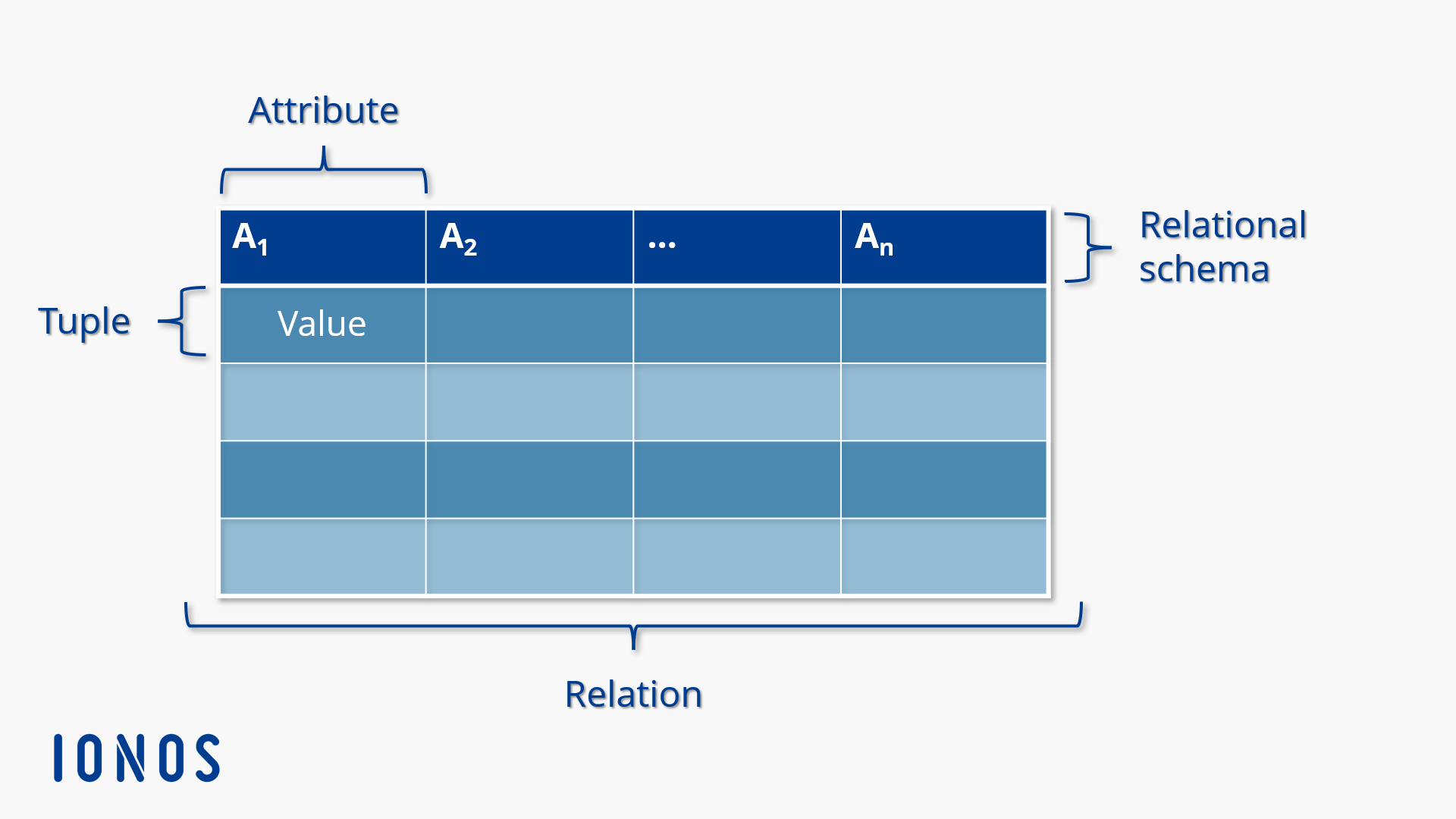
A central concept of the relational database model is relation. This goes back to the British mathematician and database theorist Edgar F. Codd. According to Codd, a relation represents a set of entities with the same properties. Each relation consists of a series of data records (so-called “tuples”) whose values are assigned to certain attributes.
The following syntax is used to define which attributes a relation schema comprises of and which data type the values assigned to the attributes correspond to:
R = (A1 : Typ1, A2 : Typ2 , … , An : Typn)
The relational schema (R) comprises attributes A1 to An. Each attribute is assigned a data type (Type1, Type2 etc.). This can be illustrated by a concrete example.
The following schema defines the attributes of the “employee” relation:
employee = (	e_id : integer,
surname : string,
firstname : string,
ssn : string,
steet : string,
zipcode : string,
location : string	)
The sample schema includes the attributes employee ID (e_id), surname, first name, SSN (social security number), street, zip code, and locations, and could be used for the internal administration of personnel data. Each attribute is assigned a data type (string or integer, for example). This means that there are attributes in this relation that expect character strings as values, and those that only accept integer values.
A relation with the schema just defined could now contain the following tuple:
(1, Schmidt, Jack, 25 120512 S 477, Main Street 1, 11111, Denver)A classic information organization concept is used in the relational database model to illustrate the assignment of individual values of a tuple to the attributes defined in the relational schema: the table. A relational database is then nothing more than a collection of tables that are related to each other.
Tables are sort schemes consisting of horizontal rows and vertical columns that make it possible to collect information and display it in an ordered form. Each line of a database table corresponds to a tuple. The values of the listed tuples are assigned to the attributes defined in the relational schema through the table columns.
The following example shows what a database table for the above employee schema can look like:
Table: employees
| e_id | Surname | First name | Social security number | Street | Zip code | Place |
|---|---|---|---|---|---|---|
| 1 | Schmidt | Jack | 25 120512 S 477 | 1 Main St. | 11111 | Denver |
| 2 | Muller | Blain | 25 100615 M 694 | 2 Station St. | 22222 | Boulder |
| 3 | McClain | Walker | 25 091225 M 463 | 3 Market Alley | 33333 | Denver |
| 4 | Cohn | Greg | 25 170839 K 783 | 4 Forest Way | 44444 | Niwot |
The example table is used to store personnel data and consists of four data records. Each data record contains information on exactly one employee.
According to Edgar F. Codd, the term “relation” is used synonymously with “table.” In practice, however, the term is used in an inconsistent way – referring to relationships between different tables. To avoid misunderstandings, we avoid the term “relation” and refer to “tables” when we refer to database tables in a relational database.
How do relational databases work?
The database in relational database systems forms the data basis and is structured in tabular form. Its data structure is defined by the database management system, which is also responsible for managing read and write accesses. Users interact with the database management system using a database language. Each relational database management system supports at least one formal language, which can be used to perform the following database operations.
- Defining data structure: when you define data, a description of the data structure is stored in the data dictionary in the database system using metadata. If, for example, a user creates a new table, then a corresponding relation schema is stored in the data dictionary. The database language vocabulary used to define data is called data definition language (DDL).
- Define authorizations: each database language provides a syntax that allows permissions to be assigned or revoked. This is referred to ask the data control language (DCL) – a sub-vocabulary of the database language.
- Define integrity conditions: integrity conditions are required for the state of a database. When integrity conditions are defined, the database ensures that they are met at all times. This is called a consistent state. A basic integrity condition in relational database systems, for example, is that each data record (tuple) can be uniquely identified.
- Define transactions: if a database is transferred from one consistent state to another, it is known as a transaction. Transactions contain a series of instructions and must always be completed in full. If a transaction terminates, the database is reset to its initial state (rollback). Each transaction begins with the statement to connect to the database. This is followed by commands that initiate the actual data operation and a test step (commit) that ensures the integrity of the database. Operations that endanger integrity are not committed (permanently written to the database). Finally, the connection to the database is closed. The database language vocabulary, which data manipulation is based on, is known as data manipulation language (DML).
- Define views: a virtual overview of selected data. In the case of a view, the database management system creates a virtual table (logical relation) based on physical tables. Users can apply the same database operations to these views as to physical tables. There are different types of views depending on the function of the data view. Views that filer certain rows (selection view) or columns (projection view) from a selected table and views that link different tables together (composite view) are common.
The standard interface for the database operations listed above in the relational database model is the database language SQL (structured query language), which is based on relational algebra.
Database operations like querying, creating, updating, or deleting data are performed using SQL statements – a combination of selected SQL commands. These are semantically based on the English language and so are largely self-explanatory. The following table contains central terms of the relational data model and their equivalents in SQL terminology.
| Relational data model | SQL |
|---|---|
| Relation | Table |
| Attribute | Column |
| Tuple | Row |
A simple query of selected data could be implemented with SQL according to the following schema, as an example:
SELECT spalte FROM table WHERE spalte = value;First, we use the “SELECT” command to instruct RDBMS to query data. We then define which data we would like to request by specifying the table and the desired column. In addition, we use “WHERE” to integrate a condition into the SQL statement. We do not want to retrieve all attribute values stored in the column, just the value of a specific data set.
With reference to our example table employees, an SQL statement could look like this:
SELECT social security number FROM employee WHERE e_id = 3;The SQL statement instructs the RDBMS to retrieve a value from the social security number columb from the “employees” table. As a condition, we have outlined that the value should be taken from the data set for which the attribute value or column e_id corresponds to the value 3.
The database gives us the result 25 091225 M 463 – Walker McClain’s social security number, who has an ID of 3.
A detailed description of basic database operations based on the database language SQL can be found in our MySQL tutorial for beginners.
Normalization
When working with relational databases, users rarely deal with individual tables. The normal structure is that data is stored in separate tables according to its meaning. This concept underlying the relational database model is associated with the need to link data tables – for example, when data that needs to be queried is stored in different tables.
In principle, all the information in a relational database could also be stored in all-encompassing table. This would have the advantage of eliminating the need to link database tables, as well as the complex syntax associated with queries across multiple tables. This, however, is the relational database models’ strength. The distribution of information to several tables serves to reduce duplicate entries (so-called anomalies) and is called normalization. The degree of normalization can be determined using predefined normal shapes. Common normal forms for relational database tables are:
1. Normalform (1NF)
2. Normalform (2NF)
3. Normalform (3NF)
Boyce Codd Normalform (BCNF)
4. Normalform (4NF)
5. Normalform (5NF)
Which requirements apply to the listed normal forms and how to transfer a database from one normal form to another is the subject of our basics of normalization.
Relationships between separate database tables are called relationships in the relational database model and are created using keys. Keys link tables together and are the basis for querying or changing data from different tables with one and the same statement.
Keys
Database tables such as the “employees” table example allow different approaches to query individual values or entire data records. The focus is on so-called keys. In the relational database model, a key is a set of attributes that are suitable for uniquely identifying a data record.
In relation to the example table shown above, the following key allows you to uniquely identify a tuple:
{e_id, surname, first name, ssn}A key with the values
(e_id = '3', surname = 'McClain', firstname = 'Walker', ssn = '25 091225 M 463')Here, keys are suitable for identifying the data record for employee Walker McClain without contradiction. Keys like this are called superkeys. However, superkeys are of little importance in practice. One reason for this is that superkeys often contain more attributes than are necessary for identification. In other words, superkeys are not minimal.
So, relational databases work with the smallest possible subsets of a conceivable super key which are key candidates. A table can have several key candidates through which data records can be uniquely identified.
The query example in the previous section already showed that the data records in the “employees” table can be identified without contradiction just by the employee ID. Another key candidate in the example table is the social insurance number. However, a key (last name, first name) would not be a suitable key candidate, since this combination of attributes cannot be uniquely assigned to an employee, since there could be several employees in a company with the name Walker McClain. Identification using this kind of key would therefore not be unique. However, it is not possible for two employees to share the same employee ID or social security number.
The following key candidate can then be determined for the example table shown above:
{e_id}
{ssn}Relational database tables are usually structured so that one of the possible key candidates specifies the data records sequence. This key candidate is called the primary key. In practice, primary keys are usually sequential IDs. With m_id, our example table also has one of these IDs.
Since keys uniquely identify records in relational database tables, they are ideal for correlating different tables in a database. To do this, you include the primary key of one table as a foreign key in the other table.
The following table contains data that a company may have entered for its own fleet. The primary key of the table “vehicle” is a consecutive vehicle_id.
Table 3: vehicle
| Vehicle_ID | Brand | Model | Registration | Year | State inspection |
|---|---|---|---|---|---|
| 1 | VW | Caddy | B KH 778 | 2016 | 18.12.2018 |
| 2 | Opel | Astra | B PO 654 | 2010 | 12.08.2019 |
| 3 | BMW | X6 | B MW 780 | 2017 | 01.09.2018 |
To map which employees use which company car, you need to link the car table with the employees table – for example, by integrating the primary key in the car table (the vehicle_id) as a foreign key in the employee table.
Table: coworker
| e_id | Surname | First name | Social security number | Street | Number | Zip code | location | vehicle_id |
|---|---|---|---|---|---|---|---|---|
| 1 | Schmidt | Jack | 25 120512 S 477 | 1 Main St. | 1 | 11111 | Denver | 3 |
| 2 | Muller | Blain | 25 100615 M 694 | 2 Station St. | 2 | 22222 | Boulder | 1 |
| 3 | McClain | Walker | 25 091225 M 463 | 3 Market Alley | 3 | 33333 | Denver | 1 |
| 4 | Cohn | Greg | 25 170839 K 783 | 4 Forest Way | 4 | 44444 | Niwot | 2 |
The employee table now shows that the employee Schmidt uses a company car with vehicle_id 3. Employee Cohn drives a vehicle with vehicle_id 2, while Muller and McClain share the car with vehicle_id 1.
If you now want to determine which employee has to have his company car serviced next time, you would have to query both the “Employees” and “Vehicles” tables. Since both tables are related to each other using foreign keys, this can be done with only one query. Database operations that span multiple tables are implemented in the relational database model using a JOIN.
JOINs
A JOIN is a database operation that allows several database tables to be queried simultaneously. The data from selected tables is combined into a result set and filtered according to user-defined conditions.
Two operations of relational algebra form the mathematical basis of SQL JOIN: the Cartesian product and selection. Users determine which data of the queried tables is included in the result set by choosing the JOIN type and using a selection condition.
The most important JOIN types include:
- INNER JOIN
- OUTER JOIN
- SELF JOIN
Independent of this, EQUI JOINS and NON EQUI JOINs should be distinguished.
We have an article about SQL JOIN which explains how SQL JOINs work with relational database tables and what to consider when choosing a JOIN type.
Differentiating from other database models
Relational databases based on SQL must be distinguished from others that do not adhere to the rigid table structure, and pursue alternative approaches to data structuring. Among the most prominent of these are object databases and document-based systems.
At the end of the 1980s, a new database model was introduced with object databases, which then took up the concept of object-oriented programming and enabled data storage in the form of objects. However, this approach has not really been successful. Instead, concepts of object orientation have been incorporated into the development of relational database systems. These results are products with object-relational extensions that allow abstract data types to be stored in the relational database model.
With the changes to the Internet that were brought about by web 2.0, the relational database model came under fire at the turn of the millennium. With the framework of a NoSQL movement (short for not only SQL), alternative models like document-oriented databases were developed. The aim of this movement was to develop powerful database concepts for data-intensive applications.
Object databases and document-oriented databases differ from the relational database model, primarily in how the data stock is stored and how stored data can be accessed.
Object-oriented databases
The object-oriented database model provides for the storage of data as objects. Objects are modulated in the same way as object-oriented programming. An object defined as an entity contains:
- The properties (attributes) required to describe the entity
- Links (relationships) to other objects
- Functions that allow access to the stored data (methods)
- An object can be defined as a group of data whose interface can be used to access data. Objects are abstract data types.
The object-oriented database management system (ODBMS) automatically assigns an ID to each object. This makes it possible to uniquely identify the object and address it with methods. This object ID is state-independent, which is to say it is decoupled from the object values. This makes it possible to give two objects with the same data (the same status) two different IDs. This clearly differentiates the object-oriented database model rom the relational model, in which each tuple can be identified from its data (e.g. by a primary key).
Another characteristic of the object-oriented database model is data encapsulation. Stored data can only be accessed using the previously defined methods. The data encapsulated in the object is then protected against charges through undefined interfaces.
Database structures are defined in the object-oriented database model using a hierarchical classification system. In object-oriented programming, a class is a set of objects that have the same characteristics. Each object class is based on a class definition. This schema specifies the attributes and methods of all objects in the class and so determines how they are created and changed.
Users interact with the ODBMS using an SQL-based query language for object databases: the object query language (OQL). The result of an OQL query is not a result set as with SQL, but a list of those objects that meet the conditions of the OQL statement.
Known implementations of the object-oriented database model are Realm, ZODB, and Perst.
Object-oriented databases were developed as a solution to a problem in application development called object-relational impedance mismatch.
If objects from an object-oriented programming language (e.g. C#, C++, or Java) are to be stored in relational database, incompatibilities inevitably occur due to fundamental differences between the two programming paradigms.
- Relational databases do not support object-oriented concepts like classes and inheritance
- State-independent object identification cannot be implemented in the relational database model
- The data encapsulation protection mechanism is not available in the relational database model
One approach to avoid these incompatibility problems is to do without relational databases and use an object database instead in object-oriented application programming. However, this is inevitably accompanied by the disadvantage that data encapsulated in objects is not available independently of the associated application. Added to this is the low distribution of object databases. Most tools and interfaces for analyzing data sets are still designed for relational databases and do not support the object-oriented data model.
However, application developers who do not want to give up the advantages of relational data storage can compensate for incompatibilities using object-relational mappers (O/R mappers). Object-relational mapping functionalities (ORM) are implemented in libraries. These create an abstraction layer between the object-oriented application and the data stored in tables.
Numerous relational database manufacturers also equip their products with functions that compensate for incompatibilities in object-oriented programming. Database systems of this kind are known as “object-relational.”
Object-relational databases
An object-relational database system is a relational database system that has been enhanced with object orientation. The proven principles of the relational database model are extended to abstract data types such as objects.
To enable the management of abstract data types, object-relational databases extend the relational database model by:
- Complex, user-defined data types
- Type constructors
- Functions and methods
While relational databases are essentially limited to alphanumeric data types, user-defined data types can also be used to manage complex multimedia files. Type constructors allow you to derive new data types from existing basic types. Since the SQL database language does not allow functions to be generated, object-relational database systems must provide extensions that can be used to define access and processing functions for complex data types.
At the turn of the millennium, object-relational extensions like structured types were included in newer versions of the SQL standard. However, not all DBMSs support these. Well-known database systems that provide extensions are IBM Db2, Oracle Database, and Microsoft SQL Server.
Document-oriented databases
While relational databases store data in database tables, the document-oriented database model is based on a heterogeneous database of individual documents. These can be structured documents like JSON, YAML, or XML files, or unstructured files like binary large objects (BLOBs) – such as mage, video, or audio files.
If structured documents are available, data is stored in the form of key/value pairs. A concrete value is assigned to each key. In this context, the key term is used synonymously with the term attribute and has nothing to do with the keys in the relational database system. Values can be any information. Lists and arrays with nested data are also possible values.
For example, a document in JSON format (JavaScript Object Notation), that is used to store employee data could look like this:
{
    "id" : 1,
    "surname" : "Schmidt",
    "firstname" : "Jack",
    "ssn" : "25 120512 S 477",
    "street" : "1 Main St.",
    "zipcode" : "11111",
    "location" : "Denver",
    "vehicle_id" : [1, 4]
}
Several documents can be grouped into collections. For example, the employee document displayed could be “Employee” together with other parts of the collection.
Queries are implemented using functions – for example, through JavaScript. Database management systems that are document-oriented also assign a unique ID to each document. However, unlike in the relational database model, there is no database schema covering the entire database. Documents in a document-based database do not have to comply with a normal form, nor are there predefined structural features that must apply to all documents. In principle, each document can be structured differently. However, we recommend that you create documents in a schema that corresponds to the application during application development to create the prerequisites for specific queries.
Relationships such as linking database tables in the relational database model cannot be implemented with document-oriented databases. Although it is possible to manually enter the document ID as a reference in another document, document-oriented database management systems do not offer JOINs. You would have to program the corresponding query options yourself.
Document-oriented database systems are particularly suitable for processing large amounts of data with a heterogeneous structure and a low networking requirement. This model of data storage is then particularly useful for big data scenarios.
Relational database systems ensure that the conditions specified in the table definitions are fulfilled at all times. This leads to comparatively slow write speeds when processing large amounts of data. NoSQL database systems do not have such strict data consistency requirements and are more suitable for large architectures in which many database instances operate in parallel.
Web applications are also increasingly using document-oriented databases. However, if strong networking is required, document based data storage is more complex. In this case, users should use relational database systems.
Examples of document-oriented databases are BaseX, CouchDB, eXist, MongoDB, and RavenDB.
Advantages of relational databases
There are plenty of good reasons why relational databases have become the standard in electronic data processing. The following aspects highlight the benefits:
- Simple data model: relational databases are based on a data model that is comparatively easy to implement and manage. Plenty of information – like customer data, order lists, or account movements – that companies may want to store long-term can be represented easily using the table structure that the relational database model is based on.
- Low data redundancy: the relational database model specifies precisely defined rules for redundancy avoidance with the various normal forms. If normalization requirements are consistently implemented, relational database systems more or less enable redundancy-free data storage. This simplifies the maintenance and servicing of data, since changes only have to be made in one place.
- High data consistency: normalized relational databases enable consistent data storage and so contribute to data consistency. Relational database systems also offer functions that allow integrity conditions to be defined and checked. Transactions that endanger data consistency are excluded.
- Quantity-oriented data processing: the relational database system is based on quantity-oriented data processing whereby each entity is broken down into atomic values. This makes it possible to link different entities through their content, as well as complex database queries like JOINs.
- Uniform query language: for queries concerning relational databases, the data base language SQL, standardized by a committee from the ISO and IEC, was developed. The purpose of this standardization is that applications can be developed and executed mostly independently from the underlying database management system. However, support for SQL still varies greatly depending on the DBMS.
Disadvantages of relational databases
Depending on what situation you are using a relational database for, advantages like the simple table-based data model and the distribution of data to several linked tables can also be interpreted as a disadvantage. Furthermore, central features of the relational data model are difficult to reconcile with modern requirements for application programming (like object orientation, multimedia, and big data).
- Tabular data display: not all data types can be compressed into the kind of rigid schema required by interconnected two-dimensional tables (impedance mismatch). Abstract data types and unstructured data that occur in connection with multimedia applications and big data solutions cannot be mapped in the relational database model.
- No hierarchical database schema: unlike object databases, relational databases offer no option to implement database schemata with hierarchically structured classes. Concepts like subordinate entities that inherit properties from higher-level entities cannot be implemented with them. For example, you cannot create sub-tuples with them. All tuples in a relational database are on the same hierarchy level.
- Data segmentation: the basic principle of a relational database systems of dividing information into separate tables (normalization) inevitably leads to the data being segmented. Related data is not necessarily stored together. This database design results in complex queries across multiple tables at application level. The resulting high number of queried segments usually also has a negative impact on performance.
- Poorer performance compared to NoSQL databases: the relational database model places high demands on data consistency, at the expense of write speed for transactions.
Conclusion
The relational database model is clear, mathematically sound, and has proven itself in practical use for more than 40 years. Despite this, data storage in structured tables is not always up to the requirements of modern information technology.
Particularly when it comes to the management of large amounts of data in the context of big data analyses and storing abstract data types, classic relational systems get pushed to their limits. This is where specialized systems like object databases or concepts developed within the framework of the NoSQL movement score points. However, the relational database model cannot be completely written off.
In business areas where transaction data processing is at the foreground, relational databases in particular offer numerous advantages. Data on customer campaigns or marketing measures can be ideally mapped in tabular systems. Users also benefit from syntax that enables complex queries despite being relatively simple.