

What is a byte?

We use units of measurement to make sense of our everyday lives. A day is 24 hours long, or 1,440 minutes, or 86,4000 seconds. We weigh ourselves in pounds and ounces. Liquids are measured in fluid ounces or liters, and distances are measured in miles. Another unit of measurement that affects our daily life is the byte. Bytes are used to express how many photos you can store on your phone or when it’s time to clean out your computer’s hard drive. They’re the smallest unit of measurement for quantities of data. Let’s take a closer look at what bytes are all about.
- Great premium TLDs at affordable prices
- Simple registration & transfer
From bits to bytes
If you want to truly understand the byte, you’ll have to first familiarize yourself with the bit. Whereas bytes are the smallest quantity of data, bits are the building blocks that bytes are made up of. The name “bit” comes from binary information digit. The term was used for the first time by mathematician John W. Turkey and then popularized by technology pioneer Claude E. Shannon in his 1948 treatise “A Mathematical Theory of Communication”. Shannon is thus considered the “father of the bit”.
The bit is the smallest unit of information in digital communications - it can represent just one of two states, 1 or 0. Since computers only know two states and communicate in binary code, the bit is the smallest distinction that a computer can understand and address.
1 bit = 1 or 0 (“On/true” or “Off/false”)
Bits themselves are too small to represent, for example, a letter. Even so-called “nibbles”, which are composed of 4 bits, are too small to be of use. Bytes are the dominant unit of measurement for calculating quantities of data or storage capacities. It was IBM engineer Werner Buchholz who developed the term “byte” from “bit”, in order to clearly distinguish between the smallest quantity of data and the smallest unit of information.
What is a byte?
A byte consists of 8 bits and is often abbreviated with “B”. Unlike the bit, which can only represent one of two states, the byte can represent 256 (28) states.
1 byte = 8 bits = 28 = 256 values
A byte could look as follows: 00111001.
Since each bit in a byte can be either a 1 or 0, there are 8 different places for a 1 to appear:
00000001
00000010
00000100
00001000
00010000
00100000
01000000
10000000
If you imagine the bit as a binary letter, then a byte is the smallest possible word. It takes 1 byte to represent an actual letter or number.
Byte: How does it differ from a bit?
Why are bits per second (bps) used when talking about internet speeds, while mega-, kilo-, or terabytes are used for storage sizes? The answer is simple - bits describe speed and the amount of data used with the bitrate. Bits can show how many units of data have been transferred in a specific period of time.
Bytes are the unit of measurement for storage sizes and storage capacities. A digitally active person generates between 700 megabytes and 1 gigabyte a day in downloads and uploads. 1 gigabyte (GB) converts to 1 billion bytes. In 2020, 59 zettabytes of data were generated worldwide. 1 zettabyte corresponds to 1 sextillion bytes (1021) - that is, dimensions that can barely be comprehended.
We produce more and more data every year and need more storage space. So it comes as no surprise that the first hard drives gave their storage capacity in megabytes, then switched to gigabytes in 1997, and now use terabytes.
Whether you’re going from bytes to GB or bytes to MB, the point is that you need to have enough storage space to accommodate your digital lifestyle. For easy access and ample storage capacity, cloud storage is a great solution when it comes to both business and private use. With IONOS’s HiDrive Cloud Storage you can securely store your data and create backups.
Kilo, mega, giga, tera – How to calculate bytes
The byte is too small to express large quantities of data. That’s where exponential powers come in. There are two different prefix systems that are used to express byte quantities: binary prefixes and decimal prefixes.
Since computers communicate in binary, binary prefixes are the more precise system. They indicate the exact quantity of data and thus provide a more accurate representation of storage capacities. However, despite the recommendation of the International Electronic Commission (IEC), binary prefixes haven’t gained much traction. Decimal prefixes are widely favored, even though they indicate less precise, rounded data quantities.
Currently there are the following eight standard labels with decimal prefixes:
| Decimal prefix | In bytes | Conversion factor in bytes |
| Kilobyte (KB) | 1,000 | 103 |
| Megabyte (MB) | 1,000,000 | 106 |
| Gigabyte (GB) | 1,000,000,000 | 109 |
| Terabyte (TB) | 1,000,000,000,000 | 1012 |
| Petabyte (PB) | 1,000,000,000,000,000 | 1015 |
| Exabyte (EB) | 1,000,000,000,000,000,000 | 1018 |
| Zettabyte (ZB) | 1,000,000,000,000,000,000,000 | 1021 |
| Yottabyte (YB) | 1,000,000,000,000,000,000,000,000 | 1024 |
- Stress-free, no matter your skill level with easy AI tools
- Fully customizable with themes and plugins
- Hassle-free updating and less admin
To indicate quantities of data and storage sizes more precisely, you can use the following binary prefixes:
| Binary prefix (IEC) | In bytes | Conversion factor in bytes |
|---|---|---|
| Kibibyte (KiB) | 1,024 | 210 |
| Mebibyte (MiB) | 1,048,576 | 220 |
| Gibibyte (GiB) | 1,073,741,824 | 230 |
| Tebibyte (TiB) | 1,099,511,627,776 | 240 |
| Pebibyte (PiB) | 1,125,899,906,842,624 | 250 |
| Exbibyte (EiB) | 1,152,921,504,606,846,976 | 260 |
| Zebibyte (ZiB) | 1,180,591,620,717,411,303,424 | 270 |
| Yobibyte (YiB) | 1,208,925,819,614,629,174,706,176 | 280 |
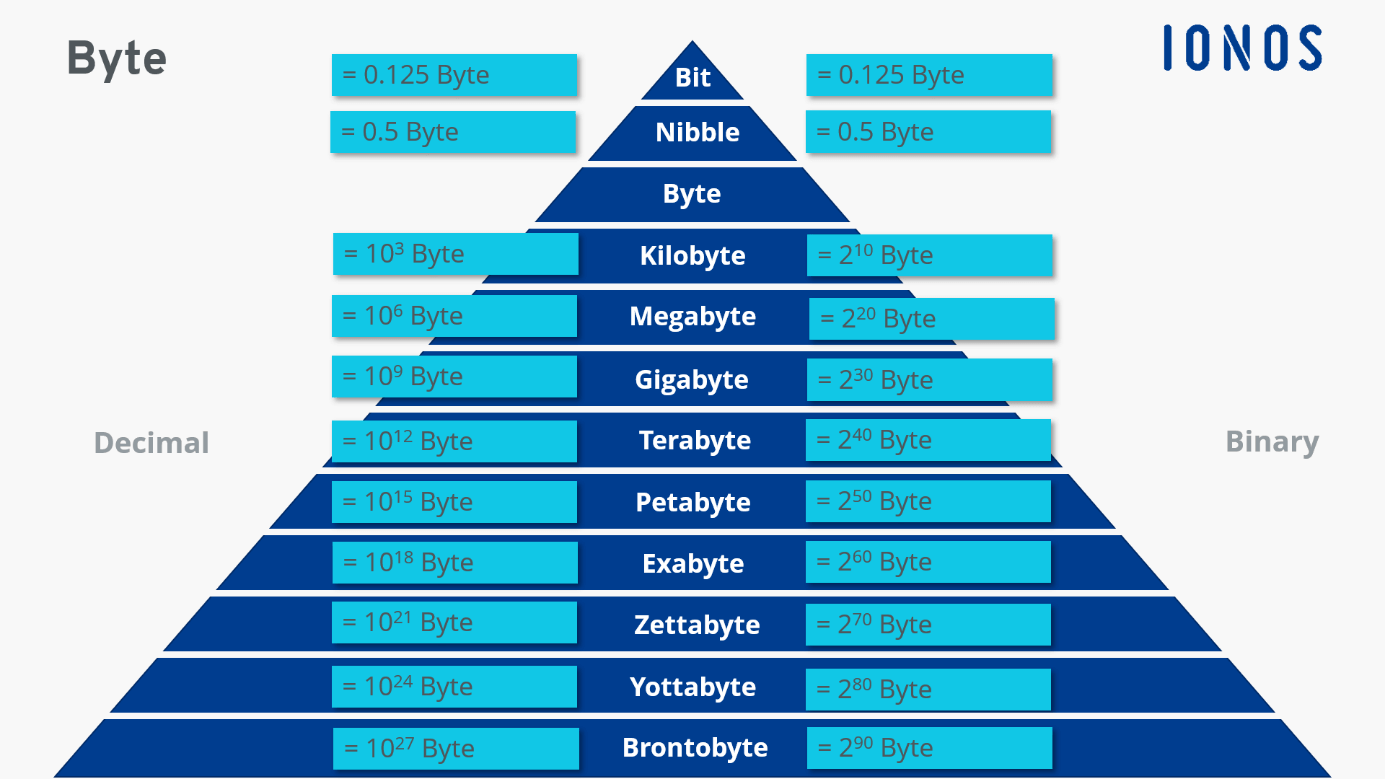
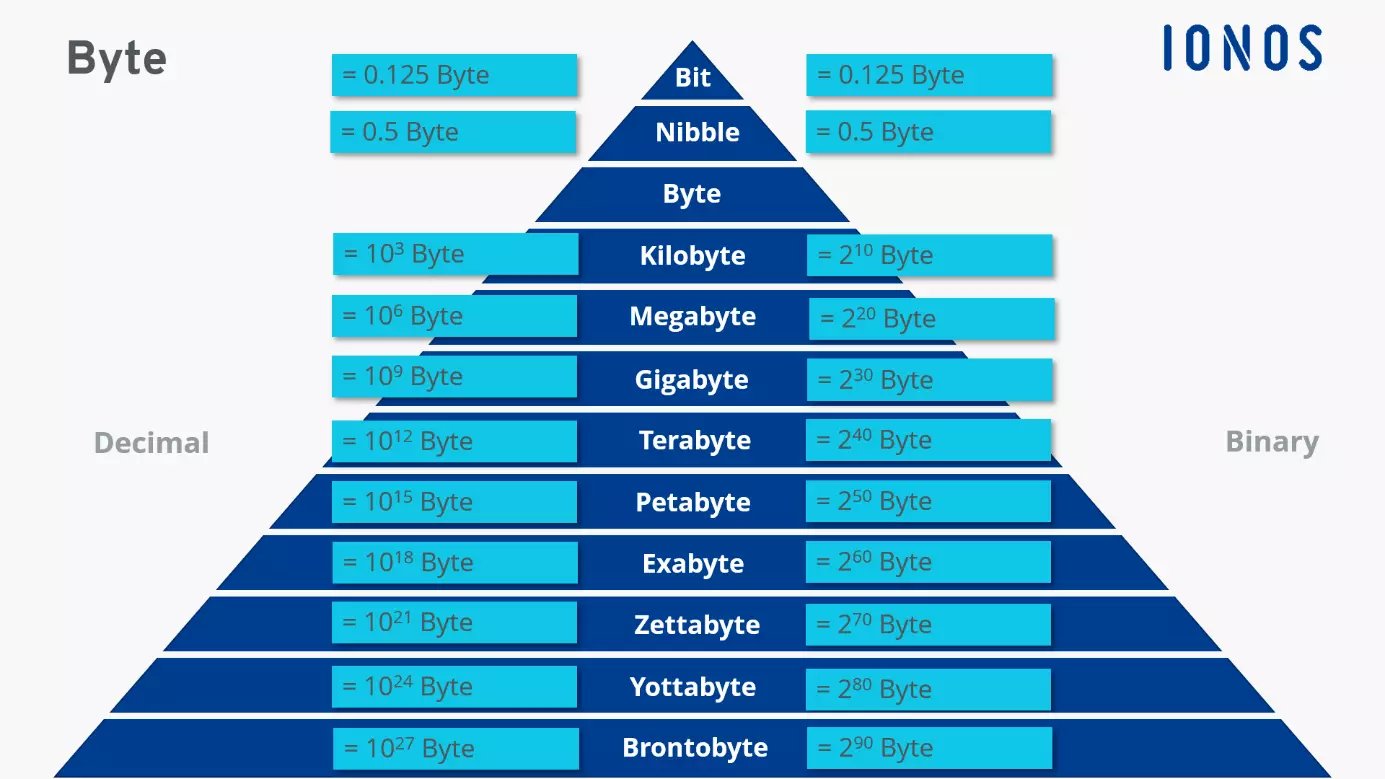
Mega-, giga-, and terabytes are abstract sizes. When it comes to zetta- or yottabytes, the dimensions are beyond our imaginations. Some practical examples from daily life can help to make these sizes more comprehendible:
1 byte = 1 letter/character
1 megabyte = 1 book (with 200 pages)
1 gigabyte = around 595 photos
1 terabyte = around 250,000 photos, 250 movies, and 500 hours of HD video
1 petabyte = around 15 trillion photos on Facebook
1 exabyte = 320 trillion copies of the Bible
1 zettabyte = all the traffic on the Internet in 2016
1 yottabyte = all of the atoms in 7,000 human bodies
Reviewer

Julia Hertler
With over 18 years of experience in content marketing, Julia Hertler has deep expertise in digital communications. For the past 10 years, she has specialized in the areas of domains and hosting at the IONOS Digital Guide, making complex technical topics easy to understand.