

Source code: What exactly is it?

If you’re neither a programmer nor a web designer, you probably don’t think much about what’s behind the programs and internet pages that you use every day. They are based in part on very complicated and long instructions to your computer. This command text is called source code. On the basis of a particular programming language, programmers lay out all of the rules for a computer-executable application. If the author writes an unnoticed error into their work that violates the specifications of the programming language, then the program either won’t function properly, will do nothing, or will crash.
Source code is a human-readable text written in a specific programming language. The goal of the source code is to set exact rules and specifications for the computer that can be translated into the machine’s language. As a result, source codes are the foundation of programs and websites.
What is source code?
Computers - regardless of whether it’s a home PC, modern smartphone, or scientific computer - work in the binary system: on/off, loaded/not loaded, 1/0. A sequence of bits instructs the computer as to what it should do. While commands were created in this way in the early days of computer technology, we have long since switched to writing applications in a human-readable programming language. This may sound strange at first since source code could also look like confused gibberish to a layman. In context, “human-readable” is understood as the counterpart to the term “machine-readable”. While computers only work with number values, humans communicate with words. So, just like a foreign language, one must learn at least one of the various programming languages before being able to program, etc.
Different programming languages
There are hundreds of different programming languages. It’s impossible to say for certain which are better or worse, as it depends on the context of the project and the application for which the source code is used. Some of the most popular programming languages are:
- BASIC
- Java
- C
- C++
- Pascal
- Python
- PHP
- JavaScript
For the computer to understand these languages, however, they need to first be translated into machine code.
Compiler & Interpreter
For the computer to be able to further process the source code written by the programmer, there needs to be a translation between the two – this occurs in the form of an additional program. This assistance application can be in either the form of a compiler or an interpreter:
- Compiler: This application type translates (compiles) the source code into a code that the process understands and can execute. This machine code is saved in the form of an executable file.
- Interpreter: An interpreter translates the source code line for line and executes it directly. The translation process is much faster than a compiler but the execution is slower and requires a large amount of memory.
You don’t get to choose, either: each programming language determines whether a compiler or an interpreter is used in combination with it. Nowadays, an intermediate solution is being used increasingly often - Just-in-time compilation (JIT). This type of translation attempts to combine the advantages of both variants (quick analysis and quick execution) and is used in browsers, for example, to more effectively handle JavaScript, PHP, or Java.
Markup languages
The foundation of a website is also referred to as a source code. However, this is not a case of a programming language but rather the markup language HTML. A markup language determines how content is structured. For example, using HTML allows you to define headlines, paragraphs, or highlights. An HTML document isn’t a program in and of itself but may contain one, for example in the form of JavaScript Code. A similar principle applies for other markup languages, such as XML.
Structure of a source text
Depending on the programming language in question, you’re limited to certain conventions when writing a program. Very few programming languages appear out of nowhere, though, and most of them build on one another. For this reason, certain elements come into use in various different program codes:
- Commands: Instructions are as a rule the basis for all applications. Here, the programmer makes it clear for their future program what needs to be done. Such commands can, for example, trigger certain calculations or display a text.
- Variables: Variables are vacancies that can be filled with information. These are referred to within the source code again and again with an assigned name.
- Comparisons: The structure of most programs is built by queries that function on the if-then scheme, i.e. the principle of propositional logic. If a particular truth value is entered, then one solution is triggered instead of another.
- Loop: Queries can also be the foundation for loops in a source code. A command is repeated until a certain value is reached. When the program ends the loop and runs the rest of the code.
- Comments: In all common programming languages, you can comment on lines within the code. This makes it possible to write text in the source code that isn’t taken into account by the program. Comments are entered into the source code, for example, so that you or another developer can continue to understand parts of the code in the future.
With the creation of a source code, there’s always a problem to solve. Developers write programs in order to provide solutions. The way to do that, though, is not set in stone. When two programmers are dealing with the same problem, it could well happen that the two resulting source codes are quite different from one another - even if they are working in the same language. Even though in many cases there isn’t one right answer, all programming work has one thing in common - a good source code avoids unnecessary text. The additional text makes the problem confusing, slower, and more prone to errors. Particularly confusing source code that even professionals can’t read is referred to as spaghetti code since the structure may be as tangled as dangly pasta on a plate.
Create source code
To write a source code, all you really need is a simple text editor - like the Notepad on Windows or TextEdit on Mac. This way, source code can be saved as plain text (e.g. in ASCII coding or with UTF-8 encoding) with the correct file name ending for the programming language. So if you find a file with the ending “.cpp” on your hard drive, then it’s actually a text file, likely containing code in the C++ programming language.
File name extensions are conventions. The suffix, which is usually separated from the attached file name by a period, is meant to indicate the format of the file. Windows uses the file ending - if it’s known - to identify which program the corresponding file is to be run with. Other operating systems that are based on Unix (e.g. macOS) consult the content of the file to determine the format.
Text editor
In addition to the standard programs of the operating system, there are also advanced text editors that simplify source code work through various functions:
- Syntax highlighting: Every programming language uses its own syntax. In many text editors, you first select the programming language in which you want to create your source code and then the program automatically highlights critical elements. Indentations that clarify the structure of the source code are also created by the program on its own.
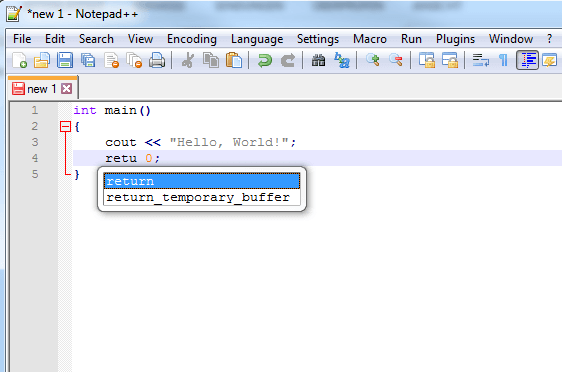
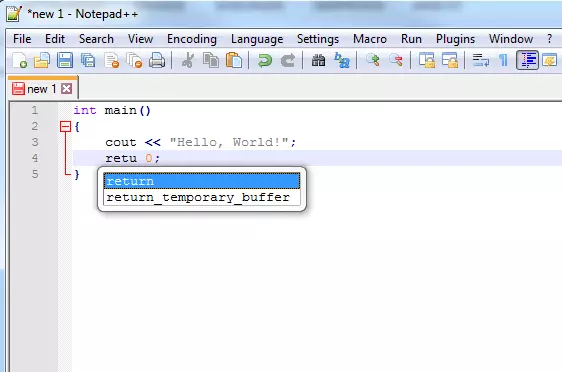
- Autocomplete: Many text editors for programmers know the corresponding commands of a programming language, complete them automatically, and close open parentheses by themselves.
- Bracket highlighting: Programming languages use parentheses (or brackets) to group elements together. To keep track of large code documents, some text editors mark the brackets in which you’re currently working.
- Code folding: Source code is built hierarchically, in most cases, through indentations and parentheses. To give a better overview during the programming process, some text editors allow you to collapse the source code located on the deeper levels. This hides parts of the code that aren’t currently relevant.
- Compiler integration: Some text editors can be upgraded using plugins with compilers. This makes it possible to directly test the program that’s just been written.
- Multiline editing: Source code written by hand can be a very elaborate endeavor. For this reason, developers like when they can do as many steps as possible at the same time. Multiline editing allows them to make identical changes to multiple sections of the document, saving time.
Integrated development environment (IDE)
Enormous projects can be realized more easily with special programs. Integrated development environments combine multiple tools that developers need for their work (hence, “integrated”), speeding up the workflow. Other advantages of such IDEs are the tools that communicate with one another seamlessly and make synchronous changes. These tools usually include:
- Text editors: The text editor is also a core piece of the development environment. Although a few visual programming languages exist that function through the arrangement of graphical elements, the vast majority of applications are written using classic source code. Text editors that are part of an IDE have a similar range of functions as editors that are used for programming outside of an environment.
- Compiler/Interpreter: IDEs also contain a compiler and/or interpreter. This way, programmers can run their code directly from the environment.
- Debugger: The use of a debugger is essential for sensible programming work. This tool is also a standard component of an integrated development environment. With this tool, you can search your source code for errors (bugs) by using breakpoints to interrupt the flow of the program and analyze the executed processes.
- Linker: To finish off a compilation process, various elements have to be merged. A linker is a program that carries out this task and creates an executable file.
- Version management: This tool records all of the changes that you make to the source code and can restore older versions of the code. This way, your entire project is not in danger if you accidentally make an error. A version management tool is also essential when multiple developers are working together on the same project.
- GUI builder: Part of many applications is a graphical user interface (GUI). Of course, this also has to be defined in the source code. A GUI builder supports developers when designing the interface. In the form of a WYSIWYG editor, you can often organize graphic elements using drag-and-drop. The GUI builder translates these into functions of the programming language within the IDE.
Well-known examples of the integrated development environment are the open source Eclipse or the Microsoft product Visual Studio.
Website source code
Even the basic structure of a website is usually referred to as a source code, even though it’s a document and not a program. Websites are written in the HTML markup language. In general, though, it’s not uncommon for websites to also contain elements that are written in a programming language such as JavaScript. What both languages have in common is that they can be written in a simple text editor. Even if you’re not a web designer, it could be worthwhile examining the source code of a page on the internet, for example, to detect faulty elements. All popular browsers give you various possibilities for viewing the source code of a website. Even if they all have different names, you can find the same functions in Mozilla Firefox, Internet Explorer (or Microsoft Edge), and Google Chrome. One option for making the source code of a website visible is by saving it as an HTML file. By either right-clicking or accessing the menu, you can easily download the page. It’s important that you select “HTML only” as the file type (if you save the entire website, it will be displayed as it appears in the browser - including all images and without the HTML tags). Then you can open the file with a text editor. The simple editors that come with your operating system will most likely present the code in a very confusing way, however. With a text editor that has a wider range of functions, you can display the source code in a form that’s easier to read.
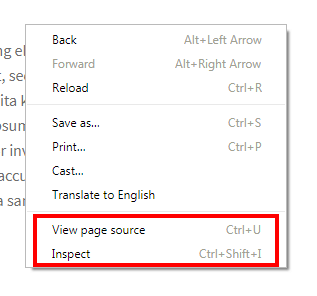
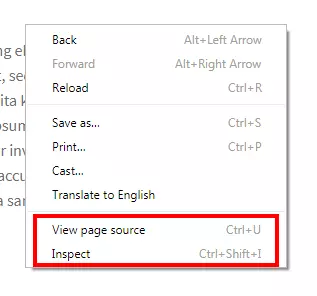
Even without saving the page, you can view the source code of a website. Modern browsers have two methods available - simply display the HTML code of the entire website or display an analysis tool to help you examine the code. The first option isn’t very different from the presentation of the downloaded file. It opens a new tab or a new page that displays the source code with structured line numbering. The second option is more interesting and offers more functions: the analysis tool can be found in the context menu under “Inspect” (Chrome) or “Inspect element” (Internet Explorer & Firefox). This opens an area within the window. Here, you can display the source code (in addition to other functions). The difference between this and the first option is that within this developer tool, you can directly select the corresponding elements on the website by moving the mouse pointer over the source code. This means that the tool is showing you which part is affected by a line of code. This is utilized by web design professionals to check the presentation of their websites, for example.
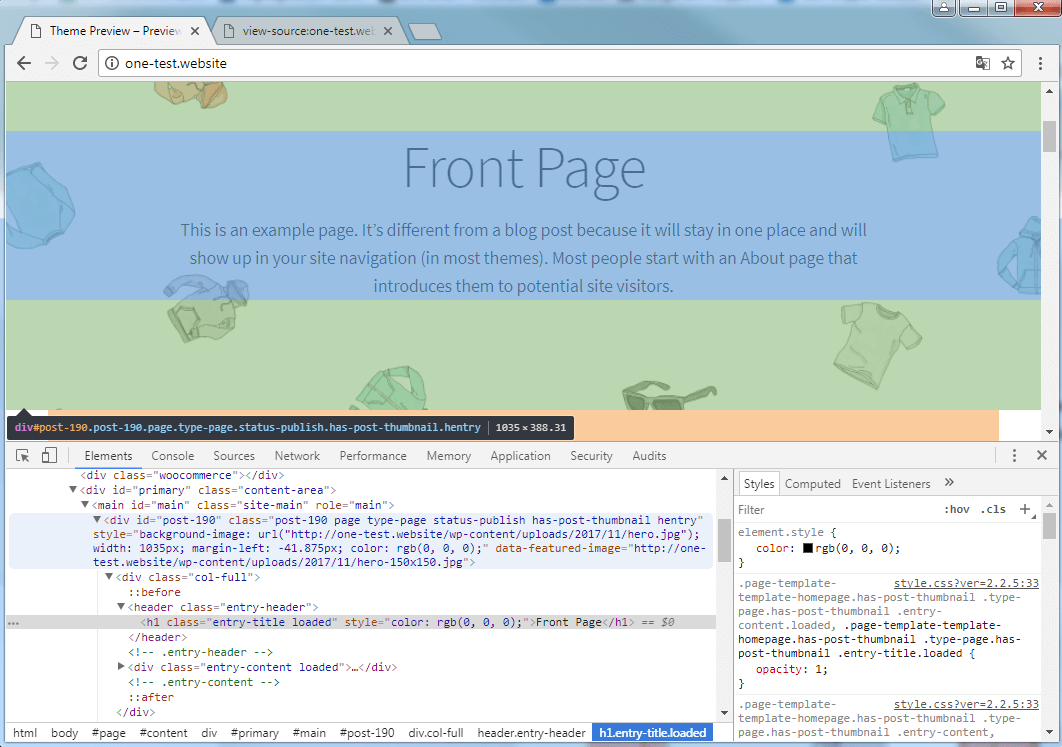
The inspect function can be opened in various different ways. Aside from the context menu, you can also open it by right-clicking the mouse, or by pressing F12 in the most popular browsers.
Copyrights for source codes
A lot of work and creative energy goes into a source code. This is why the source code of a program is also copyright protected. Just like with other intellectual property rights, it’s not permitted to distribute the code of a third party without permission. This applies especially to proprietary software. It is a different story for open source programs. In the software development world, there’s already a very active open source scene that is much more liberal with its code. The underlying impetus of the open culture among developers is to collectively work on projects, thereby developing and improving software in the long term. On GitHub, SourceForge, or other comparable platforms, developers make their source code widely available to other programmers. However, developers of open source programs usually have to adhere to certain conditions, such as naming the author and license, if they want to use the code.
Author

Vladimir Simovic
Vladimir Simović has been building web projects with WordPress since 2004. He was one of the first German-speaking WordPress bloggers and has published several specialized books as well as over 60 expert articles, and has managed well over a hundred WordPress projects.
Reviewers

Sven Ignor
Sven Ignor is a TYPO3 web developer with over 15 years of experience and specialises in bespoke solutions based on TYPO3. He is happy to share his knowledge and is committed to TYPO3 and the community

Christian Heldmaier
Christian Heldmaier is an experienced online marketing and SEO specialist from Karlsruhe. He has been working as an SEO Manager at IONOS since July 2020.