

How to create HTML line breaks with the br tag

An HTML line break allows you to start a new line without starting a new paragraph. HTML line breaks help with text formatting and make sure your content is consistently structured across different browsers.
What is an HTML line break?
Hard line breaks in HTML, also called HTML line breaks, are special HTML elements that allow you to start a new line without creating a new paragraph. You can create line breaks with the HTML <br> tag (“br” stands for “break”). Instead of letting the text continue to the end of the line, the tag moves the text to a new line, while keeping it as part of a single, continuous paragraph.
The <br> tag doesn’t require any additional attributes, can be used in HTML5 and is supported by all modern browsers. It’s an empty tag, which means it doesn’t need a closing </br> tag to work properly. You can use the <br> tag at the beginning of a line, the end of a line and inside of inline elements like <strong>, <span> or <em>, allowing you to place line breaks exactly where you need them.
Why you should use HTML line breaks
The HTML <br> tag serves various purposes and you can use it in different ways depending on how you want to format your text. In general, it’s a useful tool for managing line breaks in text without the need for more complex CSS styling like margin or padding.
HTML line breaks can serve the following purposes:
- Text formatting and structuring: HTML line breaks allow you to quickly and easily place line breaks in text, improving its readability, structure and organization.
- Consistent and compatible HTML texts: Hard line breaks in HTML ensure that text is displayed in an unaltered and consistent manner across different browsers and search engines. This is also useful when working on HTML documents with multiple developers. Since HTML is an essential part of web browsers, using the language also ensures a consistent text structure across different devices and platforms.
- Clear HTML semantics: With
<br>, you signal exactly where you want a line break without having to start a new paragraph. This helps to maintain the coherence of text and prevent unclear coding. - Easily implemented line breaks: Since it doesn’t require additional attributes or complex instructions, implementing line breaks with the HTML
<br>tag is easy to do. It also contributes to a clean and clear HTML structure.
- Free Wildcard SSL for safer data transfers
- Free private registration for more privacy
- Free Domain Connect for easy DNS setup
When to use HTML line breaks
Hard line breaks in HTML are useful for a variety of situations, including:
- Poetry or song lyrics: With
<br>, you can define line breaks that are essential for formatting poems and song lyrics. - Addresses: HTML line breaks ensure addresses are correctly formatted across multiple lines.
- Contact information: Whether it’s a phone number, email address or website, you can clearly present important contact information using
<br>. - Tables and text layouts: The
<br>tag can be used to format text in table cells or for specific text layouts.
Although <br> can be used in many ways, you should use it sparingly to avoid disrupting the semantic flow of your content. For more complex layouts, it may be better to use CSS styling or the HTML style tag to format text elements.
- Stay online with 99.99% uptime and robust security
- Add performance with a click as traffic grows
- Includes free domain, SSL, email, and 24/7 support
What is the syntax for HTML line breaks?
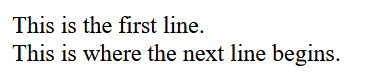
HTML line breaks use the empty <br> tag, with no additional HTML attributes. The simplicity of the syntax is one of the main benefits of implementing hard line breaks in HTML. Here’s what the tag looks like:
This is the first line.<br>
This is where the next line begins.Here’s what the output looks like:
Want to learn more about HTML? Check out our HTML beginner’s tutorial for a basic overview of how to use the popular markup language.
Paragraphs vs. line breaks—What’s the difference?
Hard line breaks and paragraphs (or <p> tags) both play an important role in structuring and formatting HTML text. With the <br> tag, you create a line break within a continuous paragraph, while with the <p> tag, you not only create a line break but also a new paragraph.