

Continuous Delivery

Continuous delivery is an innovative concept in software development that is becoming increasingly popular. With continuous delivery, the production steps of development, quality assurance, and delivery are not final, but are repeated automatically in a loop during the development process using the continuous delivery pipeline. This has the advantage that you can subject software products to a quality check piece by piece and at short intervals and deliver them while you’re still working on the product. You receive constant feedback in the pipeline, allowing you to improve the software immediately after each change to the source code.
Continuous delivery is a model that is used in software development to run development, delivery, feedback, and quality management in parallel at short intervals in a continuous loop. This makes development more efficient and the customer receives the product earlier, even if it is not yet finished. Continuous delivery provides the developer with feedback through automated tests, which usually check the build after every change to the source code.
Continuous delivery describes a reciprocal process that combines and automates development, delivery, feedback, and quality management. This minimizes lengthy and time-consuming work steps.
The benefits of continuous delivery
In classical software development, the end product is only delivered if it contains all the planned features, runs smoothly, and has no serious defects in the quality check. The developer then usually supplies the software with patches and updates at regular intervals. With continuous delivery, the product is delivered to the customer at a much earlier stage of development, while work on it continues. The pre-release version often only contains the core functions of the software, which are then tested by the customer in a real environment. The customer (or the software tester) therefore plays an important role in quality assurance.
The feedback gained in this way helps the developer to improve the existing features during development. He may also get valuable hints as to which feature should be developed next. Without continuous delivery, this process is tedious and can lead to both sides being unhappy: The customer usually expects a finished product that meets their requirements and wishes, but the developer does not yet know exactly what these are. If communication about the product’s development status begins at an earlier point in time, customer wishes can be taken into account more easily and errors can be avoided. The principle can be illustrated as a cycle:
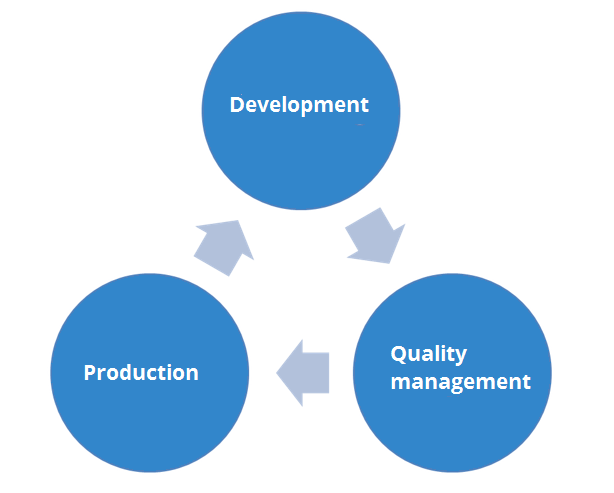
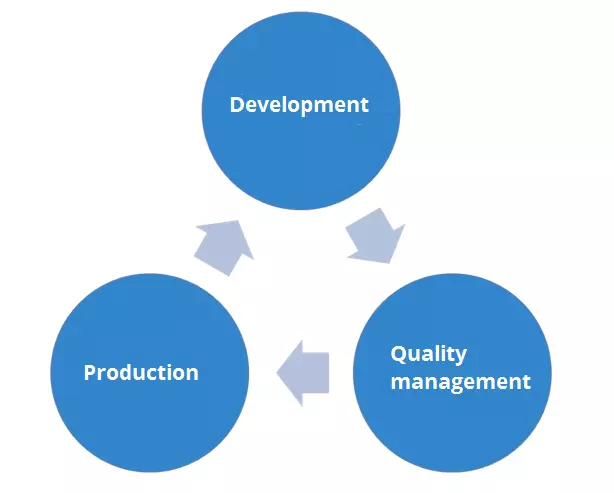
The three areas of development, quality assurance, and production do not replace each other in a single process, but interlock continuously. This means that the product passes through the individual phases again and again and is continuously improved. When there are many customers, this cannot be achieved without automation. This is where continuous delivery comes in by automating the entire process.
Thanks to continuous delivery, you can test every edit and enhancement made to the software (i.e. every change to the source code) in real time in order to collect feedback. Unwanted side effects are quickly visible, allowing you to intervene at an early stage of development. This is especially handy because it makes it easier for you to determine which part of the code causes a bug, for example. Without continuous delivery, finding a problem is often very tedious.
When it’s on its way to the customer, the software is in an intermediate stage: the continuous delivery pipeline. Both manual and automated tests are carried out in this pipeline. Each test phase entails a new software version (usually referred to as a “beta version,” sometimes also as a “nightly build,” i.e. a version created automatically “overnight”), which in turn enters the pipeline. Only if all tests are successful and give satisfactory feedback, can a “stable” version be created and the product officially released (this process as well as the published application itself is called a “release”). The probability that the customer will receive a bug-free product is much higher.
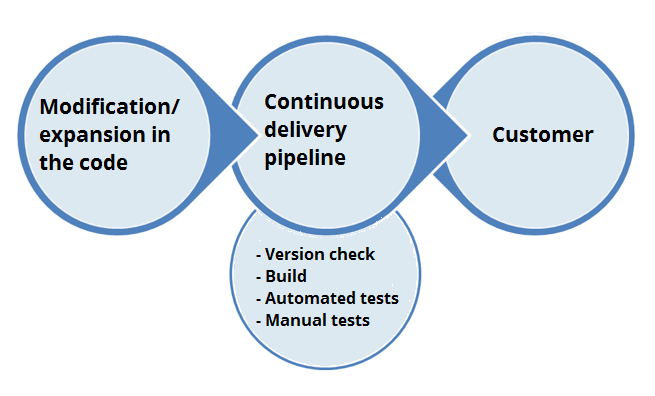
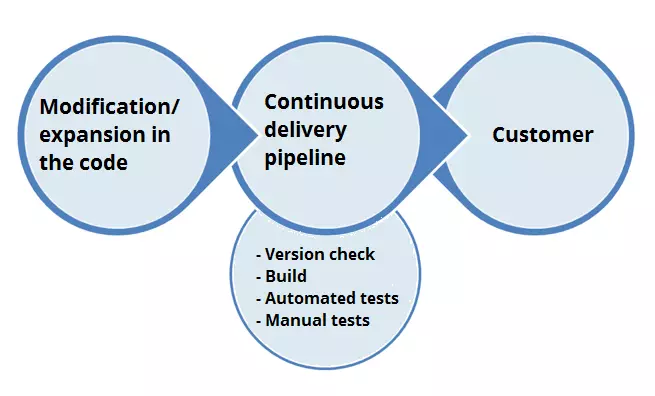
This is the biggest advantage of continuous delivery: the automated process benefits both the customer and the developer. For the customer, the product is available faster and is usually error-free. For developers, “field testing” is far more effective than in-house beta testing, because it provides more valuable data and guidance. The entire development process becomes much more flexible and the risk of releasing buggy software is minimized.
Overview: the advantages and disadvantages of continuous delivery
| Advantages | Disadvantages |
| Software errors can be found and eliminated much more efficiently in the development process. | Cost factor: A strong and reliable integration server for the automated tests is necessary for a good and secure delivery of the product. |
| There is less effort than with a classic software release. The developers can fully concentrate on the actual development. | The automated tests must be written and function perfectly. Faulty tests can cause great damage during quality testing. |
| The continuous delivery pipeline makes it much easier for developers to troubleshoot problems. | Requires good team coordination because code changes must be collected frequently and efficiently. |
| There are fewer costs that would arise from other test processes (e.g. alpha and beta tests). | Requires good and continuous communication with customers and their target systems. |
| Quality assurance can devote more resources to the conceptual improvement than to the technical improvement of the software. | The customer expects continuous updates and improvements. The software project can rarely be "paused." |
| Software development is generally faster, because the largely automated release process relieves developers of the workload and reduces the number of breaks they have to take. | New features, improvements, and changes to the product are still delivered manually. To automate this process, you need to move to continuous deployment. |
| Faster and more frequent releases accelerate the loop of feedback and improvement. | The customer must show willingness to use software that is still in development. They must also be motivated to provide important feedback. |
| Since errors are found quickly, there is less pressure on the developers with every change in the source code. This leads to motivating and inspired work. |
The phases of the continuous delivery pipeline
If the code changes, the continuous delivery pipeline is triggered and the test process is executed. These are the phases the continuous delivery pipeline goes through:
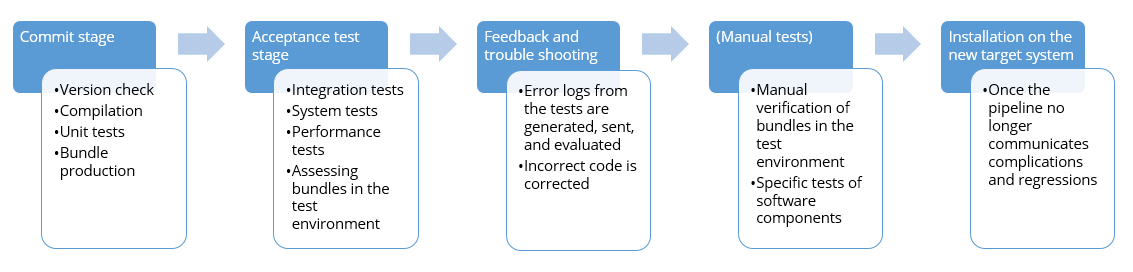
- Commit stage: In this first test phase, the software version is checked, the software components are built or compiled, and necessary unit tests are performed. After successful testing, the phase is completed. Binary artefacts of the software components are bundled and stored in the repository. This package then determines the functionality of the pipeline because it determines the software status. Finally, the package includes the amount of data that will later be installed on the target system. The test results in the commit stage can then be assigned to the concrete changes in the source code, which is a significant advantage of continuous delivery.
- Acceptance test stage: In the second test phase, the acceptance tests take place. This includes integration tests (does the interaction of the components work?) as well as the necessary system tests (does the software work on the user side?). There are also some optional tests that are integrated into the acceptance test stage, such as performance tests and other tests that check the software’s non-functional requirements. For the acceptance test stage, the bundle created in the previous phase is reused and installed in a suitable test environment.
- Any errors or complications in these phases will be documented and, if necessary, sent as feedback to the developer. This can be done via e-mail, messaging programs, or special tools (see below). Because the pipeline is triggered with every code change, error messages or regressions always refer to the last change here. This allows the developer to react quickly and efficiently, and fix any bugs or buggy code.
- Manual tests are now performed as required. For these tests, too, the pipeline uses the bundle from the first phase and installs it in a suitable test environment.
- If all tests are completed with positive feedback, the package can be installed manually on the target system. This usually only requires a “push of a button.” If this step is automated, it is called continuous deployment.
Continuous integration vs. continuous delivery
Continuous delivery and continuous integration are often mentioned together. However, there is one major difference, which lies in the scope. While continuous integration refers to automating the test process and shares most of the pipeline with continuous delivery, continuous delivery extends the concept and also includes the release process of the software as an automated process. So, continuous delivery adds the end user to the continuous integration model by simultaneously delivering the product for testing.
Whether a developer simply uses continuous integration or extends the development process to continuous delivery depends on development planning, the development team, and the customer base. In the following table, we compare both concepts:
| Continuous integration (CI) | Continuous delivery (CD) |
| Automated testing process that critically reviews every change in source code. | Extends the test process to include the delivery process. New features and changes to the code automatically reach the end user. |
| The team must write automated tests for each new feature, each improvement, and each code change. | The effectiveness of these tests is all the more important in the case of CD because the results are delivered to the end user directly. |
| Requires a dedicated and continuous integration server that monitors and applies the automatic tests. | The installation on the target system must also be as automated as possible, which places higher demands on the server. |
| Developers need to merge their code changes continuously and often. | Developers must also maintain good customer contact and be as transparent as possible about the software. |
| Requires a relatively high resource input to ensure product quality on delivery. | More effort is involved with CD. But the product can be delivered much earlier and subjected to “real” tests. |
| The development itself is more efficient, but is paused more often by manual releases. | It can be developed continuously because the release process is also largely automated. |
Popular tools for continuous delivery
Various programs make it easier for you to switch to continuous delivery. We present four of them.
Jenkins
Jenkins is a web application that enables the continuous integration of software components. Java-based Jenkins runs in any EJB container and contains various build tools (Apache Ant, Maven/Gradle, CVS, Subversion, Git, etc.) as well as the automatic test procedures important for continuous delivery (JUnit, Emma). Optional plugins ensure compatibility with other compilers. The REST-based programing interface also allows other programs to access Jenkins. Jenkins is a free open source program. It is recommended especially for beginners because the interface and functionality are very beginner friendly.
Our Jenkins tutorial explains step by step how the application works.
CircleCI
CircleCI is also a web-based application for continuous integration, delivery, and deployment. CircleCI works preferably with GitHub, GitHub Enterprise, and Bitbucket. In addition, the platform offers many practical features such as order management, resource management, docker support, support of all known programming languages, secure caching, data analysis with statistics, and comprehensive security concepts. CircleCI received the “Leader in Continuous Integration” award from Forrester in 2017. The first container is free of charge, the second one is $50 per container per month.
Microsoft Team Foundation Server
Microsoft Team Foundation Server (TFS) is a collaboration tool for software projects that are jointly planned, created, and then managed. TFS is the unofficial successor of Microsoft’s Visual SourceSafe. To work together on a software project, TFS supports various development processes, including CMMI, agile software development, and Scrum. For the work, TFS links and integrates familiar Office programs such as Word and Excel, so you don’t have to switch from TFS to another program.
Various features are available for continuous integration, delivery, and deployment to help you build a pipeline. TFS basically separates the entire process into the version control, build, reports, and user administration sections.
Teams with a maximum of 5 people can use the free Express version; all larger teams have to use the commercial version, which costs about $6 per user per month. However, this usually requires you to purchase a server license. You can also purchase TFS without a monthly subscription, but you must contact a local reseller. The price seems to fluctuate between $570 and $800.
Codeship
Codeship is an SaaS platform for continuous integration (and delivery) that adapts its scope to the needs of the user. Codeship supports GitHub and Bitbucket as well as GitLab. The available features depend on the respective payment plan: In the free version, Codeship provides a preset CI environment and also takes care of the CI/CD workflow. In addition, the free version allows efficient caching and parallel testing of builds in shared and preconfigured containers. The free plan allows 100 builds per month with a continuous build and a test pipeline. There is, however, a missing upper limit for projects, users, and teams.
To get more out of Codeship you can purchase “Codeship Basic,” which is available from $49/month and will be more expensive depending on the team size. Another paid version, “Codeship Pro,” extends the feature list by one Docker support, the “complete control” over the build environment, local builds, and a better control over the workflow. It also provides multiple tools that make continuous integration/delivery even more efficient and transparent. Depending on the number of parallel builds, Codeship Pro costs around $75 per month.
Reviewer

Julia Hertler
With over 18 years of experience in content marketing, Julia Hertler has deep expertise in digital communications. For the past 10 years, she has specialized in the areas of domains and hosting at the IONOS Digital Guide, making complex technical topics easy to understand.