

Near-Field Communication (NFC)

Your bank may have recently sent you an NFC-compatible debit card and your smartphone probably supports NFC functions. But are you unsure what exactly is NFC? No problem. We give you an overview of the RFID-based near-field standard.
NFC is taking over more and more aspects of daily life, enabling contactless payments, and simplifying connectivity with Bluetooth devices and Wi-Fi networks. Further applications can be found in smart home solutions and the Internet of Things. These benefits of NFC technology are accompanied by security concerns and data privacy issues. Read on to learn more about the risks of the wireless standard and the general security requirements applicable to NFC applications.
What is NFC?
NFC – or near-field communication – is a transmission standard based on radio frequency identification (RFID) which enables contactless data transmission across a distance of a few centimeters.
We explain the technical foundations of radio frequency identification in the basic article “What is RFID?”.
A key application of the NFC function is contactless payments at Point-of-Sale terminals (PoS) in retail or gastronomy. Besides bankcards, modern smartphones are also generally equipped with the NFC technology as standard. When combined with other transmission standards like Bluetooth or Wi-Fi, a wide range of possibilities are opened up in which the near-field technology can make processes requiring data exchange between two devices faster, more flexible, or more convenient.
How Does NFC Work?
NFC is based on RFID technology. RFID systems comprise at least one initiator (typically an RFID reading/writing device) and any number of target devices (known as transponders), which receive, process, and answer messages received from the initiator. Data transmission occurs by means of electromagnetic induction between two loop antennas. The gap between the RFID reading device and the transponder is called the air interface. The aim of RFID technology is to identify, authenticate, and track objects or people. For instance, in logistics RFID transponders are attached to products or transport pallets to track the flow of goods.
As an international standard, NFC specifies an RFID connection process for the electromagnetic near field. In accordance with ISO/IEC 180000-3, the standard frequency for NFC systems is 13.56 MHz – one of the ISM high-frequency bands available worldwide without a license.
ISM bands (industrial, scientific, and medical bands) refer to frequency ranges that can be used worldwide without permission for industrial, scientific, and medical applications as well as in private use.
The short range of the wireless standard is typical for NFC. NFC data transmission is only possible when the sender and receiving antennas are located in direct proximity with each other. In practice, the operational distance between two NFC devices is below 10 centimeters. For example, NFC-compatible payment cards have to be held directly against the card reader. Only then can transactions be made. The limited range is intended to prevent unintended connections and plays an important role in the security of the wireless standard.
In principal, two modes of communication are conceivable with NFC wireless transmission: passive and active mode. While passive mode only permits one-way communication in which an NFC device retrieves data from another, active mode allows mutual communication.
- Passive mode: In the passive mode, active NFC readers are used to read passive transponders. The antenna of the active device thereby generates a high-frequency, alternating electromagnetic field. If a passive transponder enters the range of the high-frequency field, it is supplied with energy for a short time. Passive transponders themselves do not generate a feedback signal, instead the data is transmitted by modulating the inquiry signal. This mode is used for contactless payments, for example. These transponders can now be found in most debit and credit cards.
- Active mode: If both the initiator of the wireless transmission as well as the target device are able to transmit NFC signals, transmission in the active mode is possible. Active NFC devices have their own energy source. During communication, the devices involved generate their own high-frequency, alternating fields to transmit data, and deactivate them when waiting for a response.
Data transmission via NFC is relatively limited at 106, 212 or 424 kbit/s. For data-intensive applications, NFC technology is therefore usually combined with wireless standards like Bluetooth – in order to make the pairing of Bluetooth devices easier, for example. Wi-Fi connections can also be established faster and more easily using NFC technology. When NFC connection data is stored on an NFC transponder, users only need to read the data using an NFC phone to connect to the network. This makes entering the Wi-Fi key manually unnecessary.
NFC Phone Functions
NFC functions are considered standard features on smartphones today. Google in particular is advancing the transmission standard. All smartphones that run on Android OS version 4.0 or higher are NFC-compatible. Apple has declared NFC support since the iPhone 6, but only uses it for its own services. The near-field interface is not currently available to third-party applications on Apple devices.
NFC Operating Modes
NFC phones, tablets or other smart devices, such as watches or gaming controllers, generally support three modes of operation:
- NFC card emulation mode
- NFC reader/writer mode
- NFC peer-to-peer mode
NFC Card Emulation Mode
An NFC device in card emulation mode behaves like a passive transponder – such as the NFC chip in a debit or credit card. The card emulation mode is used in combination with mobile payment apps. Corresponding applications support all common payment cards, including some customer cards, bonus cards, and discount vouchers. The user selects the desired card via the display and holds the NFC device against an NFC-compatible PoS terminal – just like they would with their contactless debit or credit card.
NFC Reader/Writer Mode
In reader/writer mode, the NFC phone or tablet acts like a reading or writing device for NFC chips. Passive transponders can be integrated into stickers on product packaging, for instance. A user who holds their NFC device in reader/writer mode near such a transporter can read and – where permitted – enter data for it.
NFC Peer-to-Peer Mode
The peer-to-peer mode facilitates data exchange between two or more terminal devices. This NFC function is used, for example, with Android Beam. The NFC peer-to-peer technology could also be used in gaming or for productivity apps that enable teams to work together on projects.
Activating NFC on Smartphones
You can activate the NFC function on an Android smartphone in just a few steps.
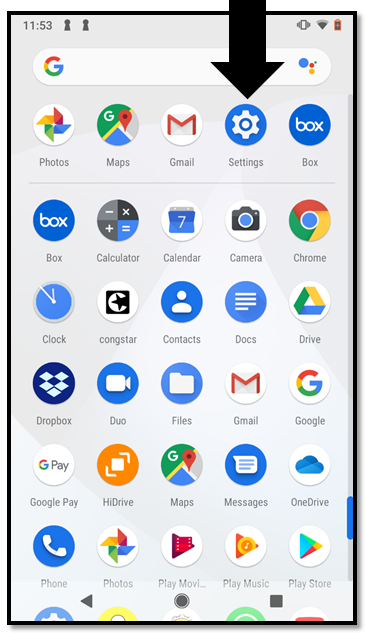
Step 1: Open the Drawer app – the Android application that gives you an overview of all apps installed on your smartphone.
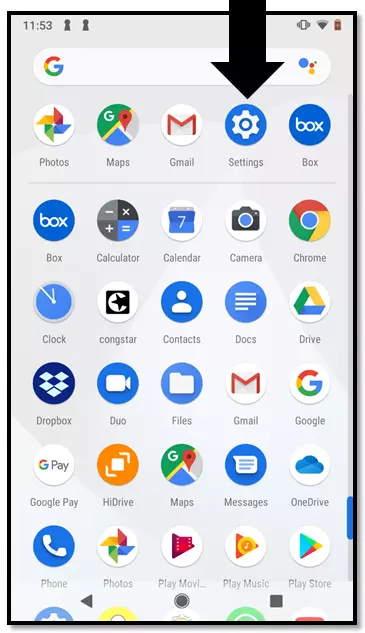
Step 2: Open the “Settings” app by tapping on the symbol.
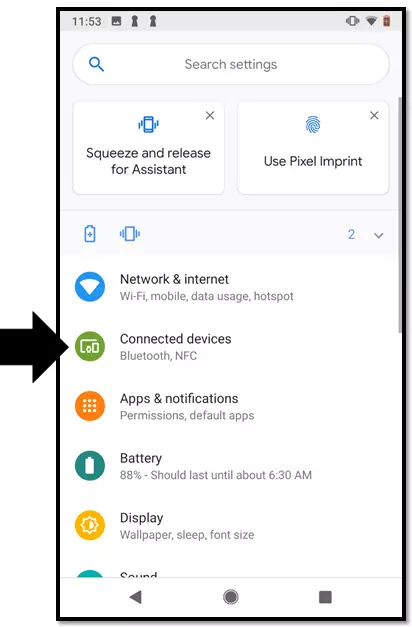
Step 3: Select the menu item “Connected Devices”.
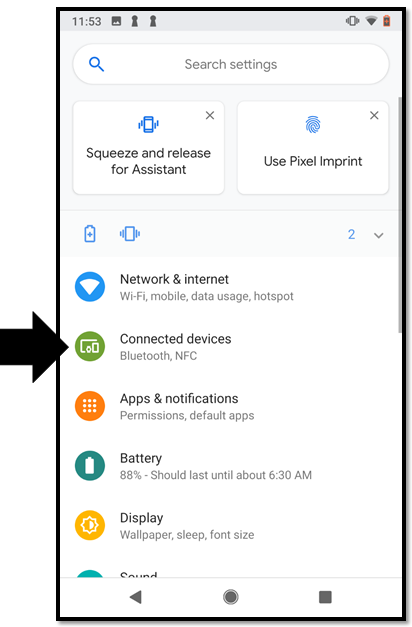
If you are using a version older than Android OS 8.0, you can find the NFC function under “Wireless and Networks” → “More”.
Step 4: Tap on “Connection Settings”.
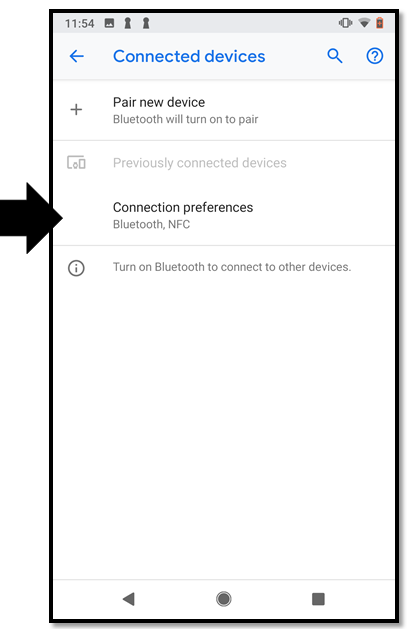
Step 5: Tap on the slider to activate the NFC function.
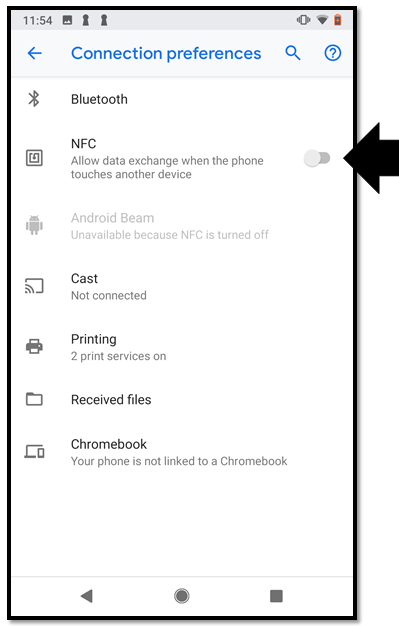
A colored slider indicates that the NFC function is active.
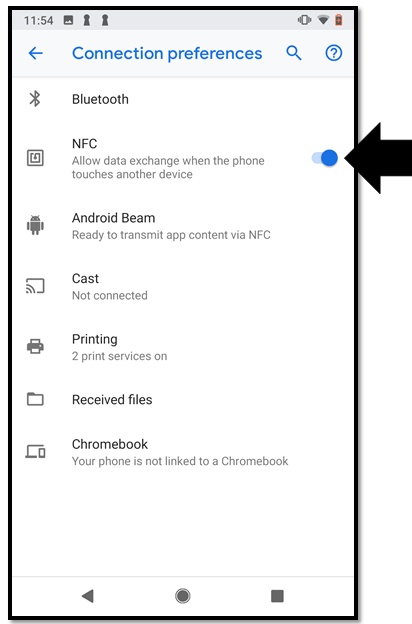
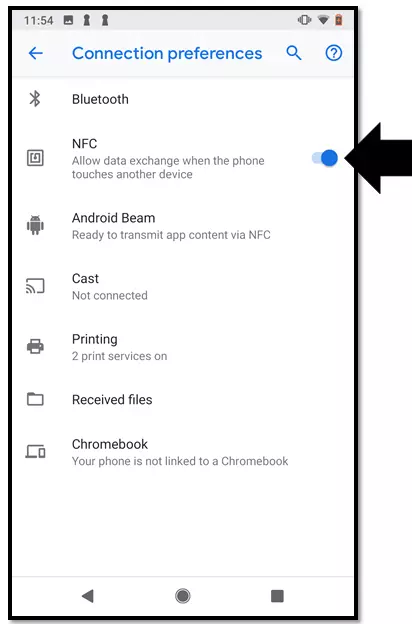
Tap on the slider again to deactivate the function.
Applications of NFC Technology
NFC technology can be used for a wide range of identification and authentication processes due to its quick and easy connectivity. Practical applications are available to users for the following areas in particular:
Contactless Payments
NFC technology enables contactless card payments at PoS terminals, without having to insert the debit or credit card into the reader. Authentication is based on bank data saved on an NFC chip which is integrated in the bankcard. A number of banks in the USA are rolling out debit cards that support contactless payments. The credit card companies Visa and Mastercard offer the NFC function under the brand names Paypass and Visa payWave. In the USA, contactless payments can be made for any amount, although the card holder may have to sign for large purchases. In the UK, contactless card payments below £30 do not require a PIN or signature. It can be higher for the time being in the USA where contactless payment systems are still gaining popularity. This means contactless payment transactions can be much faster than conventional card payments. You can see whether your debit or credit card is NFC-compatible via the contactless logo – stylized radio waves.
Mobile Payments
In the case of mobile payments, the smartphone is replacing the bankcard. Mobile payment apps like Google Pay and Apply Pay enable users to save bank data to their smartphone and create a virtual version of their chosen bankcard. Instead of using a plastic card, the NFC phone is held in the range of the card reader, allowing it to read the data required for authentication. Transactions are then typically confirmed with a PIN number or by the user providing their fingerprint via smartphone.
Paperless Entry Passes and Tickets
Entry tickets could soon be a thing of the past when visiting movie theaters, concerts, and museums. The same may also apply to tickets for public transport. Rather than using paper cards, e-tickets can be saved on the smartphone, allowing them to be quickly and conveniently read via contactless NFC technology. In this context, near-field communication is competing against visual identification methods like barcodes and QR codes.
Access Control
Key cards with RFID chips are now part of everyday life. In hotels, they open doors to suites – or lockers and changing cubicles at swimming pools and sports centers. Companies are using RFID systems to control access to secured areas or workstations. To gain access here, RFID transponders in the form of chip cards or key fobs are held against a terminal or sensor attached to locking mechanisms. NFC phones may render separate transponders obsolete in the future. The smartphone is set to become the universal key for electronic locking systems.
Two-Factor Authentication
NFC is also used as a supplementary technology for security systems – such as when accessing desktop applications and web apps. Here, an NFC token or smartphone serves as an extra security component as part of two-factor authentication. For instance, users can enter their password and then also hold an NFC-compatible device to a corresponding sensor.
NFC Tags and Displays
A passive RFID transponder is nothing more than a microchip including a capacitor and antenna. The smallest elements are just a few millimeters in size. In logistics and retail, these kinds of chips are integrated in labels – or tags – and placed on goods and product packaging, allowing the supply chain to be retraced. The advertising industry is also putting NFC tags to use. When built into NFC displays (also known as smart posters), NFC tags open up interactive options. Viewers can read the chip in the poster using their smartphone, for example, and receive information that triggers a response in the corresponding smartphone app.
Smartphone Control Via NFC
Samsung offers self-adhesive stickers with a built-in NFC chip – called TecTiles – onto which users can enter commands for user-defined purposes. When the user’s smartphone enters proximity of the NFC tag, the preprogrammed commands are transmitted and performed. A wide range of applications are possible with TecTiles: Suitably positioned, NFC tags can cause a smartphone to automatically connect with a car’s Bluetooth radio or switch the ring tone to silent when at the workplace, for example.
How Secure is NFC?
The security of the NFC function is not just discussed in relation to contactless payments. In principle, any NFC device can be used to read a transponder. The same applies to data on an NFC phone, provided the function is activated. All that without the user having to actively initiate or approve the data transmission. But this has got the attention of data privacy advocates.
The discussion revolves around the following security risks and data protection concerns:
- The loss of NFC bankcards, mobile devices or other chipped media
- The unauthorized reading of data stored on the NFC chip by third parties
- The manipulation of data transmission during contactless payment transactions
- The creation of behavior, usage and movement profiles based on information read contactless from NFC devices
Data privacy advocates argue that NFC chips should not be able to provide any recurring identifiers – such as account numbers – that can be read contactless and used to create profiles. Work on international standards for encrypting near-field communication still needs to be pursued further by the American industry.
Consumers have to be specifically informed of the risks of mobile payment apps. Moreover, providers of these applications need to provide information on minimizing risks. Providers have to keep updating payment apps that enable contactless payments with smartphones, in order to resolve ongoing security issues.
Using NFC Securely
In practice, the security of NFC systems not only depends on the provider of these applications, but also on how the consumer treats the near-field technology. Take the following steps to keep security risks to a minimum.
Contactless payments with NFC debit and credit cards
- Store your NFC bankcard in a protective sleeve that blocks radio waves; this prevents your chip from being read without authorization. Only take your card out of the sleeve when you wish to pay with it.
- Check your account statements regularly and report any suspicious transactions to your credit institution straight away.
Mobile payments via app
- Activate the NFC function on your mobile device only when you want to use the relevant app. Deactivate NFC after successfully completing the payment transaction.
- Always keep your smartphone’s software as well as mobile payment apps updated.
- Use all the security features offered by the provider – such as authentication via PIN or fingerprint.
- Protect your mobile device from unauthorized access with a pass code.
Take immediate action if you realize your bankcard or mobile device with mobile payment apps is lost. Use the emergency number of your credit institution to have any lost debit or credit cards blocked.
You can find the emergency hotline of your credit institution on your account statements or online. Alternatively, you may also be able to block lost or stolen debit cards at your local bank branch. In any case, it is important to act quickly.
Reviewer

Christian Heldmaier
Christian Heldmaier is an experienced online marketing and SEO specialist from Karlsruhe. He has been working as an SEO Manager at IONOS since July 2020.