

How to add WordPress breadcrumbs to your website

Breadcrumb navigation is a useful feature for websites and users alike. In WordPress, you can add breadcrumbs via themes, plugins or by adding the relevant code.
- Great premium TLDs at affordable prices
- Simple registration & transfer
What are WordPress breadcrumbs?
Breadcrumbs are navigation paths which show users the area of the website they’re in. They’re meant to facilitate orientation on a website and improve navigation. Breadcrumbs make it easy to return to the superordinate level or the starting point in just one click.


What are the advantages of WordPress breadcrumbs?
Breadcrumbs are great for boosting the user-friendliness of a website. Better navigation means that users can jump between the individual (sub)pages of a website more easily. That means they also tend to hang around a bit longer which lowers the bounce rate. At the same time, usability and internal linking are improved. This has a positive effect on search engine crawlers and bots. In other words, WordPress breadcrumbs are useful for search engine optimization.
Get the most out of WordPress with Hosting for WordPress from IONOS. You’ll get 99.97% server availability, many useful security features and can manage your website more effectively through CLI control.
What types of WordPress breadcrumbs are there?
There are three different types of breadcrumbs. Their functionality is always the same. The three different variants are:
- Hierarchical: These breadcrumbs show visitors exactly where they are on a website and map the levels above. In most cases, the homepage and respective subpages are displayed. These breadcrumbs are suitable for most websites.
- History-based: This option is used less frequently, but serves its purpose. Individual steps are created and displayed as paths while visiting the website. If necessary, individual points of a path can be navigated to again.
- Attribute-based: Attribute-based WordPress breadcrumbs are useful for web shops. This option displays search terms and categories that led a user to an article. One example of this is the structure “Home -> Bicycles -> E-bikes -> specific model”.
Your perfect domain is just a few clicks away! When you register a domain with IONOS, you also get Wildcard SSL, a 24/7 service and simple setup.
Add WordPress breadcrumbs
There are three options to set up WordPress breadcrumbs and these are by using a theme, SEO or plugins or adding code manually. The step-by-step guide below explores each option to help you enhance your web presence using WordPress breadcrumbs.
Using a theme
WordPress themes are a simple option to add WordPress breadcrumbs. Themes are easy, practical solutions to design a website. But if you already have a fully functioning website, adding a theme could be a hassle as it changes the design of a page. To design a new website using a new WordPress menu or if you’re planning on changing the design of your website, various free themes are available. For example, OceanWP is a popular WordPress theme containing breadcrumbs.
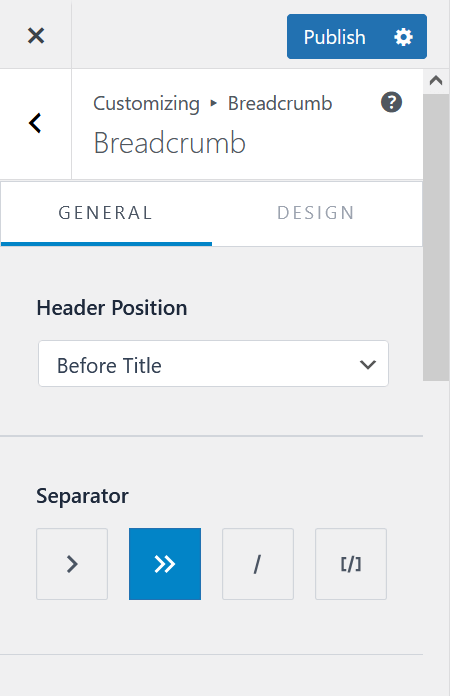
Simply use the Customizer to add WordPress breadcrumbs. You can select the option and easily customize it to your liking. Choose the positioning, the separator between layers and the font color. Not only is this a simple option to add website breadcrumbs but it ensures that they also match the design of your online presence.
Using plugins
If you don’t plan on changing the design of your own WordPress website or blog, or if you’ve chosen a theme with no option for WordPress breadcrumbs, you can use a WordPress plugin. One of the most popular plugins to this end is Breadcrumb NavXT. It is free and user-friendly.
- Add the plugin as usual.
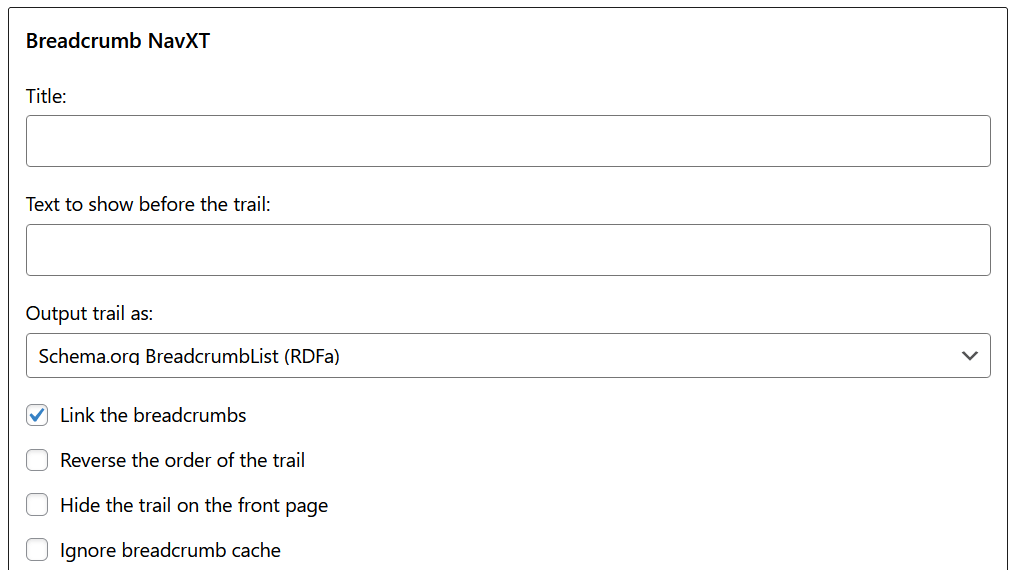
- Select “Widgets” in “Appearance”. You should be able to see Breadcrumb NavXT.
- Drag the widget to the area where you want the WordPress breadcrumbs to be displayed later.
- A drop-down menu appears below the arrow from where you can now make various adjustments, e.g. set the start page, store separators, determine the order, exclude select pages or ignore caching.
- Save your settings and check the WordPress breadcrumbs on your website.
- Stress-free, no matter your skill level with easy AI tools
- Fully customizable with themes and plugins
- Hassle-free updating and less admin
Using SEO plugins
Prefer working without additional plugins? You can use WordPress SEO plugins to insert breadcrumbs. One of the most popular solutions is Yoast SEO. The breadcrumb feature is intended for displaying search results, but it can be used on a website. To insert WordPress breadcrumbs using the plugin, proceed as follows:
- Install Yoast SEO and activate the plugin from your dashboard.
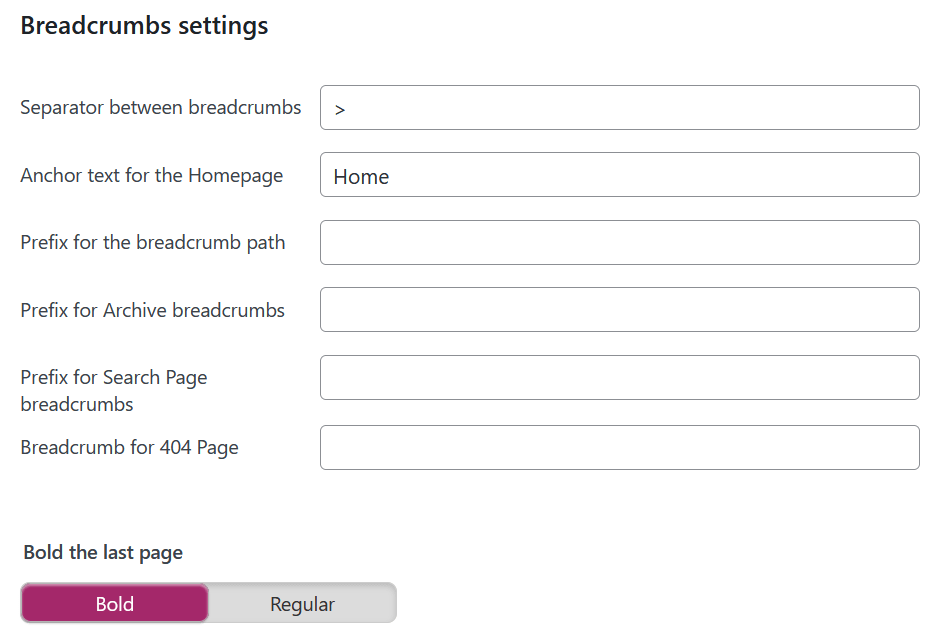
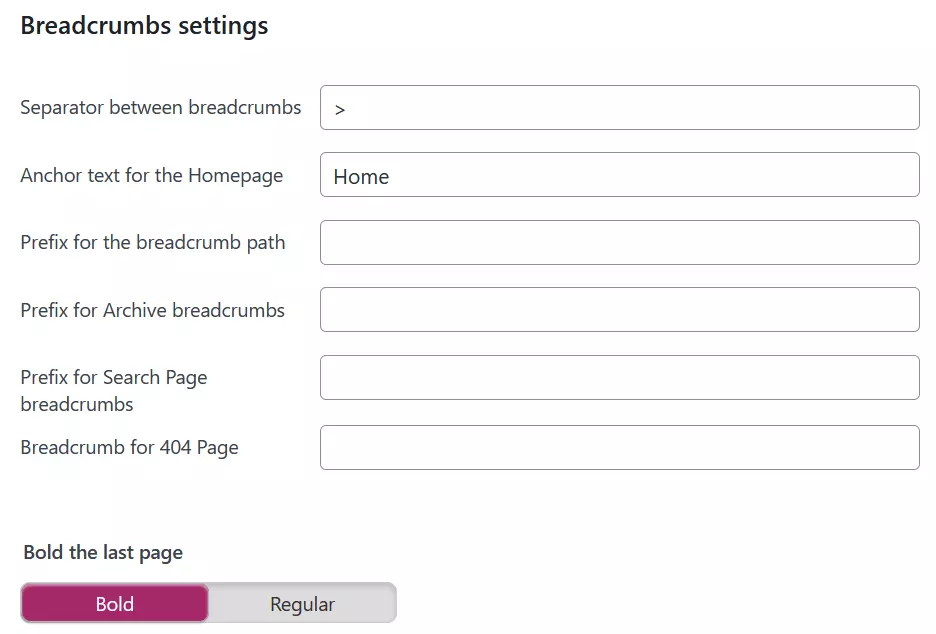
- On the left, in the “Yoast SEO” section, select “Search Appearance” and then “Breadcrumbs”. Enable the option at the bottom of the website appearance settings.
- Use shortcode [wpseo_breadcrumb] to insert it anywhere on your website.
Using code
Another option is to add WordPress breadcrumbs manually. You’ll be adding code in this case. First add the code to the functions.php file of your theme. For safety reasons create a child theme first. The code looks like this:
function breadcrumb() {
    echo '<a href="'.home_url().'" rel="nofollow">Startseite</a>';
    if (is_category() || is_single()) {
        echo "  »  ";
        the_category(' • ');
            if (is_single()) {
                echo "   »   ";
                the_title();
            }
    } elseif (is_page()) {
        echo "  »  ";
        echo the_title();
    } elseif (is_search()) {
        echo "  »  searchresults... ";
        echo '"<em>';
        echo the_search_query();
        echo '</em>"';
    }
}Add the code to the corresponding template. For example, to add WordPress breadcrumbs to the header, add the following code to header.php in the header section of the file.
<div class="breadcrumb"><!--?php breadcrumb (); ?--></div>To customize the design of WordPress breadcrumbs use additional CSS.
WordPress breadcrumbs are a useful addition to your website and have a positive impact on SEO while boosting the user experience. There are various ways in which to use the feature. Themes or plugins are an easy option to do so, while implementing code has the advantage of additional design and customization options.
Reviewers

Melissa Senn
Melissa Senn has been with IONOS since 2016 and focuses on the areas of websites, e-commerce, social media, and AI in the Digital Guide. As a digital strategist, she draws on her extensive SEO and GEO experience to translate complex technological trends into practical content.

Julia Hertler
With over 18 years of experience in content marketing, Julia Hertler has deep expertise in digital communications. For the past 10 years, she has specialized in the areas of domains and hosting at the IONOS Digital Guide, making complex technical topics easy to understand.