

Microsoft .NET Framework

Since Windows Vista, .NET Framework is installed by default with the operating system from Microsoft. The framework is both a runtime environment for the execution and a library for the development of programs. In our guide, we provide you with the most important information about the platform. Then we show the basic steps for getting started with the application.
- Great premium TLDs at affordable prices
- Simple registration & transfer
What is .NET Framework?
NET Framework is one of the main components of the software platform programmed by Microsoft .NET. Within this collection of tools for developers, .NET Framework fulfills two functions at once. Firstly, the partially open-source framework offers programming interfaces, utilities and class libraries for the development of programs. Secondly, with its CLR (Common Language Runtime), it has a runtime environment at the ready, which enables software based on .NET Framework to run easily.
Since Windows Vista (2007), Microsoft has included the .NET Framework with its operating systems. The library and runtime environment are installed by default and automatically kept up to date via Windows Update. Since not all versions of the framework are backward compatible, Microsoft’s systems usually install and maintain multiple editions of .NET Framework in parallel.
.NET Core, a completely open-source variant of .NET Framework, has existed since 2016 (since November 2020 as .NET Framework, part of .NET) and is developed by the .NET Foundation in collaboration with Microsoft, made available under the MIT license. Central points of the open-source edition are a modular structure and platform independence - .NET Core therefore also runs on Linux and macOS, among others.
What about .NET Framework makes it so interesting for programming?
Working with .NET Framework is useful for program developers for two reasons in particular:
- .NET Framework enables cross-language projects.
The platform makes it possible to work on the same project in different programming languages. In many cases, a simple code editor and the respective compiler, which .NET Framework also provides, are enough for this to be possible. For example, you can write program parts in C++, C#, F# or Visual Basic and later combine and use them in an application. For this purpose, the Microsoft tool collection makes use of the intermediate language CIL (Common Intermediate Language), formerly also known as Microsoft Intermediate Language (MSIL), which has a cross-language system with object-based data types.
Microsoft has continuously developed .NET Framework and the language co-working on the platform. Meanwhile, you can also program HTML5 or JavaScript applications based on the framework easily.
- Application execution guaranteed for Microsoft users
As mentioned, .NET Framework is now installed by default on Microsoft operating systems (with the exception of server editions). So if you develop a .NET Framework-based application, you’ll automatically have the assurance that a large part of the potential user base has the appropriate runtime environment. Otherwise, the framework, including its interfaces and libraries, can be post-installed in a few steps to support the execution of the software in question. With the additional edition .NET Core or the complete .NET suite, the necessary support on computers with Linux or macOS as operating system is also provided.
Microsoft and .NET Framework: A Timeline
Just in time for the turn of the millennium, Bill Gates presented his vision of .NET Framework to the public for the first time in June 2000. As a language-unifying platform for the three programming languages that dominate Windows, C++, J++ and Visual Basic, the framework became an indispensable tool even before its release. How was this possible? Several executable pre-release versions were used until Microsoft presented the first official edition in January 2002 with .NET (V1.0).
The biggest milestones in the version history of .NET Framework:
- 2002: Microsoft releases .NET (V1.0) and Visual Studio .NET 2002.
- 2005: .NET Framework 2.0 is released as the first major update to the platform, including a new runtime environment.
- 2006: In November, Microsoft releases .NET Framework 3.0, the first version of the framework to become a direct part of a Windows operating system (Vista).
- 2007: .NET Framework 3.5, one of the most famous versions of the Microsoft framework, arrives at the end of 2007. Like its predecessor 3.0, 3.5 draws on the second-generation runtime environment, which is why .NET Framework 3.5 is backward compatible to 2.0.
- 2008: Microsoft publishes parts of the source code for the first time.
- 2010: After a beta phase of almost two years, .NET Framework 4.0 is finally released in April 2010. The numerous innovations include a new runtime environment. There is therefore no compatibility with applications from previous versions.
- 2012: .NET Framework 4.5 is released in August 2012 and becomes the standard version of the developer platform shipped with Windows 8.
- 2015: .NET Framework 4.6 arrives as an integral part of Windows 10.
- 2020: .NET 5.0 becomes the official successor to .NET Framework (now in version 4.8) and .NET Core.
Getting Started with .NET Framework: The most important information at a glance
The Microsoft framework .NET provides an excellent basis for programming applications. The variety of programming interfaces and libraries reduces the effort for developers enormously. Added to this is the advantage of not being tied to a specific programming language and certain programming paradigms which gives you a lot of freedom.
Are you still at the very beginning of your developer career? In our learn-programming-basics article we offer you valuable tips for getting started in the world of programming.
We have summarized the most important facts for you to get started with .NET Framework.
Conditions of use
.NET Framework was only available for Windows, so macOS and Linux users had to switch to the alternative .NET Core. Since the merger to .NET, this restriction has been lifted, so you can take advantage of Microsoft’s developer tools on the operating system of your choice. This platform independence does not apply if you explicitly want to work with .NET Framework 4.8 or an even older version, as these were still developed exclusively for Windows.
In addition, if you do not want to write your own .NET applications from the command line using the .NET Software Development Kit, you will need one of the following applications:
Programing languages
The three main programming languages that you can use to program a .NET application are C#, F#, and Visual Basic. All three languages are supported by Windows as well as macOS and Linux. Windows users have another option with C++/CLI, a variant of classic C++ developed by Microsoft.
In addition, various other languages can be implemented in the framework with the appropriate compiler. For example, the PeachPie compiler, for example, allows you to work with PHP, while the Compiler Jurassic makes .NET programming with JavaScript possible.
Installation
Since Windows Vista, .NET Framework has been closely tied to Microsoft operating systems. However, the latest version is always recommended for development with the platform, so a manual installation is preferable here. For example, the current Windows 10 (as of July 2021) only has .NET Framework 3.5 and .NET Framework 4.8 pre-installed.
Of course, you can also work with older .NET Framework versions if this makes sense for your projects.
You can find the latest .NET version in the Download Center on the official Microsoft website. Simply select your system there - Windows, macOS, or Linux - and download the NET 5.0 Software Development Kit (SDK).
The runtime environment (.NET Runtime) is also included in the SDK. So the second download button presented for Windows users is only of interest if you just want to run .NET programs and don’t have the runtime environment installed yet!
Your first .NET app
Once you have installed the current version of the Microsoft framework, you can start programming your first app. You can either use one of the development environments listed under “Usage requirements” or - as in the following - the command prompt.
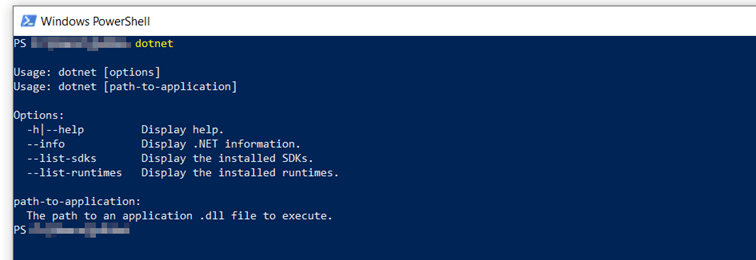
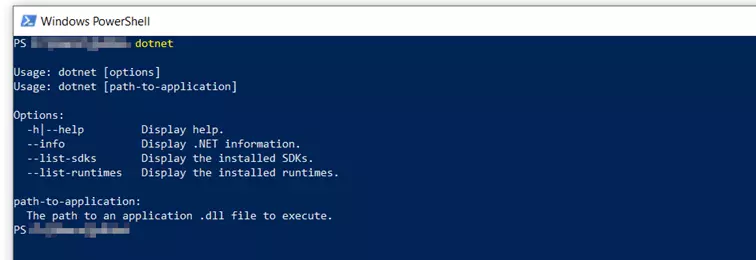
First, check the success of the installation by running the “dotnet” command. The command line subsequently presents you with an overview of the available options.
Now create your own .NET app in a new directory (here: “myApp”):
dotnet new console -o myAppThen open this app directory with the following command:
cd myAppThe main file of the newly created app is named Program.cs. It automatically contains a simple “Hello World!” code that you can now play out. To do this, run your program with the following command:
dotnet run

Reviewer

Julia Hertler
With over 18 years of experience in content marketing, Julia Hertler has deep expertise in digital communications. For the past 10 years, she has specialized in the areas of domains and hosting at the IONOS Digital Guide, making complex technical topics easy to understand.