

JSONP

Browsers and web applications have many features and mechanisms to protect users and their data from cyber-attacks. One of them is the same-origin policy, in short SOP, introduced by the former browser corporation Netscape in 1996 upon the implementation of JavaScript. This directive prohibits client-side scripting languages like JavaScript and ActionScript, but also stylesheet languages such as CSS, from accessing objects (graphics, videos, etc.) originating from another website or URL.
The origin is defined in the URL as a combination of protocol (e.g. HTTP or HTTPS), domain, and port. The SOP is only considered fulfilled if all three elements are identical, so that cross-site script access is possible. An exception is subdomains that can access objects of higher-level domains via corresponding DOM properties.
However, the boundaries set by the same-origin policy are not beneficial for every type of web project, and can even be obstructive in certain cases – such as in web applications that rely on an asynchronous data transmission between the browser and server (for example, on an Ajax basis). For such projects, solutions to circumvent the directive, like the JSON method JSONP, are required. This is explained in more detail in the following sections.
What is JSONP?
JSONP (also written as JSON-P) is a method that helps structured data be sent between different domains in JSON format. The acronym stands for JSON (JavaScript Object Notation) with Padding. To bypass the same-origin policy when requesting files from other domains, JSONP does not use the “XMLHttpRequest” object, as the usual JSON code does, but rather the element “script” including a function call. Unlike other files, scripts can also be transferred across domains without the SOP being violated.
JSONP was developed in 2005 by software developer Bob Ippolito and has been integrated into many Web 2.0 frameworks such as Dojo Toolkit, jQuery, or Google Web Toolkit in recent years as a viable alternative to the customary JSON.
JSONP is just one method of many for enabling cross-domain data transfers. A comparable mechanism exists in cross-origin resource sharing (CORS) that is not bound to JSON, but instead works with special HTTP headers.
How Does JSONP Work?
JSONP solves the same-origin policy problem using <script> elements. As many domains as you like can be specified in the “src” attribute of this element, and the directive does not apply here. Therefore, the attribute can also be used to distinguish URLs that belong to a foreign domain and return JSON code and other files. In such a case, the script itself is exclusively used as a service provider, which sends the JSONP query to the respective web server without having its own effect. In order for the client to be able to subsequently process the data, the server packs this again as a parameter in a JavaScript function, which is already predefined in the web browser and is communicated to the server in the query string (or query part) of the URL.
</script>
The format and name of the parameters to be specified in the query string for initiating a JSONP query are not standardized. Therefore, they may differ across web applications.
The following example is intended to clarify the operation of JSONP:
<script type="text/javascript" < codesnippet></script>
src="http://not-origin-url.com/getjson?jsonp=exampleCallback">
If this simple JSONP script is embedded in the HTML code of a website and then run by any client, JSON data is accessed by the foreign domain “not-origin-url.com” (“getjson”). The query string “?jsonp=exampleCallback” tells the contacted server that it is a JSONP query. In addition, the information is supplied that it should send the requested data as a parameter of the JavaScript function “exampleCallback”.
The server then generates the appropriate JavaScript code including the queried information as a parameter – in the case of this example, a name-value pair – and returns it to the client:
exampleCallback( {"name":"test", "value":1} );The function call is then executed by the browser as if it were listed directly in the HTML code of the source page. The browser is thereby able to process the data retrieved from the third-party URL.
A single
<script> element is required for each JSONP query. Alternatively, you can add a new element on the client side (referred to as script element injection) or reuse an existing element.</script>
The following YouTube tutorial provides a slightly more extensive demonstration of the JSONP method:
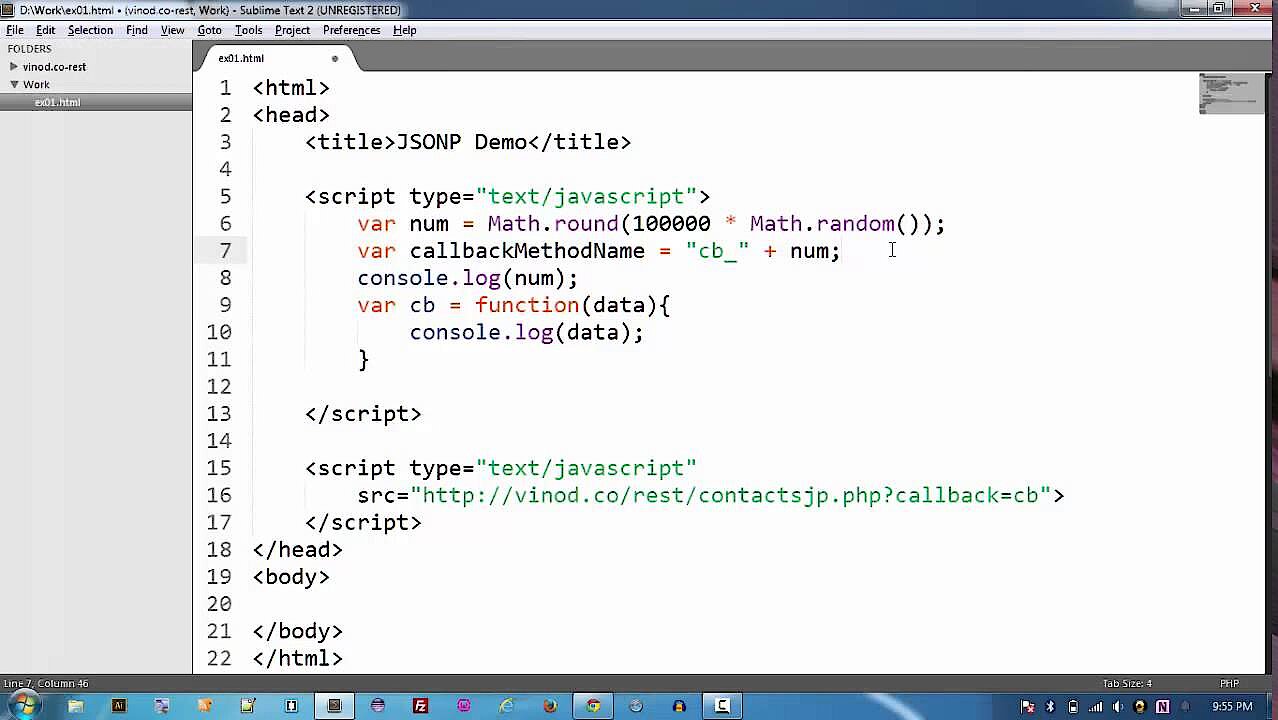 To display this video, third-party cookies are required. You can access and change your cookie settings here.
How Safe is JSONP?
JSONP is a solution for bypassing the SOP that is hotly debated in professional circles, due in particular to the increased security risk associated with script queries. This heightened risk already arises by the fact alone that an additional component is integrated into the processes of the website of origin, whose security system cannot be influenced. If, in fact, the contacted server exhibits vulnerabilities that enable unwanted JavaScript injections (incorporation of JavaScript code) by attackers, the server of origin is automatically exposed to an immediate danger – especially because not only JSON documents (as in the example), but any type of data can be retrieved.
Other known attack patterns that exploit the JSONP method are the following:
-
RFD (Reflected File Download): JSONP is prone to RFD attacks, where client users only seemingly download data from the desired target domain. In fact, however, malicious files or URLs are loaded, which in most cases is due to manipulation of callback functions.
-
CSRF/XSRF (Cross-Site Request Forgery): As the <script> element ignores the same-origin policy, a malicious website can request, obtain, and evaluate data from other web applications. If the user is logged on to the attacked site, attackers with these “fake” cross-domain requests could access sensitive data such as login information.
So, if you want to use JSONP scripts in your own web project, you should be absolutely sure that not only your own web server, but also the web server of the contacted web application is protected against such attacks and any kind of malware. JSONP code that retrieves data from insecure sources should therefore not be embedded or permitted.
Reviewer

Julia Hertler
With over 18 years of experience in content marketing, Julia Hertler has deep expertise in digital communications. For the past 10 years, she has specialized in the areas of domains and hosting at the IONOS Digital Guide, making complex technical topics easy to understand.