

What is Node.js and how does the JavaScript runtime environment work?

Node.js is a server-side runtime environment for JavaScript. It allows JavaScript to be executed not just in browsers but also on servers, making it especially suitable for developing scalable and event-driven applications. Thanks to its asynchronous, non-blocking architecture, developers can create efficient network and real-time applications with node.js.
What is Node.js?
Node.js is a server-side runtime environment based on Google Chrome’s V8 JavaScript engine, allowing JavaScript code to be executed outside of the browser. This enables both client and server logic to be implemented in the same language, making development more consistent and efficient. A key feature of node.js is its event-driven and non-blocking architecture, which allows for a high number of simultaneous connections with minimal resource usage.
Rather than creating a separate thread for each task, Node.js relies on an event loop model that continuously handles tasks and reacts to incoming events. This approach makes it especially well-suited for I/O-intensive scenarios such as running web servers. Thanks to the Node Package Manager (npm), developers have access to a vast ecosystem of modules, libraries, and tools that simplify the implementation of complex features. Node.js is also cross-platform, working on Windows, macOS, and Linux, and can power anything from lightweight server applications to large-scale, microservices-based systems.
- NEW: VM cloning, load balancing, block storage, and more
- Ideal for agentic AI, LLMs, and automation at scale
- Free 24/7 expert support and 99.99%+ uptime
- Unlimited traffic and no setup fees
How to install Node.js
Before you can work with node.js, you need to install node.js on your computer. The runtime environment includes everything you need: JavaScript, the Command Line Interface (CLI) for running scripts, and the package manager npm, which allows access to additional modules and libraries. With this environment, you can test simple scripts as well as develop complex server and web applications.
Visit the official Node.js website to download. On the homepage, you will typically see two versions: the LTS (Long Term Support) version and the current version. For beginners and production projects, the LTS version is recommended because it is supported long-term and is more stable.
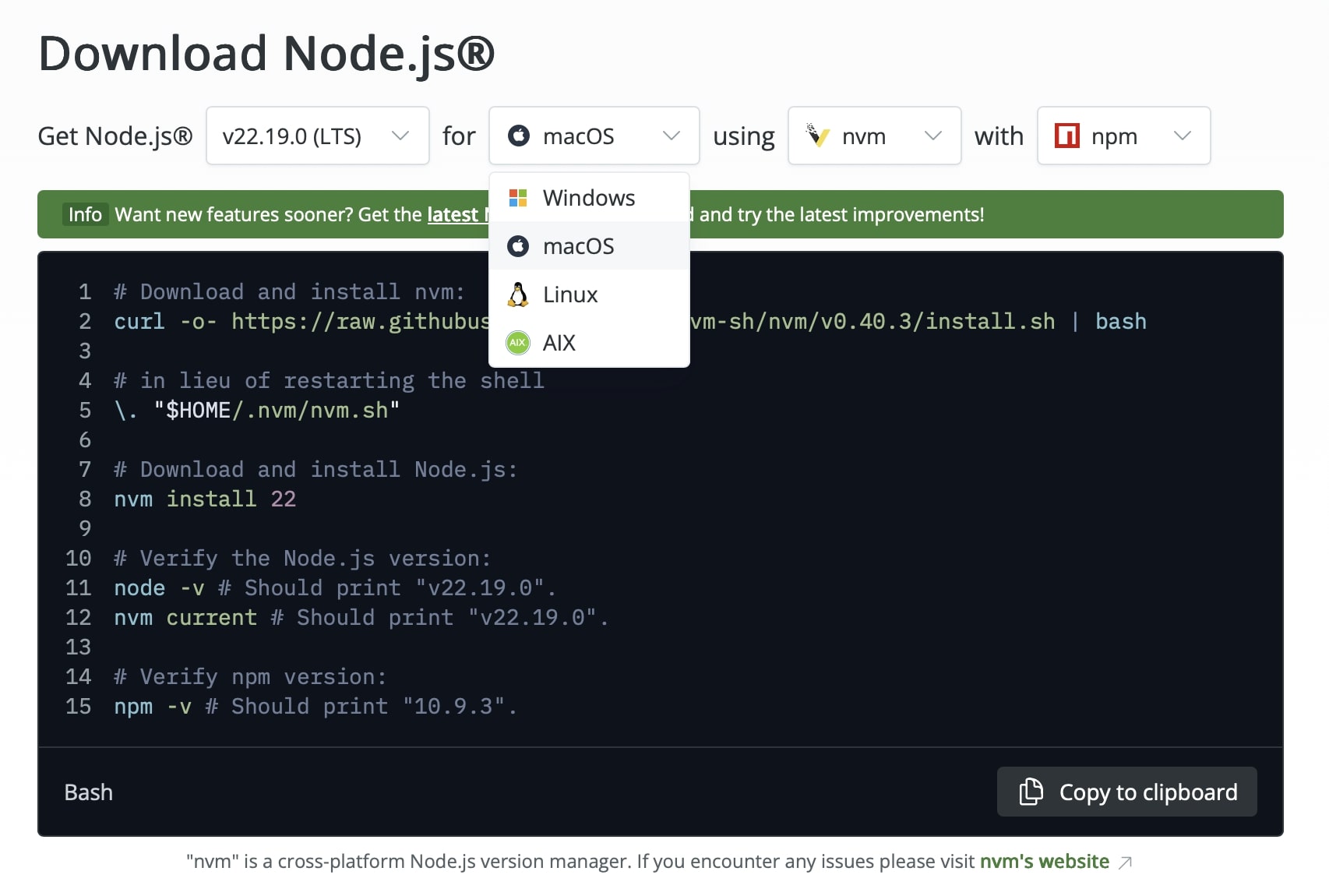
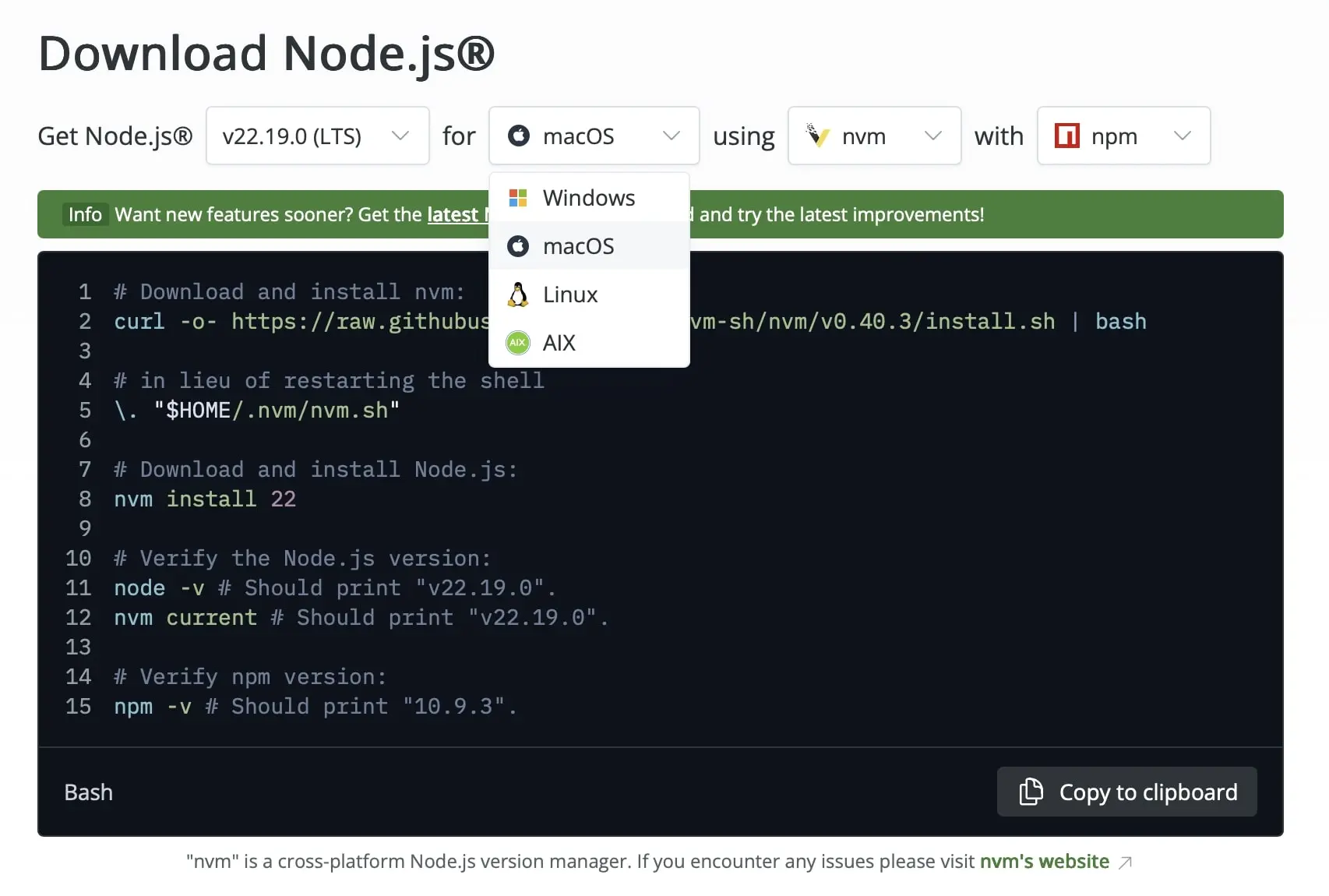
Click the download button for your operating system. Copy the terminal commands or open the downloaded installation package and follow the installer instructions. You can accept the default options during the process.
After the installation is complete, open your terminal. Enter the following commands to ensure that node.js has been installed correctly:
node -v
npm -vIf both commands return a version number, node.js is ready to use. You can now run your own JavaScript scripts or start node.js web servers.
How to write your first hello world in the CLI with Node.js
Once node.js is installed, you can use the command line to run JavaScript code directly on your computer. This is an easy way to test the functionality of node.js without setting up a complete web server right away.
Create a new file named hello.js and insert the following code:
console.log("Hello, World!");The console.log() command is a built-in JavaScript function that outputs content to the standard output, in this case, your console. Node.js interprets this command and prints the text directly in the terminal. You can save the file and then navigate to the file’s directory using the terminal or command prompt. There, execute the command:
node hello.jsYou should now see the following output:
Hello, World!This simple example demonstrates how Node.js functions as a JavaScript runtime environment on your computer and how code can be executed in the console before you move on to more complex applications.
How to create a hello world web server
In addition to simple scripts, Node.js is excellent for creating web servers. With just a few lines of code, you can set up a functional HTTP server that responds to requests.
First, create a file named server.js with the following content:
const http = require('http'); // Import the built-in HTTP module
const hostname = '127.0.0.1';
const port = 3000;
const server = http.createServer((req, res) => {
res.statusCode = 200; // HTTP status code 200 = OK
res.setHeader('Content-Type', 'text/plain'); // Defines the response as plain text
res.end('Hello, World!\n'); // Sends the text to the client and ends the response
});
server.listen(port, hostname, () => {
console.log(`Server running at http://${hostname}:${port}/`);
});Node.js has a built-in module named http that provides functions for communication over the HTTP protocol. We first include this module with require('http').
http.createServer() then creates a new web server. The provided function (req, res) => { ... } is called for each incoming request. req contains information about the incoming request, such as the URL, headers, or parameters. res is used to send a response to the client.
The code snippet res.statusCode = 200; sets the status code of the HTTP response (200 = successful). The MIME type of the response, in this case plain text, is also defined. With res.end('Hello, World!\n');, the message is sent to the client and the response is ended.
Now start the file with Node.js:
node server.jsThen, open a web browser or use a tool like curl to access the following IP address:
http://127.0.0.1:3000/You should see the message “Hello, World!” which confirms that the web server is functioning correctly.
Module structure and npm
Node.js is based on a modular architecture, allowing developers to break down applications into smaller, reusable units. These units, called modules, encapsulate specific functionalities such as file processing, network communication, or mathematical calculations and can be imported and used in other parts of the application. Node.js offers not only built-in core modules like fs (file system), the previously used http module, or path, but also the possibility to create custom modules to organize specific tasks within a project. Each module in Node.js is stored in a separate file and exports its functions or objects via module.exports, enabling other files to import and use them.
A central component of the Node.js ecosystem is the Node Package Manager (npm). With npm, thousands of freely available packages provided by the community can be installed, managed, and updated. Developers can use npm to automatically integrate dependencies into a project, control versions, and avoid conflicts between different packages. Packages are typically stored in a project’s node_modules subdirectory, while the package.json file contains the project’s metadata, dependencies, and scripts.
The modular structure and npm significantly simplify the maintenance and expansion of projects since individual modules can be developed, tested, and replaced independently. It also promotes code reusability and separation of concerns within an application. In combination with modern package management tools like npx, node.js modules can also be executed temporarily without permanent installation, supporting quick testing and prototyping. Thanks to this system, developers can create very complex applications based on small, easily maintainable building blocks that are easily scalable.
Applications of Node.js
Node.js is not only a JavaScript runtime environment but also a versatile tool for application development. Below, three application areas are presented in detail as examples.
Developing APIs
Node.js is well-suited for developing APIs that serve as interfaces between different applications or systems. Thanks to its event-driven architecture and non-blocking I/O functions, APIs developed in Node.js can handle large volumes of requests simultaneously without sacrificing performance. Developers often use frameworks like Express.js to quickly and efficiently create RESTful APIs. These APIs enable applications to read, write, and update data. With Node.js, it’s also easy to connect databases such as MongoDB, PostgreSQL, or MySQL, which makes the API more powerful, flexible, and scalable.
Real-time applications
Node.js is also excellent for real-time applications where data needs to be exchanged instantly between the server and client. Examples include chat applications, collaborative document editing, or live dashboards. By using Websockets, which enable bidirectional communication, Node.js applications can respond immediately to user interactions. Thanks to the asynchronous event loop, Node.js can handle many simultaneous connections without noticeable delay. This makes it an ideal choice for applications where latency needs to be minimal.
Tools and automations
Node.js is often used for creating development and automation tools. This includes build tools, task runners, or scripts that automate recurring tasks. CLI tools for administration or DevOps tasks can also be easily developed in Node.js, as the platform provides direct access to the file system, network, and operating system functions.
Popular frameworks for Node.js
Node.js serves as the foundation for many frameworks that significantly simplify development. These frameworks abstract repetitive tasks, provide structures for clean code, and offer built-in features that reduce development time. The most well-known and widely used frameworks include Express, Nest, and Socket.io, each with different focuses and applications.
Express.js
Express.js is one of the most popular frameworks built on Node.js, designed mainly for developing web applications and RESTful APIs. Its minimalist, flexible nature lets developers add custom middleware to process HTTP requests, manage routing, and send responses. Because of its lightweight structure, Express works well for both simple prototypes and large-scale applications. A vibrant community also contributes countless extensions that add features like authentication, session handling, and template engines. By abstracting much of the complexity of Node.js’s native HTTP module, Express helps developers build server applications that are both efficient and easy to maintain.
Nest.js
Nest.js is a progressive framework that focuses on structure, scalability, and type safety. It uses TypeScript by default but also supports plain JavaScript, and is architecturally inspired by the Angular web framework. Nest simplifies the implementation of APIs, microservices, and server-side applications by providing dependency injection, declarative modules, and a consistent pattern system. The framework is particularly suited for larger projects where clean architecture and long-term maintainability are crucial.
Socket.io
Socket.io is a framework for developing real-time applications that enables bidirectional communication between client and server. It is built on Websockets but offers additional features like fallbacks for older browsers, event-driven communication, and automatic reconnections. Socket.io is frequently used in applications where data needs to be instantly exchanged between the server and client. The integration into node.js projects is straightforward, as the framework provides a simple API for sending and receiving messages. Thanks to the robust architecture, developers can build scalable real-time systems that respond reliably and efficiently to many simultaneous connections.
- Get online faster with AI tools
- Fast-track growth with AI marketing
- Save time, maximize results
How does PHP compare with Python?
Node.js stands out from traditional server-side languages like PHP and Python mainly due to its event-driven and non-blocking architecture. While PHP traditionally starts a new process per request and runs through the entire workflow for each one, node.js handles many simultaneous requests asynchronously within a single process, significantly improving performance under heavy load. Although Python is versatile and suitable for web development, data analysis, and Machine Learning, it typically uses blocking I/O operations, necessitating additional frameworks like Asyncio for real-time applications.
Another difference lies in the programming language itself: node.js is based on JavaScript, which can be used both in the browser and server-side. This allows developers to use a unified language across the entire stack, whereas PHP is limited to the server and Python is typically combined with frameworks like Django or Flask for web projects.
Node.js is particularly well-suited for real-time applications, APIs, and microservices, while PHP is still often used for traditional web applications or content management systems. Python, on the other hand, impresses with its simplicity and extensive libraries for a wide range of use cases. Ultimately, the choice of technology depends on individual requirements: node.js offers advantages in performance and scalability, PHP excels in traditional web projects, and Python is strong in data-intensive and analytical applications.
Best practices for beginners in node.js
When starting with node.js, it is especially important to develop good programming habits from the beginning to write clean, secure, and maintainable code. A central aspect is structuring the project:
- Separate modules logically.
- Use folders for routes, controllers, models, and helper functions.
- Avoid long monolithic files.
Error handling is an essential part of Node.js development, since its asynchronous design can easily result in unexpected crashes if not managed properly. For synchronous code, rely on try-catch blocks, and for promises, use error callbacks or .catch(). In Express, it’s recommended to set up a centralized error-handling middleware to ensure consistent handling of unexpected issues and maintain application stability.
Security is another key consideration. Never execute unvalidated user inputs, use parameter binding for database queries, and store sensitive information in environment variables. To further protect your application, keep dependencies up to date, run vulnerability checks with tools such as npm audit, and secure communication with HTTPS encryption.
Don’t neglect logging and monitoring: capture errors, key events, and performance metrics to identify problems before they escalate. For larger applications, it’s also a good idea to use linters like ESLint to maintain code consistency and prevent common mistakes.
For handling asynchronous code, beginners are encouraged to use the async/await syntax, as it improves readability and makes error handling more straightforward.
Reviewer

Christian Heldmaier
Christian Heldmaier is an experienced online marketing and SEO specialist from Karlsruhe. He has been working as an SEO Manager at IONOS since July 2020.