

Composite Pattern: sample solutions for part-whole hierarchies

Dynamic data structures require a clear and concise hierarchical structure. Putting these structures into practice is often not that easy. Care must be taken that the type of object is not queried every time before the actual data is processed because this would not be efficient. Using a Composite Design Pattern is recommended when many primitive objects meet composite objects. This software design approach lets clients treat individual and compound objects consistently by hiding their differences from the client.
What is a Composite Pattern?
The Composite Design Pattern (Composite Pattern in short) is one of 23 GoF design patterns for software development, published by Erich Gamma, Richard Helm, Ralph Johnson, and John Vlissides (collectively referred to as the “Gang of Four”) in 1994. Like the Facade Pattern and the Decorator Pattern, it is a design pattern which compounds objects and classes into larger structures.
The Composite Pattern follows the basic idea of representing simple objects and their containers or compositions (i.e. compositions of objects) in an abstract class so they can be treated uniformly. This type of structure is referred to as part-whole hierarchy, whereby an object is either only part of a whole or the whole that consists of individual parts.
Which problems can be solved using a Composite Pattern UML?
The basic purpose of the Composite Design Pattern is – as with all GoF patterns – the best possible handling of recurring design problems in object-oriented development. The desired end result is flexible software, characterized by easily implementable, testable, exchangeable, and reusable objects. To this end, the Composite Pattern describes a way in which individual objects and composite objects can be treated in the same way. In this way, an object structure can be created that is easy to understand and enables highly efficient client access. Further, the code's susceptibility to errors is minimized.
Composite Design Pattern: graphical notation (UML)
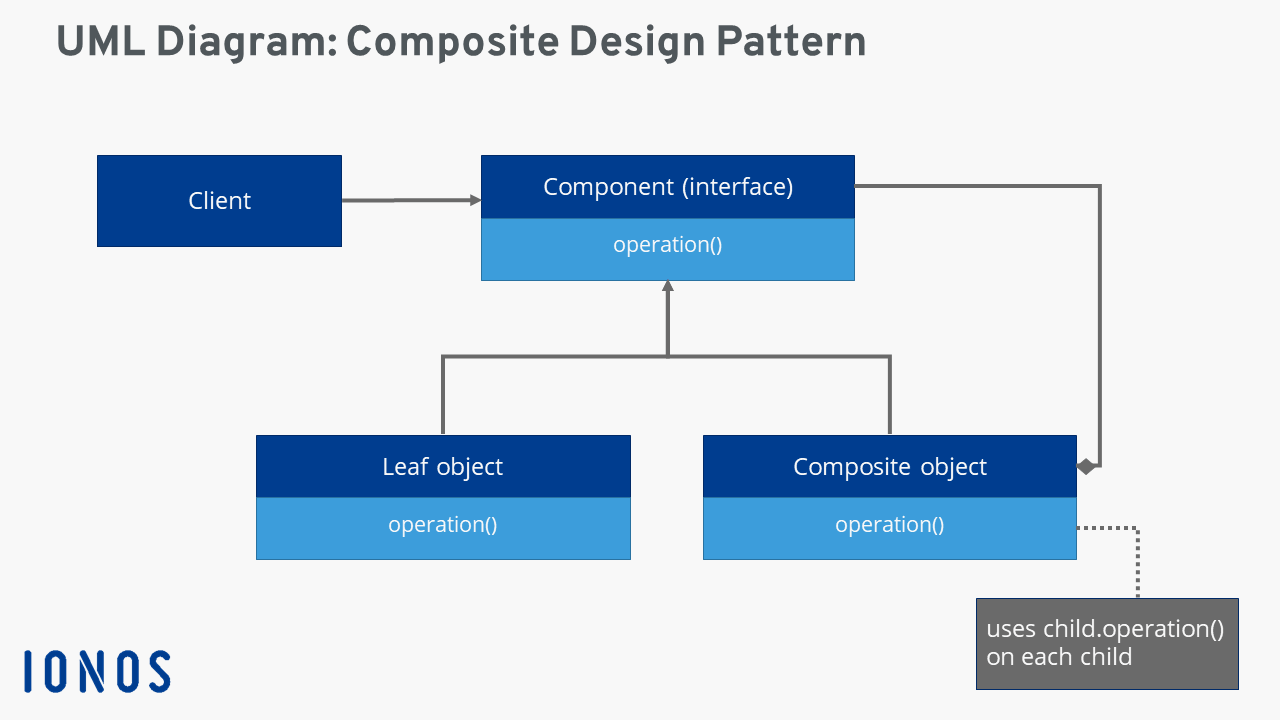
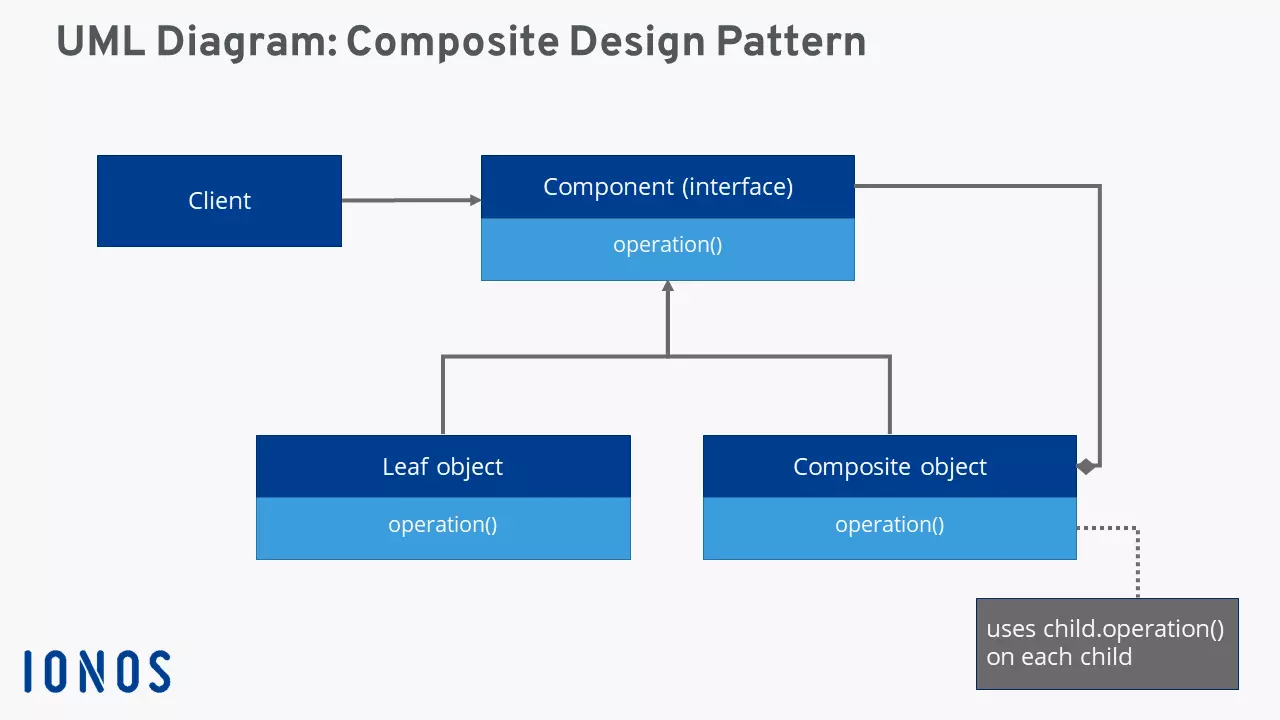
To implement part-whole hierarchies, the Composite Pattern provides for the implementation of a uniform component interface for simple part objects, also referred to as leaf objects, and composite objects. Individual leaf objects directly integrate this interface; composite objects automatically forward specific client requirements to the interface and their subordinate components. For the client, it doesn’t matter what type an object is (part or whole) since it only addresses the interface.
The following class diagram using the graphical notation UML visualizes connections and hierarchies of a software Composite Pattern more clearly.
Strengths and weaknesses of the Composite Pattern
The Composite Pattern is a constant in software development. Projects with heavily nested structures tend to benefit from practical approach that are objects: whether that’s a primitive object or a composite object, whether it has simple or complex dependencies. The depth and width of the nesting doesn’t matter in the Composite Design Pattern. The differences between the object types can be ignored by the client so that no separate functions are required for a query. This has the advantage that the client code is simple and lean.
Another advantage of the Composite Pattern is the flexibility and simple extendibility that the pattern gives a software. The universal component interface allows the integration of new leaf and composite objects without changes to the code – whether on the client side or existing object structures.
But despite all its advantages, the Composite Pattern and its uniform interface do have some weaknesses. The interface can be a pain for developers. Implementation comes with several major challenges. For example, it should be decided upfront which operations are to be defined in the interface and which are to be defined in the composite classes. Subsequent adjustment of the composite properties (for example, the restricting child elements) is often complicated and difficult to implement.
| Advantages | Disadvantages |
|---|---|
| Provides everything to display heavily nested object structures | Implementation of component interfaces is very challenging |
| Lean, easy-to-understand program code | Subsequent adjustment of composite features is difficult and cumbersome to realize |
| Great expandability |
Application areas for the Composite Pattern
Using a Composite Pattern pays off wherever operations need to be carried out on dynamic data structures with complex hierarchies (in terms of depth and width). This is also referred to as a binary tree structure, which is interesting for a wide variety of software scenarios and is often used. Typical examples are:
Data systems: Data systems are among the most important components of device software. These can be easily displayed using a Composite Pattern. Single files are displayed as leaf objects or folders, which can contain their own data or sub-folders.
Software menus: Program menus represent typical use cases for a binary tree structure according to the Composite Design Pattern. Program menus represent a typical use case for a binary tree structure according to the composite design pattern. The menu bar contains one or more root entries (composite objects) such as “File”. These provide access to various menu items that can either be clicked directly (leaf) or contain further sub-menus (composite).
Graphical interface (GUIs): Tree structures and the Composite Pattern also play an important role in the design of graphical user interfaces. Aside from simple leaf elements such as buttons, text fields, or checkboxes, composite containers such as frames or panels ensure a clear structure and greater clarity.
Code example: Composite Pattern
The Composite Pattern is probably best established in the Java programming language. The pattern forms the basis of the Abstract Window Toolkit (AWT), among other things. AWT is a practical and popular API with around 50 ready-to-use Java classes for the development of cross-platform Java interfaces. In the code example that follows – taken from the blog entry “Composite Design Pattern in Java” on baeldung.com – we’ve focused on the popular programming language.
In this practical example, the hierarchical structure of company departments is shown. As a first step, the component interface “Department” is defined:
public interface Department {
	void printDepartmentName();
}Subsequently, two simple leaf classes “FinancialDepartment” (for the finance department) and “SalesDepartment” (for the sales department) are defined. Both implement the printDepartmentName() method from the component interface, but don’t contain any further Department objects.
public class FinancialDepartment implements Department {
	private Integer id;
	private String name;
	public void printDepartmentName() {
		System.out.println(getClass().getSimpleName());
	}
	// standard constructor, getters, setters
}
public class SalesDepartment implements Department {
private Integer id;
private String name;
public void printDepartmentName() {
System.out.println(getClass().getSimpleName());
}
// standard constructor, getters, setters
}A composite class that fits the hierarchy is defined as “HeadDepartment”. This consists of several department components and, in addition to the printDepartmentName() method contains methods for adding further elements (addDepartment) or removing existing elements (removeDepartment):
public class HeadDepartment implements Department {
	private Integer id;
	private String name;
	private List<department> childDepartments;</department>
	public HeadDepartment(Integer id, String name) {
		this.id = id;
		this.name = name;
		this.childDepartments = new ArrayList<>();
	}
	public void printDepartmentName() {
		childDepartments.forEach(Department::printDepartmentName);
	}
	public void addDepartment(Department department) {
		childDepartments.add(department);
	}
	public void removeDepartment(Department department) {
		childDepartments.remove(department);
	}
}