

What is a proxy server?

A proxy server is an intermediary between a client (e.g., a computer) and a target server, forwarding requests and sending back responses. It can be used for anonymization, enhancing security, restricting access, or speeding up connections through caching.
- Great premium TLDs at affordable prices
- Simple registration & transfer
A proxy server refers to a communication interface in a network that mediates between two computer systems. The fundamental task of the proxy server is to receive client requests on behalf of a server and forward them with its own IP address to the target computer. In this type of communication, there is no direct connection between the sender and the receiver. Occasionally, the requesting system and the target computer are unaware that they are dealing with a proxy.
How does a proxy server work?
A proxy server acts as an intermediary between a client (e.g., a computer or smartphone) and the target server on the internet.
When a user makes a request, such as accessing a webpage, it is not sent directly to the target server but first to the proxy server. The proxy processes the request, can modify or analyze it, and then forwards it to the actual server. Once the response from the target server arrives, the proxy receives it, may process it again, and sends it back to the user.
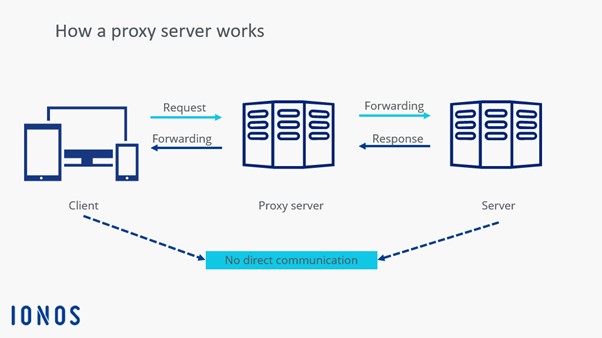
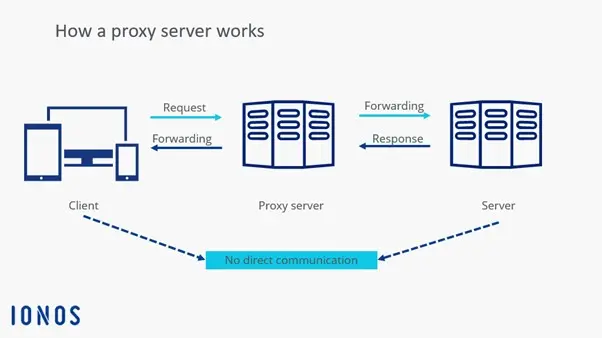
Some proxy servers cache frequently requested content to provide it faster for later requests and reduce server load. Depending on configuration, the proxy can also filter network traffic, such as blocking or redirecting certain requests. Moreover, it can replace the user’s original IP address with its own, so the target server only sees the proxy IP.
What differentiates proxy servers and VPNs?
A proxy server and a VPN (Virtual Private Network) may seem to have similar functions at first glance, but they differ in their operation and level of protection. While a proxy only redirects the traffic of individual applications or browser requests, a VPN encrypts the entire internet traffic of the device. This provides higher privacy protection and secures data against eavesdropping attempts, even in insecure networks.
Another difference lies in IP masking. While a proxy server merely changes the IP for specific requests, a VPN replaces the user’s entire IP address. Additionally, VPNs are often more powerful for security-critical applications because they protect data from hackers and surveillance programs. However, this also affects speed. VPNs are generally slower than proxies due to additional data encryption. Proxies, on the other hand, are faster and easier to set up.
How to set up a proxy server
Setting up a proxy server depends on the operating system or the application being used.
- Windows: On Windows, a proxy server can be configured through network settings. Open Settings, go to Network & Internet, and select the Proxy section. There, you can either enter an automatic configuration URL or manually set up a proxy server with IP address and port.
- macOS: On macOS, set up is done through System Preferences under Network, where the proxy server is activated and configured in the advanced options.
- Browser: In web browsers, the proxy server can be set up by using the browser settings. This is particularly useful for bypassing network restrictions.
- Mobile devices: On mobile devices, the proxy server is set under the Wi-Fi settings for the respective network.
- Corporate context: For businesses or larger networks, a proxy server can be set up on a separate computer or firewall, often with specialized software like Squid or Microsoft Forefront TMG. Some proxies require authentication, where a username and password must be entered. After configuration, the connection should be tested by accessing a webpage or checking the IP address to ensure the proxy server is functioning correctly.
Advantages and disadvantages of proxy servers
Proxy servers offer a wide range of advantages. Particularly noteworthy is anonymization, as the proxy server can mask users’ IP addresses, thereby protecting their identity on the internet. Additionally, proxies enable caching of web pages, which reduces traffic and speeds up load times. A proxy server can also be used for load balancing, distributing incoming requests across multiple servers to evenly distribute the load.
In businesses and educational institutions, proxy servers are often used to control access to certain websites and filter out unwanted content. Geographic restrictions can also be bypassed with a proxy by altering the user’s location. Another advantage is protection from harmful websites, as the proxy server can block suspicious traffic.
However, there are also some disadvantages. Free or insecure proxy servers can pose a security risk, as they may intercept data and even collect personal information. Unlike VPNs, many proxies do not offer end-to-end encryption, leaving traffic vulnerable to interception by third parties. Additionally, proxies can slow down internet speed due to high user numbers or poor configuration. Some websites detect and block proxy IPs, so access to certain content remains restricted. Moreover, setting up your own proxy server can be complicated for inexperienced users.
| Advantages | Disadvantages |
|---|---|
| ✓ Anonymization | ✗ Security risk when using insecure software |
| ✓ Speed increase through caching | ✗ Slowdown of internet speed |
| ✓ Access control to websites | ✗ Blocked proxy IPs sometimes unintentionally prevent access |
| ✓ Bypass geographical restrictions | ✗ Sometimes no end-to-end encryption |
| ✓ Blocking suspicious content | |
| ✓ Load balancing |
Applications of a proxy server
There are various reasons to implement a proxy server. As an intermediary between two communication partners, this network component can implement a range of additional functions.
Load balancing and filtering
A proxy server enables data exchange between two systems even when a direct connection is impossible due to incompatible IP addresses—for example, if one component uses IPv4 and the other uses the new IPv6 standard. Data taking a detour through a proxy can also be filtered and cached to block certain web content for clients or automatically reject suspicious server requests.
Furthermore, in the context of load balancing, a proxy server can distribute incoming requests across various target systems to ensure a sensible overall network load. Additionally, a proxy server is a central component of the firewall, protecting computer systems from public network attacks.
Proxy as cache
Another standard function for a proxy server is caching. To quickly respond to recurring requests from a local network, a properly configured proxy server temporarily stores a copy of the data it receives from servers on the internet in its cache. Frequently requested web content doesn’t need to be reloaded every time but can be directly delivered. This saves time and bandwidth.
Bandwidth control and load distribution
When a proxy server is used for bandwidth control, it allocates predefined resources to network clients based on load. This ensures that individual applications do not completely block the bandwidth. As a central interface, a proxy server also enables the redistribution of resource-intensive client requests or server responses across different systems, allowing for even load distribution within a computer network.
Anonymization
Since proxy servers prevent a direct connection between sender and recipient, it is possible to hide a client’s IP address behind the communication interface. This allows for a certain level of anonymity, as users outwardly operate with the IP address and location of the proxy. In countries with strict internet censorship or restricted access to copyrighted content, proxy servers abroad are sometimes used to bypass geo-blocking.
What are the different types of proxy servers?
In addition to a general proxy definition, various names circulate for different types of proxy servers, which are often not clearly distinguished from one another. They relate to the technical implementation of the network component as well as application-specific differences.
Forward vs. reverse proxy
Proxy servers can be implemented in two directions. A forward proxy serves to protect a client network from influences from the internet. If the target system, such as a web server, is to be protected by an upstream proxy server, it is called a reverse proxy.
- Forward proxy (client protection): When a proxy server is installed as an interface between a private network (LAN) and the internet, local devices can be effectively shielded from influences from the public network. Requests from the LAN are received by the proxy and forwarded with its IP address as the sender address to the target machine on the internet. Response packets from the internet are thus not addressed to the client in the LAN but also pass through the proxy server before being forwarded to the actual destination. Generally, the proxy server acts as a control instance. Corresponding security systems do not need to be installed on every client in the network but can be implemented on a manageable number of proxy servers.
- Reverse proxy (server protection): Web servers can also be additionally secured by placing a proxy server in front of accesses from the public network. Clients from the internet do not directly access the target machine. Instead, requests are received by the proxy server, checked according to configured security rules, and forwarded to the background server if deemed safe.
Application level vs. circuit level
Some proxy servers are technically designed to analyze data packets handed to them for forwarding. Other proxy implementations, however, do not have access to packet data. In such cases, filtering functions can be implemented based on the sender’s IP address and the addressed port.
-
Application-level proxy: An application-level proxy is located on the application layer (Layer 7) of the OSI reference model. This type of proxy server has functions to analyze data packets and block, modify, or forward them according to preconfigured rules. An application-level proxy is also called an application or application filter.
-
Circuit-level proxy: The circuit-level proxy operates on the transport layer (Layer 4) of the OSI reference model and, therefore, cannot analyze packet data. This type of proxy server is usually used as a firewall filter module and allows filtering of data packets through ports and IP addresses. Unlike the application-level proxy, the circuit-level proxy cannot influence the communication itself. Instead, the filtering is based on an all-or-nothing principle. Data packets are either passed through or blocked.
Dedicated vs. generic proxy servers
The classification based on the terms “dedicated” and “generic” refers to whether a proxy server is responsible for just one communication protocol (dedicated proxy) or if the network interface serves as a contact point for all communication protocols (generic proxy).
- Dedicated proxy: A dedicated proxy server is configured for a specific communication protocol as its name suggests. Typically, different dedicated proxy servers are operated in parallel for various protocols like HTTP, FTP, or SMTP.
- Generic proxy: Unlike dedicated proxies, a generic proxy server is not specialized and is used for multiple communication protocols.
In practice, an application-level proxy is usually implemented as a dedicated proxy server. Generic proxy servers, on the other hand, are used as circuit-level proxies. Consequently, the corresponding terms are sometimes used interchangeably.
Reviewers

Melissa Senn
Melissa Senn has been with IONOS since 2016 and focuses on the areas of websites, e-commerce, social media, and AI in the Digital Guide. As a digital strategist, she draws on her extensive SEO and GEO experience to translate complex technological trends into practical content.

Christian Heldmaier
Christian Heldmaier is an experienced online marketing and SEO specialist from Karlsruhe. He has been working as an SEO Manager at IONOS since July 2020.