

TCP (Transmission Control Protocol) – The transmission protocol explained

When you connect to the Internet, you establish a connection between a router and a computer or mobile device in a few simple steps, whether you’re using wired or wireless technology. Nothing else is required because the system automatically logs in to the network and obtains the unique Internet address that you need to receive and send data. This is made possible by a set of protocols known as the Internet protocol suite. One of the oldest and most important protocols in the suite is the Transmission Control Protocol (TCP). It determines how network devices exchange data.
What is TCP (Transmission Control Protocol)?
The Transmission Control Protocol, or TCP protocol for short, is a standard for exchanging data between different devices in a computer network. This protocol dates back to 1973, when computer scientists Robert E. Kahn and Vinton G. Cerf published the first version of the standard as part of a research paper. However, it took another eight years before TCP was standardized in RFC 793. Since then, there have been a number of improvements and extensions, although the core of the protocol has remained unchanged. The current version, which is defined in RFC 7323 is from 2014.
The current version of the TCP protocol allows two endpoints in a shared computer network to establish a connection that enables a two-way transmission of data. Any data loss is detected and automatically corrected, which is why TCP is also called a reliable protocol. Together with UDP and SCTP, TCP forms the group of transmission protocols belonging to the Internet protocol suite that are located at the transport layer in the network architecture according to the OSI model. The term TCIP/IP protocol stack is also commonly used to refer to the Internet protocol suite since the TCP protocol is almost always based on the Internet protocol (IP) and this connection is the foundation for the majority of public and local networks and network services.
How exactly do TCP connections work?
TCP allows for transmission of information in both directions. This means that computer systems that communicate over TCP can send and receive data at the same time, similar to a telephone conversation. The protocol uses segments (packets) as the basic units of data transmission. In addition to the payload, segments can also contain control information and are limited to 1,500 bytes. The TCP software in the network protocol stack of the operating system is responsible for establishing and terminating the end-to-end connections as well as transferring data.
The TCP software is controlled by the various network applications, such as web browsers or servers, via specific interfaces. Each connection must always be identified by two clearly defined endpoints (client and server). It doesn’t matter which side assumes the client role and which assumes the server role. All that matters is that the TCP software is provided with a unique, ordered pair consisting of IP address and port (also referred to as "2-tuple" or "socket") for each endpoint.
The three-way handshake: How a TCP connection is established in detail
Prerequisites for establishing a valid TCP connection: Both endpoints must already have a unique IP address (IPv4 or IPv6) and have assigned and enabled the desired port for data transfer. The IP address serves as an identifier, whereas the port allows the operating system to assign connections to the specific client and server applications.
For a detailed explanation of how TCP and IP interact, see our in-depth article on TCP/IP.
The actual process for establishing a connection with the TCP protocol is as follows:
- First, the requesting client sends the server a SYN packet or segment (SYN stands for synchronize) with a unique, random number. This number ensures full transmission in the correct order (without duplicates).
- If the server has received the segment, it agrees to the connection by returning a SYN-ACK packet (ACK stands for acknowledgment) including the client's sequence number plus 1. It also transmits its own sequence number to the client.
- Finally, the client acknowledges the receipt of the SYN-ACK segment by sending its own ACK packet, which in this case contains the server's sequence number plus 1. At the same time, the client can already begin transferring data to the server.
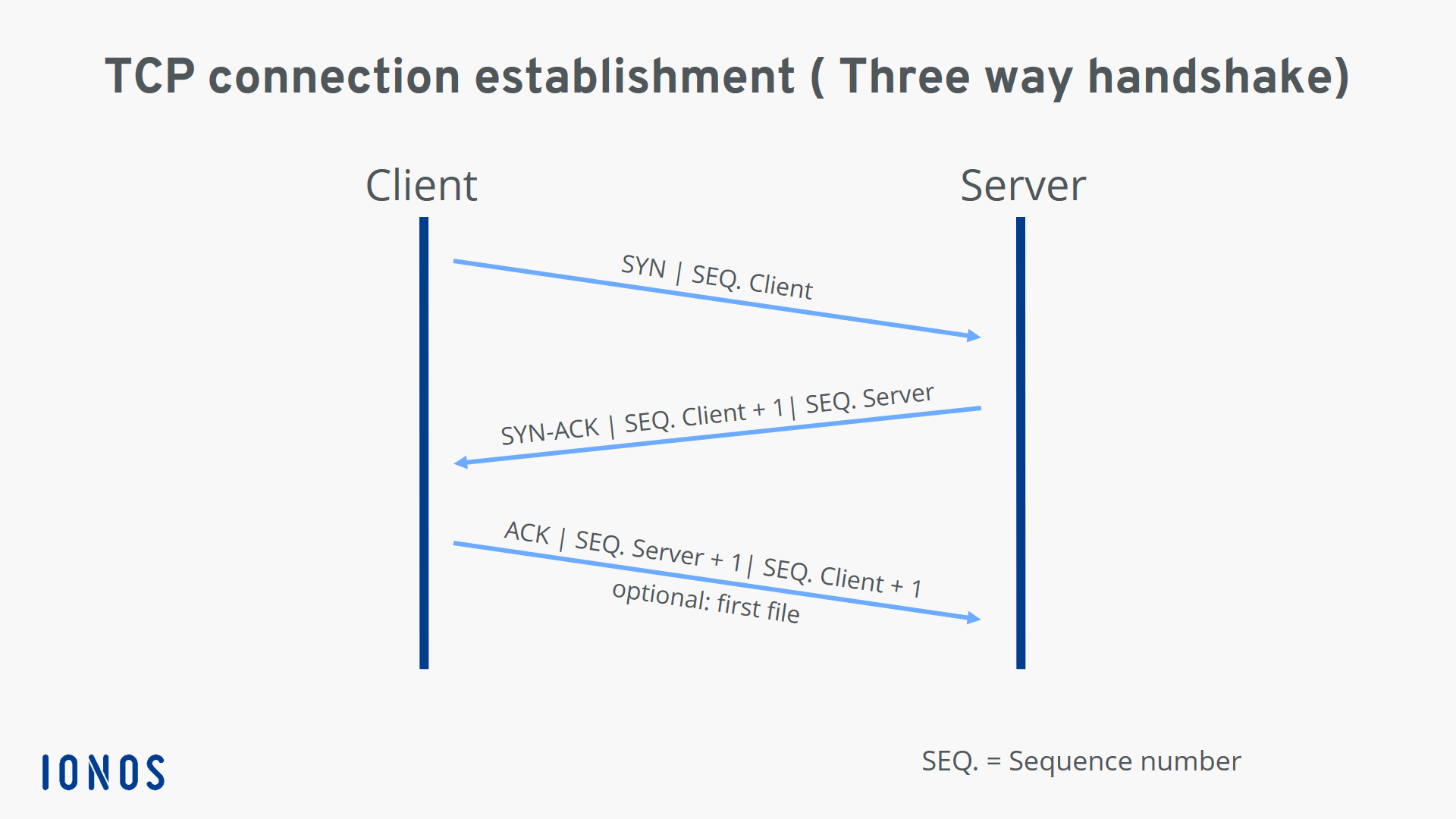
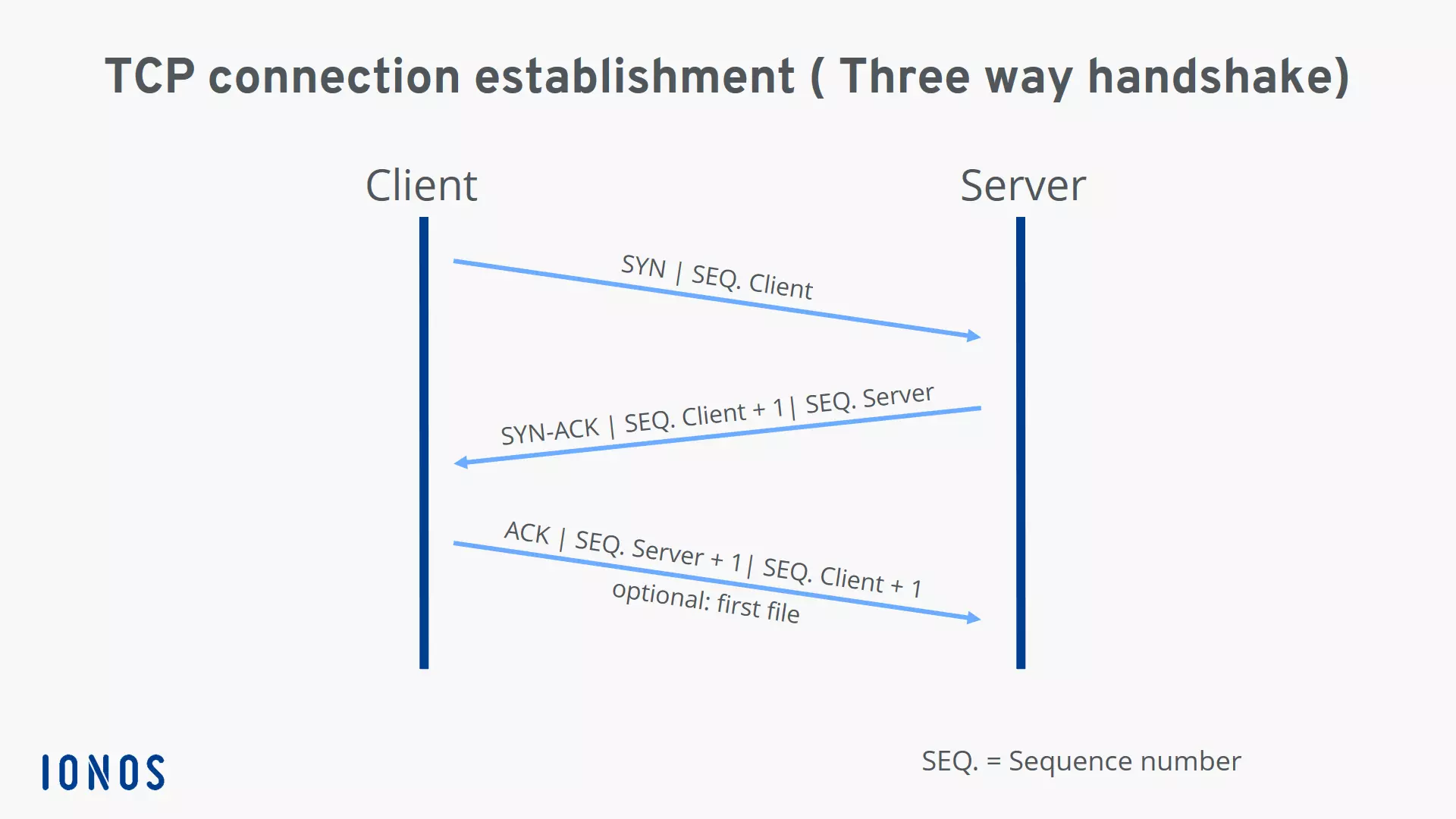
Since the TCP connection is established in three steps, the connection process is called a three-way handshake.
If the server port is closed or access is blocked, the client receives a TCP RST packet (reset) instead of an acknowledgment packet.
TCP teardown: How a controlled TCP connection termination works
Both sides of a connection can terminate a TCP connection, and even one-sided termination is also possible. This is also known as a half-open connection, whereby the other side is still allowed to transfer data even if one side has already disconnected.
The individual steps of two-way termination (initiated by the client for the sake of simplicity in this example) can be summarized as follows:
- The client sends a FIN segment to notify the server that it no longer wants to send data. It sends its own sequence number, just as it does when the connection is established.
- The server acknowledges receipt of the package with an ACK segment that contains the sequence number plus 1.
- When the server has finished the data transfer, it also sends a FIN packet, to which it adds its sequence number.
- Now it is the client's turn to send an ACK packet including the sequence number plus 1, which officially terminates the TCP connection for the server.
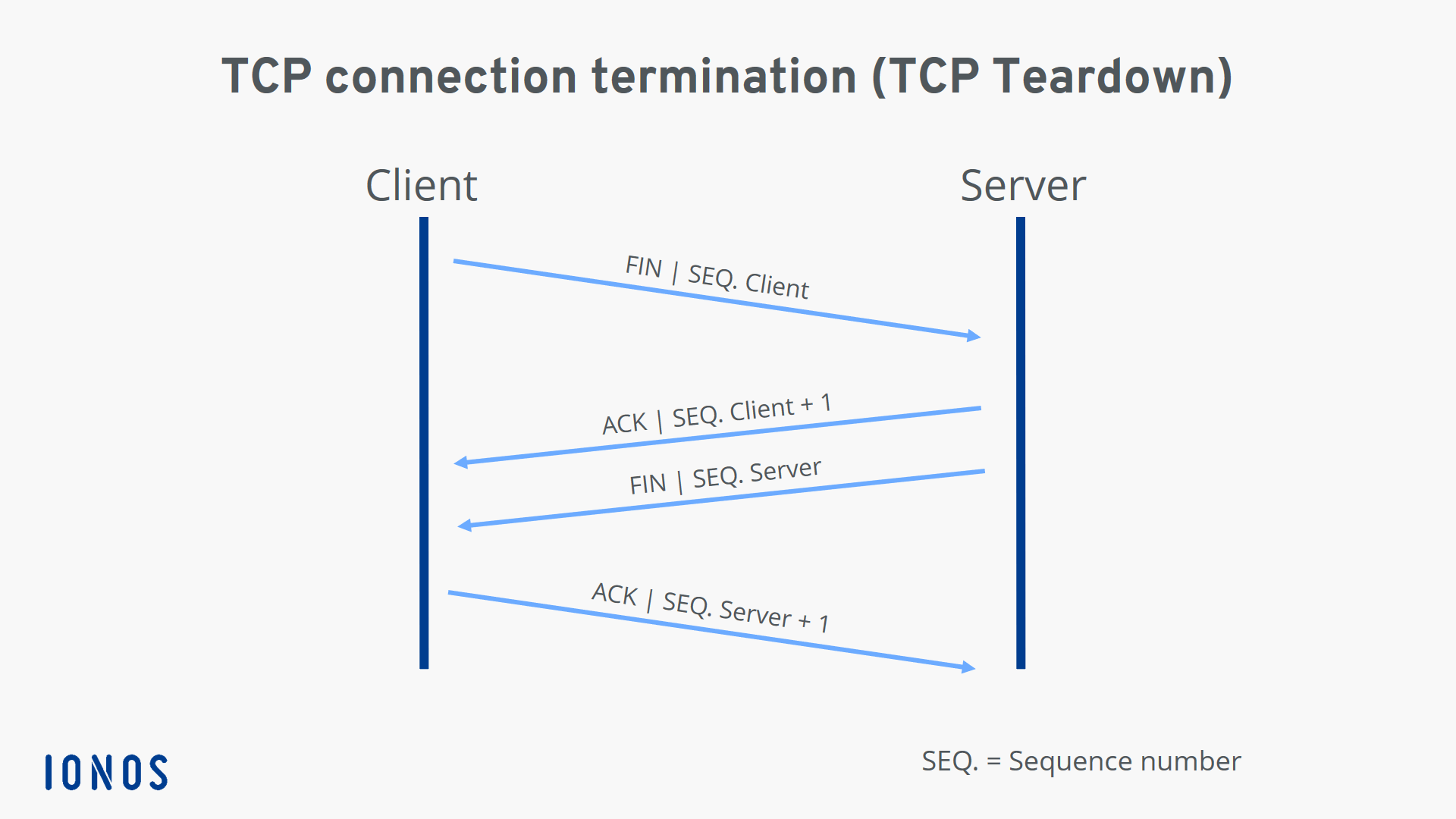
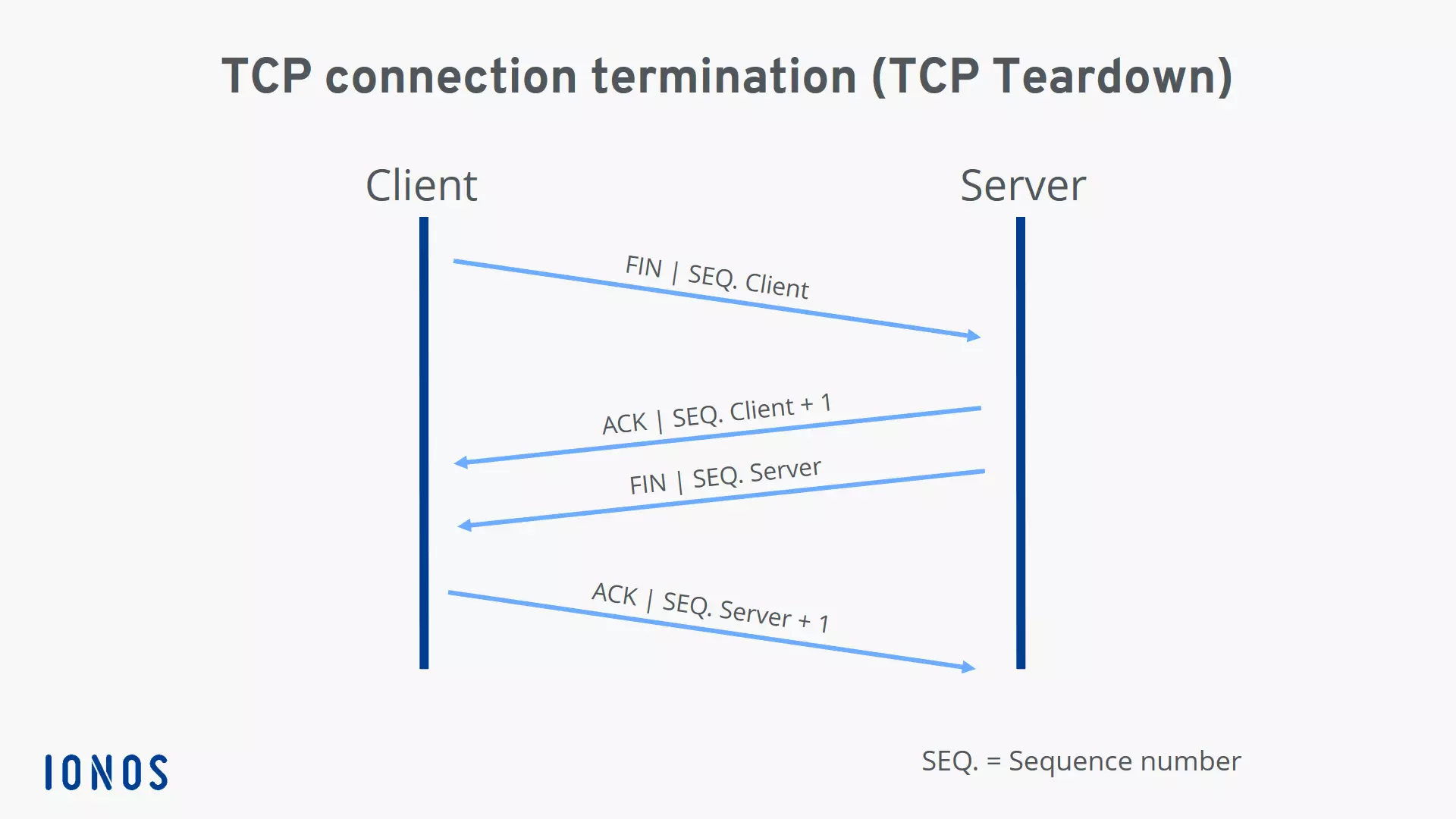
However, the connection is not immediately terminated for the side that sent the last ACK segment (in our case, the client). Since there’s no guarantee that the last packet sent has actually arrived, the client or server will initially remain in time-wait state until the maximum lifetimes of the ACK segment and any new FIN segments (according to RFC 793, two minutes for each segment) have expired.
What is the structure of the TCP header?
Typically, the header of a TCP packet contains the data required for connection and data transmission with the Transmission Control Protocol. This header data (which contains control information) precedes the payload to be transferred and is typically 20 bytes (160 bits) in size. It is followed by up to 40 bytes (320 bits) of additional information, which is optional and not used in all packets.
TCP segments without payload data, essentially pure headers, are also allowed if only acknowledgments, error messages, etc. need to be transmitted, as in the case of SYN and FIN messages (connection establishment/termination).
The detailed structure of the TCP header is as follows:
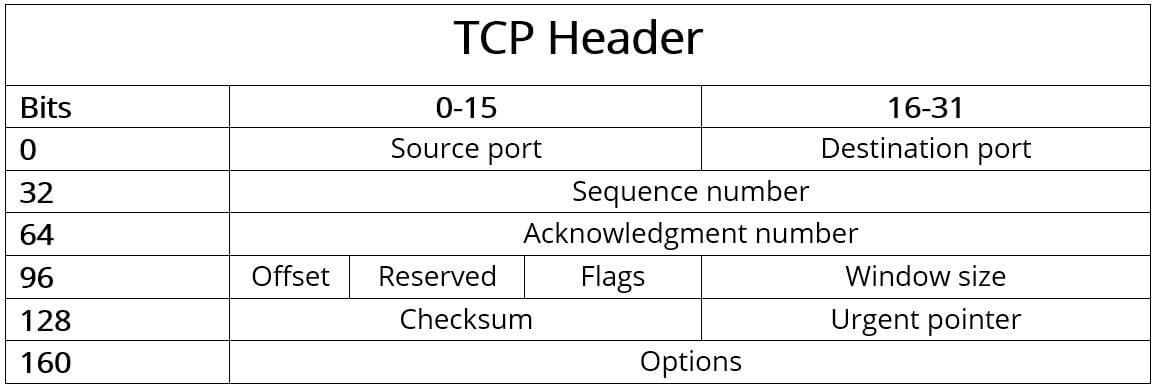
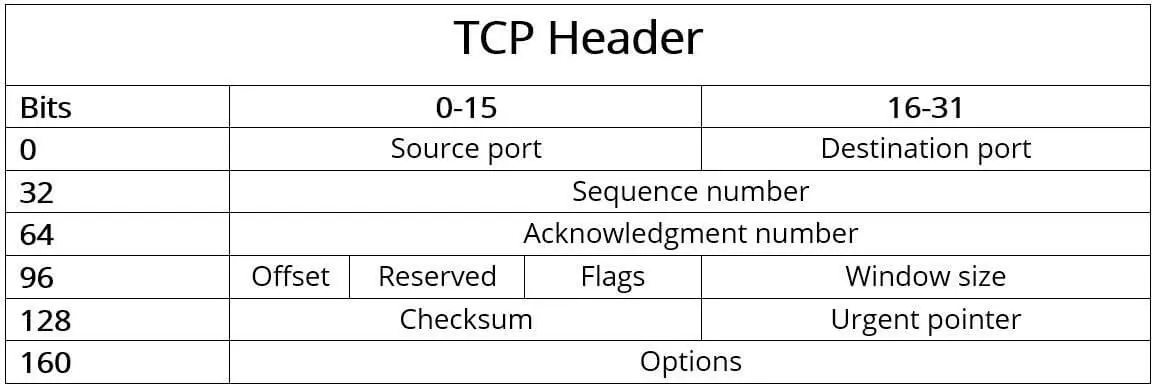
The individual components or fields of the header of the TCP protocol have the following meaning:
Source port (16 bits): Identifies the port number of the sender.
Destination port (16 bits): Identifies the port number of receiver.
Sequence number (32 bits): The sequence number specifies the first byte of attached payload data or is sent when the connection is established or terminated. It is also used for validating and sorting the segments after transmission.
Acknowledgment number (32 bits): This field contains the next sequence number that the sender is expecting. An ACK flag (in the “Flags” field) is a precondition for validity.
Offset (4 bits): The “Offset” field specifies the length of the TCP header in 32-bit words to highlight the starting point of the payload data. This starting point varies from segment to segment due to the variable “Options” field.
Reserved (6 bits): Reserved for future use according to RFC 793 and not yet in use. This field must always be set to 0.
Flags (6 bits): The six possible single bits in the “Flags” field enable various TCP actions for organizing communication and data processing. The following flags are either set or not set for these actions:
- URG: The "Urgent" flag signals to the TCP application that the payload data must be processed immediately up to the set Urgent pointer (see above).
- ACK: In combination with the acknowledgment number, the ACK flag acknowledges the receipt of TCP packets. If the flag is not set, the confirmation number is also invalid.
- PSH: The "Push" flag ensures that a TCP segment is immediately pushed through without first being sent to the buffer of the sender and receiver.
- RST: If there is an error during transmission, a TCP packet with the RST flag set can be used to reset the connection.
- SYN: Messages that have SYN flag set represent the first step of the three-way handshake, meaning they initiate the connection.
- FIN: The "Finish" flag signals to the other party that a sender is ending the transmission.
Window size (16 bits): This field specifies the number of bytes that the sender is willing to receive.
Checksum (16 bits): The Transmission Control Protocol can reliably detect transmission errors. The checksum calculated from the header, the payload data and the pseudo-header is used for this purpose.
Urgent pointer (16 bits): The urgent pointer indicates the position of the first byte after the payload data that is to be processed urgently. As a result, this field is only valid and relevant if the URG flag is set.
Options (0 - 320 bits): Use the Options field if you want to include TCP functions that don’t belong in the general header, for example if you want to define the maximum segment size. The length of the options must always be a multiple of 32, otherwise zero-bit padding is required.
How data transmission via TCP protocol works in detail
Even before the first data is transmitted, the sender and receiver typically agree on the maximum size of the TCP segments to be sent (MSS). By default, up to 1,500 bytes per segment are possible, with at least 20 bytes for the TCP header and a further 20 bytes for the IP header, leaving 1,460 bytes for payload data. If you need a custom size, you have to specify it in the Options field as described above, but you’ll have to reduce the payload data accordingly.
 To display this video, third-party cookies are required. You can access and change your cookie settings here.
With the maximum segment size minus the headers, a TCP packet can only transmit 1.46 kilobytes or 0.00146 megabytes of data. Segmentation is used to exchange web content like images, which are sometimes several hundred kilobytes in size, via the TCP protocol. In this case, the application data is divided into several blocks of data before transport, numbered and then sent in random sequence. Since the receiver must acknowledge the receipt of each segment and can reconstruct the actual sequence based on the sequence numbers, the receiver can easily completely reassemble the received payload data after the TCP transmission.
If the sender does not receive acknowledgment for a transmitted segment, the retransmission timeout (RTO) technique is used. If this timer expires after a packet is sent before a response is transmitted, the packet is automatically retransmitted. The duration of the timer is dynamically adjusted by an algorithm and depends on the individual transmission speed.
Summary of key facts about the Transmission Control Protocol
The TCP protocol has shaped the history and development of computer networks for nearly a half a century. TCP can be easily combined with Internet protocol (IP), which also has a long history, and it has many advantages over other alternatives such as UDP and SCTP. The most important features can be summarized as follows:
- TCP is connection-oriented and enables two-way communication between two endpoints after the three-way handshake.
- TCP is reliable because the protocol ensures that all data is fully transmitted and can be assembled by the receiver in the correct order.
- TCP allows data to be sent in individual segments of up to 1,500 bytes (including headers) in size.
- TCP is positioned at the transport layer (layer 4) of the OSI model.
- TCP is usually used in conjunction with the Internet Protocol (IP) and is commonly known as the TCP/IP protocol stack.
- The TCP header has a default size of 20 bytes. Up to 40 bytes of additional options can be added.