

What are Kubernetes nodes?

A Kubernetes node is a single working node in a Kubernetes cluster that consists of infrastructure components on which container workloads (pods) run. Nodes provide the necessary resources such as computing power and memory.
Definition of a Kubernetes node
Nodes are essential building blocks in a Kubernetes cluster. Each node represents a physical or virtual machine and provides resources such as CPU, memory and storage space. These nodes work together to host and manage the container workloads. They perform tasks such as starting, monitoring and scaling containers to ensure applications run smoothly.
Kubernetes nodes are flexibly scalable as they can be added or removed as required. They support efficient resource utilization and adapt dynamically to the requirements of running applications. In addition, the distribution of nodes across different servers promotes the resilience of the cluster. Smart coordination via Kubernetes ReplicaSets and Kubernetes DaemonSets allows container applications to be managed securely and easily.
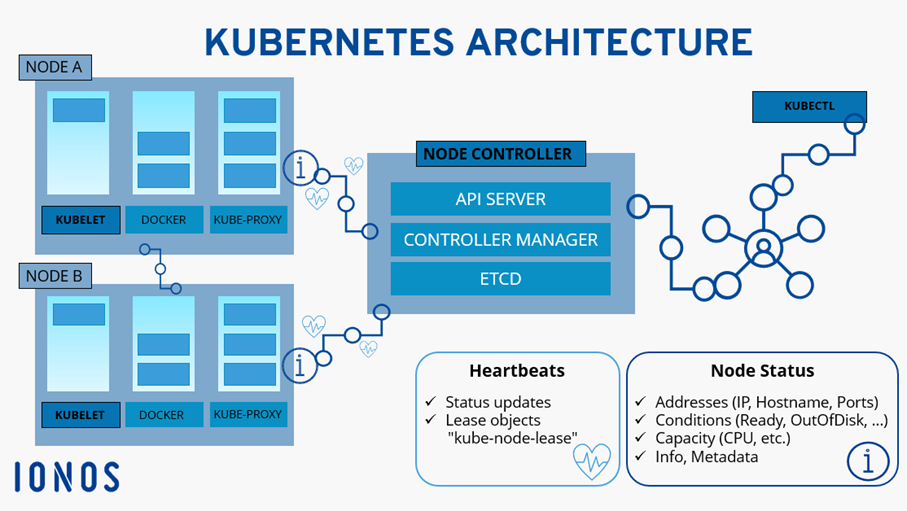
Node status
The node status provides information about the status of a working node in the Kubernetes cluster. It shows whether the node is functioning properly and is able to host pods.
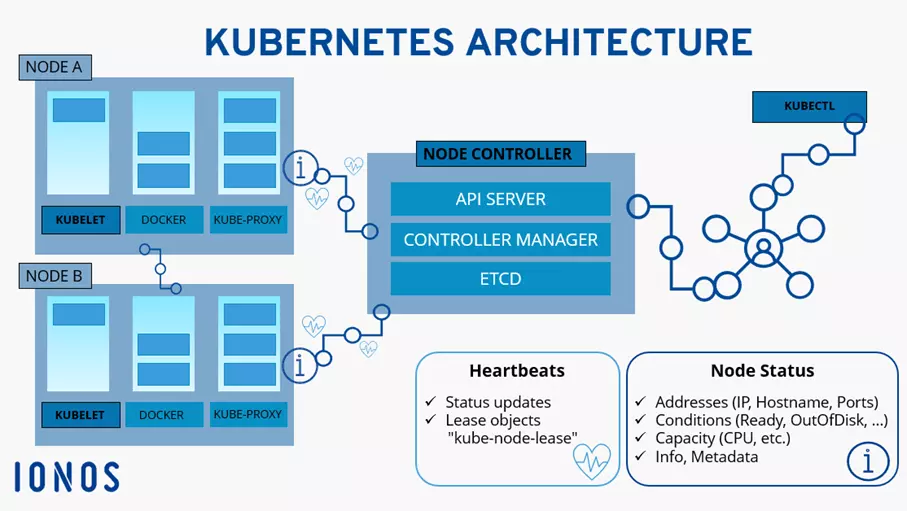
- Addresses: The addresses of a node provide insight into its accessibility in the network. This includes IP addresses, host names and ports. A node can have several addresses, and these are crucial for communication within the cluster.
- Conditions: The conditions reflect the current health status of the Kubernetes node. Typical conditions include Ready, OutOfDisk (lack of space), MemoryPressure and DiskPressure (hard disc pressure). These messages indicate whether nodes are operational or whether there are certain resource shortages.
- Capacity: The capacity of a node refers to the available resources such as CPU, RAM and hard disc space. This information is important when it comes to understanding how much workload a node can handle. Kubernetes uses this data to decide where to place containers based on resource requirements.
- Info: The information section can contain additional details about the node, for example, the operating system, the kernel or kubelet version and other metadata.
With managed Kubernetes from IONOS, you can easily orchestrate container applications in distributed production environments. Benefit from security, transparency and control during operation, all with minimal administrative effort.
Node heartbeat
Heartbeats periodically send status information to the Kubernetes master. These status updates are used to inform the master that the node is still available and ready for use.
In the context of Kubernetes, there are two forms of heartbeats for nodes:
- Updates to the
.statusof a node: These are regular status updates that a node sends to the Kubernetes master. The status contains information about the availability and status of the node. - Lease objects in the namespace
kube-node-lease: Each node is linked to a lease object in thekube-node-leasenamespace. A lease object is essentially a type of lease agreement that is sent from the node to the master. This lease confirms that the node is still active and is using resources in the cluster.
Kubernetes node management
The three main components that form the node management in a Kubernetes cluster are the node controller, kubelet and the command line tool kubectl.
Node controller
The node controller is a core component of Kubernetes that is responsible for managing nodes. It monitors the heartbeats in the form of status updates and lease objects to ensure that the nodes are running smoothly. If the node controller detects that a node is no longer active and no heartbeats are being received, it can take appropriate action, such as re-scheduling pods on other available nodes. The node controller therefore plays a pivotal role in maintaining the availability and integrity of the node pool in the Kubernetes cluster.
Kubectl
kubectl is a command line tool that allows users to interact with a Kubernetes cluster. With kubectl you can send commands to the Kubernetes master to create, monitor, update and delete resources in the cluster. This tool is versatile and allows you to manage deployments, services, pods, ConfigMaps and other Kubernetes objects.
Kubelet
Kubelet is present on every Kubernetes node in the cluster and is responsible for communication between the node and the master. The main task of the kubelet is ensuring that container pods are started, monitored and terminated according to the instructions of the Kubernetes master.
In the Kubernetes tutorial, we’ll show you how to set up your own Kubernetes cluster.
The ideal platform for demanding, highly scalable container applications. Managed Kubernetes works with many cloud-native solutions and includes 24/7 expert support.