Ordering and setting up Redirect Shield and Redirect Shield+
This article explains how to order Redirect Shield or Redirect Shield+ and set up SSL certificates for your redirect domains. Redirect Shield and Redirect Shield+ are SSL packages for domains that only redirect to another website. They let you secure these domains with SSL certificates, so visitors no longer see a browser warning when they open them.
General information on redirecting domains with and without an SSL certificate
As of Google Chrome 154, the Always use secure connections setting is enabled by default. If a visitor opens a domain that has no SSL certificate, the browser displays a warning about an unencrypted connection before loading the page. The redirect itself still works, but visitors have to bypass the warning manually to reach the destination. An SSL certificate for the redirect domain prevents this warning.
General information on Redirect Shield
Redirect Shield and Redirect Shield+ are packages of SSL certificates for domains on which a redirect has been set up. The certificates are issued, installed, and renewed automatically. You do not need to download or install any files.
Redirect Shield
- Certificates included: 5
- Validation level: Domain Validation (DV)
- Protection: Wildcard certificate covering redirects of the domain and its subdomains
- Use: Redirect domains only
Redirect Shield+
- Certificates included: 10
- Validation level: Domain Validation (DV)
- Protection: Wildcard certificate covering redirects of the domain and its subdomains
- Use: Redirect domains only
Note
You can reassign the SSL certificates to other domains at any time.
Requirements and restrictions
- Redirect Shield and Redirect Shield+ are only available to existing IONOS customers.
- The domain must use the IONOS name servers.
- The domain must be set up as a redirect only.
- Each certificate secures exactly one domain name (including its subdomains).
- For websites with content, use a different SSL certificate. For more information, see the following article: SSL certificate types offered by IONOS
Ordering Redirect Shield
You order Redirect Shield and Redirect Shield+ as a separate contract in your IONOS account. To do this, complete the following steps:
- Log in to your IONOS account.
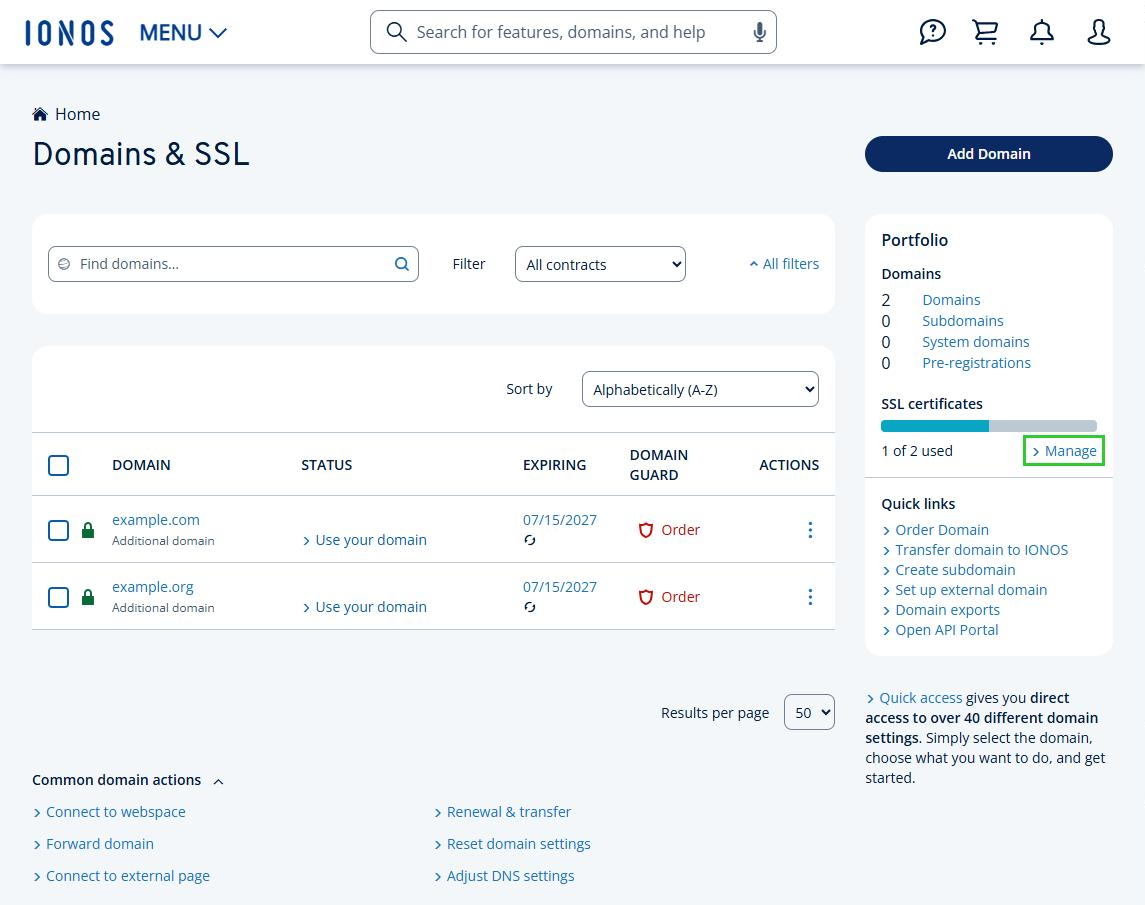
- Click Menu > Domains & SSL in the title bar. The overview of your domains opens.
- In the Portfolio tile, under SSL certificates, click Manage. The overview of your SSL certificates opens.
- Click Set Up Certificate. The IONOS SSL Certificates for your website page opens.
- Scroll down and, in the Activate Redirect Shield section, click Redirect Shield or Redirect Shield+. A window with the offer opens.
- To complete your order, accept the General Terms and Conditions and click Order now!
Assigning a Redirect Shield certificate to a domain
- Log in to your IONOS account.
- Click Menu > Domains & SSL in the title bar. The overview of your domains opens.
- In the Portfolio tile, under SSL certificates, click Manage. The overview of your SSL certificates opens.
- In the Type drop-down menu, select Redirect Shield Certificates.
- Select one of the Redirect Shield certificates that has not been set up yet.
- Select the domain you want to secure. The Set Up Certificate page opens.
- Accept the terms of use.
- Click Set Up Certificate.
The SSL certificate is now requested and installed. This may take a moment.
Troubleshooting
The domain cannot be selected
Check whether the domain uses the IONOS name servers and is set up as a redirect only. A certificate can only be assigned if both conditions are met.
Validation fails
Read the error message displayed. It contains the steps for resolving the issue. For more information on this topic, see the following article: Problems encountered during creation of SSL certificates
Switching from Redirect Shield to Redirect Shield+
- Upgrade: You can switch from Redirect Shield to Redirect Shield+ at any time. The price is prorated, and the certificates you have already assigned are retained.
- Downgrade: You can only switch from Redirect Shield+ to Redirect Shield if no more than 5 certificates are assigned. If necessary, first unassign any certificates you no longer need.