Object Storage: Deleting a bucket
Valid for migrated Cloud Servers.
This article explains how to delete a bucket.
Note
To delete a bucket, you must empty its entire contents.
Caution
If you delete data in a bucket, it can no longer be restored afterwards.
- Log in to your IONOS account.
Click on Menu > Servers & Cloud in the title bar.
Optional: If you have multiple server contracts, select the desired contract.
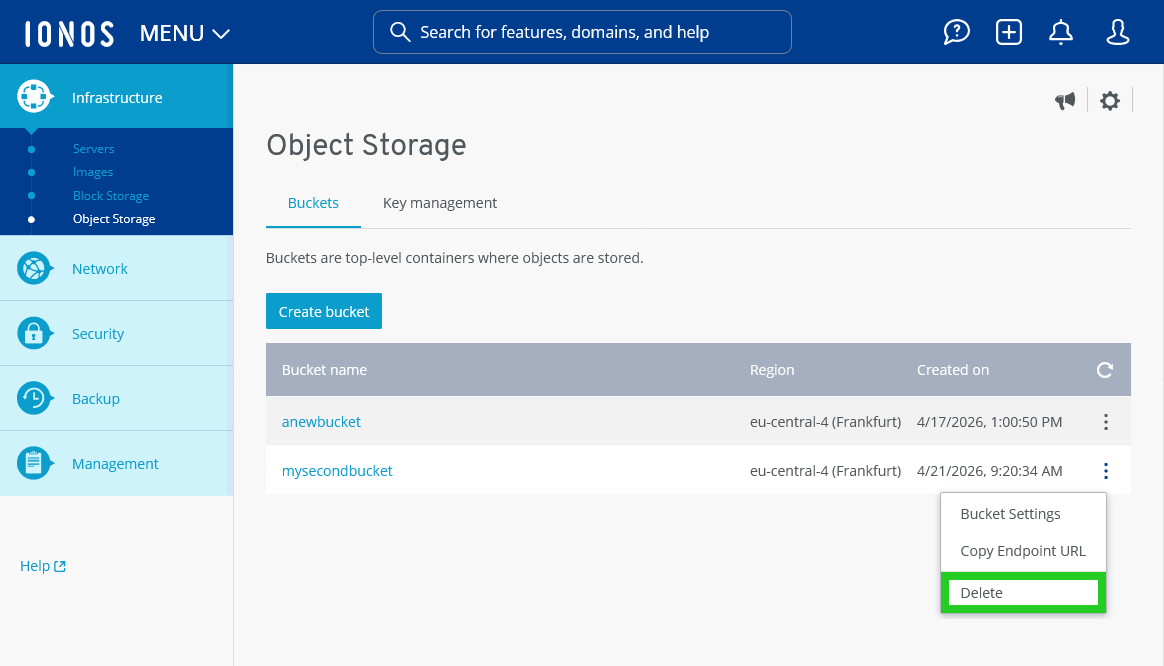
- Click on Infrastructure > Object Storage in the left-side menu.
- Click on the three-dot icon in the line with the bucket name.
- Click on Delete. The Delete bucket window opens.
- Click on Delete. The bucket is deleted. If the bucket is not empty, the Bucket not empty window opens. In this case, click on Empty and delete. If the bucket is not deleted, check the default storage configuration in the bucket settings.