Using Vibe Mode to configure your AI Receptionist
Valid for AI Receptionist.
Vibe Mode is an included feature rolled out automatically across all IONOS AI Receptionist packages at no extra cost. Operating as a dedicated chat tab inside your AI Agent Portal, it allows you to manage your agent's configuration using natural language requests rather than scrolling through standard settings menus. Changes are executed in real-time, accompanied by transparent background reasoning and an instant rollback fallback option. This article explains how to access and utilize the AI Receptionist Vibe Mode.
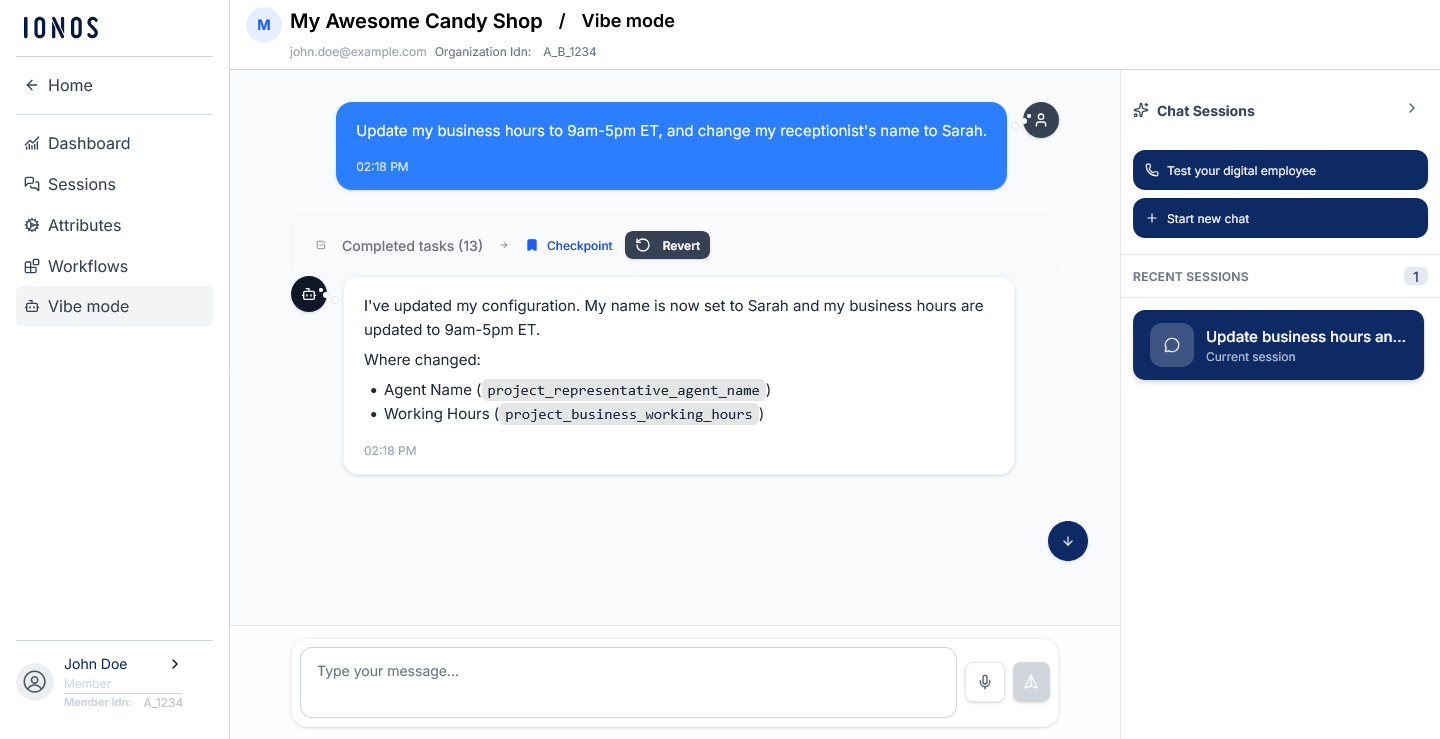
Key features & benefits
- Natural language customization: Modify complex workflows, update hours, or edit greeting scripts using everyday conversation.
- Synchronized configuration: Changes immediately update fields in the background Settings and Workflow tabs.
- Explanatory transparency: The AI tells you why it’s adjusting its configuration as you talk.
- One-click revert: An immediate safety mechanism allowing users to instantly roll back any modified settings if they don't like the result.
Step-by-step instructions
- Log in to your IONOS account.
- Click on Menu > AI Receptionist in the title bar. The AI Agent Portal opens.
- Click on Customer Portal under Actions for the desired receptionist. The Dashboard opens.
- Select the Vibe mode tab from the left-hand menu.
- In the message box, describe your desired changes in plain English.
- Example 1: “Change my receptionist's name to Sarah and make her sound warm and welcoming.”
- Example 2: “Change our Friday hours so we close early at 4:00 PM.”
- Review the agent's summary of changes and background reasoning.
- If the modification requires adjustment, click the Revert button inside the chat timeline immediately to undo it.
Customizing conversational workflows
While Vibe Mode makes it easy to update basic profile attributes like your agent's name, voice, or business hours, it can also modify your underlying conversational workflows and scripts.
Instead of manually editing rules manually inside of the Workspaces area, you can use plain English to change how your agent behaves during a live call. Vibe Mode interprets your intent, updates the step-by-step logic in your Workflows and Scenarios tabs in real-time, and explains exactly what it changed.
Example use case: changing confirmation behavior
You can alter individual conversational steps to streamline how your AI Receptionist verifies user information, improving call efficiency and protecting user privacy.
- Goal: Change the agent’s behavior during telephone verification so it only repeats the last 3 digits instead of reading back the full phone number.
- Sample prompt to type in Vibe Mode: “When confirming a caller's telephone number, please update the step to repeat only the last 3 digits instead of the full number.”
Testing your AI Receptionist
Vibe Mode includes a built-in testing tool that allows you to instantly validate your configuration changes. This provides a risk-free environment to hear your AI’s voice, check its logic, and perfect its conversational flow before it interacts with real customers.
To test your agent, complete the following:
- Click the Test your digital employee button located on the right side within the Vibe Mode chat area to open the in-browser phone.
- When prompted by your web browser, you must grant microphone permissions to your browser so you can speak directly to the AI.
- Start talking. Have a natural conversation with your assistant to verify your latest settings, scripts, and call-handling workflows.
In-browser test calls are 100% free and do not count toward your monthly call minute allowance. You can test as often as you need.
To prevent confusion with actual business leads, test conversations will appear in your call history but are explicitly labeled as "Test-call".
Frequently asked questions (FAQs)
What if I do not like a change the agent made?
You can instantly roll back any update by clicking the interactive Revert button directly within the Vibe Mode chat stream.
How do I know what the agent actually changed?
The agent provides full transparency, detailing its reasoning and providing an interactive summary of exactly what was modified in the background.
Click on Completed tasks after the AI agent is finished to display a drop down list of completed actions including setting attributes and workflows.
Where do I see the updates once they are made?
Changes are instantly pushed live and are visible inside your standard Attributes and Workflows configuration tabs.